TCP/IP uses a 32-bit address to route a datagram to a destination. It is useful to forget these 32-bit addresses and use common names instead, because names are much easier to remember. There are several methods used for this. The most common is examined on Day 7, "TCP/IP Configuration and Administration Basics," employing an ASCII file on the sending machine that had names and corresponding addresses (/etc/hosts on a UNIX device). One major limitation to this system is that the machine can route only to other machines that have an entry in this file, which can be impossible to maintain when there are many target machines or you want to access all the devices on your network.
Another approach is to off-load the address resolution to another process that acts like a directory service. There are two such schemes in common use today: Domain Name Service (DNS) and Network Information Service (NIS), which is now part of NFS. Today I look at DNS in more detail. On Day 12, "NFS and NIS," I examine NFS in depth.
Also today I look at the BOOTP protocol, a system that is becoming widely adopted as diskless workstations and client/server systems become more common. BOOTP relies on TCP/IP. Anyone working with TCP/IP can eventually expect to run across the BOOTP protocol, so an explanation of it is useful at this stage.
Finally, the day closes with a quick look at the Network Time Protocol (NTP), which is used to ensure synchronization of timestamps between machines.
A symbolic name is a character string that is used to identify a machine. A symbolic name can be straightforward (bills_machine or tpci_server1) or more complex, as is often the case in large organizations where the name identifies the type of machine and its location (such as hpws510, where hpws identifies an HP workstation on the fifth floor, room 10).
When sending information to remote machines, IP addresses or Internet addresses must be used. Instead of requiring the user to memorize the remote machine's numbers, it is common to use a symbolic name. After all, a simple name is much easier to remember than a 32-bit Internet address.
As you saw earlier in this book, the conversion from a symbolic name to an actual IP address is usually performed within the sending machine, using a file such as UNIX's /etc/hosts file. This type of approach works well within a small network, where a limited number of destination machines are involved. When dealing with the entire Internet, however, it is unreasonable to expect an ASCII file to contain all possible symbolic names and their addresses.
The sheer size of a file required to hold all possible symbolic domain names and their corresponding unique network addresses is not the only problem. Large networks tend to change constantly, especially on an internetwork the size of the Internet. Hundreds of additions and modifications to existing entries must be performed daily. The time required to update each machine (or even selected gateways to autonomous networks) on the internetwork would be huge.
The solution to the problem is to offer a method of moving the management of the lookup tables away from the Network Information Center (NIC), which governs the Internet, and toward the participants and their autonomous networks in such a manner that the load on the network is small but flexibility is not compromised. This is what the Domain Name Service (DNS) does. DNS is sometimes also called the Internet directory service, although the name is somewhat of a misnomer.
UNIX implements DNS through a daemon called named, which runs on a name server, a machine that handles the resolution of symbolic names using DNS methods. Part of the system is a library of functions that can be used in applications to perform queries on the name server. This query routine is called the resolver or name resolver and can reside on another machine. The name server and resolver are examined in more detail shortly.
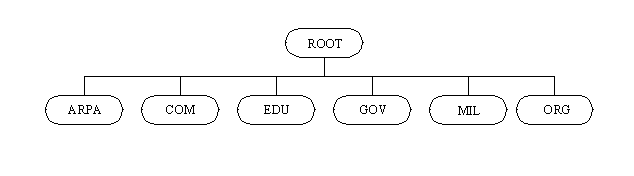
The Domain Name Service, as its name implies, works by dividing the internetwork into a set of domains, or networks, that can be further divided into subdomains. This structure resembles a tree, as shown in Figure 11.1, using some arbitrarily chosen domain names. The first set of domains is called the top-level domains. There are six top-level domains in regular use:
Figure 11.1. The Internet domain structure.
In addition to these top-level domains, there are dedicated top-level domains for each country that is connected. These are usually identified by a short form of the country's name, such as .ca for Canada and .uk for the United Kingdom. These country top-level domains are usually left off diagrams of the Internet structure for convenience (otherwise there would be hundreds of top-level domains). The domain breakdown is sometimes repeated beneath the country domain, so there could be a .com extension coupled with .ca to show a Canadian commercial domain, or an .edu with .uk for a British university.
Beneath the top-level domains is another level for the individual organizations within each top-level domain. The domain names are all registered with the Network Information Center (NIC) and are unique to the network. Usually the names are representative of the company or organization, but a few "cute" names do work their way in (usually because of historical reasons).
There are two ways to name a target. If the target is on the internetwork, the absolute name is used. The absolute name is unique and unambiguous, specifying the domain of the target machine. A relative name can be used either within the local domain, where the name server knows that the target is within the domain and hence doesn't need to route the datagram onto the internetwork, or when the relative name is known by the name server and can be expanded and routed correctly.
Each DNS Name Server manages a distinct area of a network (or an entire domain, if the network is small). The set of machines managed by the name server is called a zone. Several zones can be managed by one name server. Almost every zone has a designated secondary or backup name server, with the two (primary and secondary) name servers holding duplicate information. The name servers within a zone communicate using a zone transfer protocol.
DNS operates by having a set of nested zones. Each name server communicates with the one above it (and, if there is one, the one below it). Each zone has at least one name server responsible for knowing the address information for each machine within that zone. Each name server also knows the address of at least one other name server. Messages between name servers usually use the User Datagram Protocol (UDP) because its connectionless method provides for better performance. However, TCP is used for database updates because of its reliability.
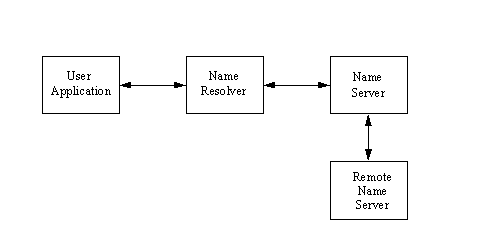
When a user application needs to resolve a symbolic name into a network address, a query is sent by the application to the resolver process, which then communicates the query to the name server. (I examine the resolver in more detail in the next section, "Resource Records.") The name server checks its own tables and returns the network address corresponding to the symbolic name. If the name server doesn't have the information it requires, it can send a request to another name server. This process is shown in Figure 11.2. Both the name servers and the resolvers use database tables and caches to maintain information about the machines in the local zone, as well as recently requested information from outside the zone.
Figure 11.2. Resolving symbolic names.
When a name server receives a query from a resolver, there are several types of operations the name server can perform. Name resolver operations fall into two categories: nonrecursive and recursive. A recursive operation is one in which the name server must access another name server for information.
Nonrecursive operations performed by the name server include a full answer to the resolver's request, a referral to another name server (which the resolver must send a query to), or an error message. When a recursive operation is necessary, the name server contacts another name server with the resolver's request. The remote name server replies to the request with either a network address or a negative message, indicating failure. DNS rules prohibit a remote name server from sending a referral to yet another name server.
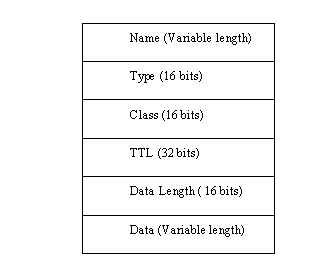
The information required to resolve symbolic names is maintained by the name server in a set of resource records, which are entries in a database. Resource records (often abbreviated RR) contain information in ASCII format. Because ASCII is used, it is easy to update the records. The format of resource records is shown in Figure 11.3.
Figure 11.3. The resource record format.
The Name field is the domain name of the machine the record refers to. If no name is specified, the previously used name is substituted.
The Type field identifies the type of resource record. Resource records are used for several purposes, such as mapping names to addresses and defining zones. The Type of resource record is identified by a mnemonic code or a number. These codes and their meanings are shown in Table 11.1. Some of the resource record types are now obsolete (3 and 4), and others are considered experimental at this time (13 and 17–21).
|
Number |
Code |
Description |
|
1
|
A
|
Network address
|
|
2
|
NS
|
Authoritative name server
|
|
3
|
MD
|
Mail destination; now replaced by MX
|
|
4
|
MF
|
Mail forwarder; now replaced by MX
|
|
5
|
CNAME
|
Canonical alias name
|
|
6
|
SOA
|
Start of zone authority
|
|
7
|
MB
|
Mailbox domain name
|
|
8
|
MG
|
Mailbox member
|
|
9
|
MR
|
Mail rename domain
|
|
10
|
NULL
|
Null resource record
|
|
11
|
WKS
|
Well-known service
|
|
12
|
PTR
|
Pointer to a domain name
|
|
13
|
HINFO
|
Host information
|
|
14
|
MINFO
|
Mailbox information
|
|
15
|
MX
|
Mail exchange
|
|
16
|
TXT
|
Text strings
|
|
17
|
RP
|
Responsible person
|
|
18
|
AFSDB
|
AFS-type services
|
|
19
|
X.25
|
X.25 address
|
|
20
|
ISDN
|
ISDN address
|
|
21
|
RT
|
Route through |
The Class field in the resource record layout contains a value for the class of record. If no value is specified, the last class used is substituted. Internet name servers usually have the code IN.
The Time to Live (TTL) field specifies the amount of time in seconds that the resource record is valid in the cache. If a value of 0 is used, the record should not be added to the cache. If the TTL field is omitted, a default value is used. Usually this field tells the name server how long the entry is valid before it has to ask for an update.
The data section of the resource record contains two parts, consisting of the length of the record and the data itself. The Data Length field specifies the length of the data section. The data is a variable-length field (hence the need for a length value) that describes the entry somehow. The use of this field differs with the different types of resource records.
Some resource record types have a single piece of information in the data area, such as an address, or at most three pieces of information. The only exception is the Start of Authority resource record. The contents of the resource record data areas (except SOAs) are given in Table 11.2.
|
RR Type |
Fields in Data Area |
|
A
|
Address: A network address
|
|
NS
|
NSDNAME: The domain name of host
|
|
MG
|
MGNAME: The domain name of mailbox
|
|
CNAME
|
CNAME: An alias for the machine
|
|
HINFO
|
CPU: A string identifying CPU type
|
|
OS: A string identifying operating system
| |
|
MINFO
|
RMAILBX: A mailbox responsible for mailing lists
|
|
EMAILBOX: A mailbox for error messages
| |
|
MB
|
MADNAME: Now obsolete
|
|
MR
|
NEWNAME: Renames the address of a specific mailbox
|
|
MX
|
PREFERENCE: Specifies the precedence for delivery
|
|
EXCHANGE: The domain name of the host that acts as mail exchange
| |
|
NULL
|
Anything can be placed in the data field
|
|
PTR
|
PTRDNAME: A domain name that acts as a pointer to a location
|
|
TXT
|
TXTDATA: Any kind of descriptive text
|
|
WKS
|
Address: A network address
|
|
Protocol: The protocol used
| |
|
Bitmap: Used to identify ports and protocols |
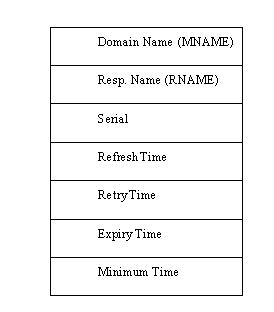
The Start of Authority (SOA) resource record format is used to identify the machines within a zone. There is only one SOA record in each zone. The format of the SOA data field is shown in Figure 11.4. The fields in the SOA resource record are used mostly for administration and maintenance of the name server.
Figure 11.4. The SOA resource record format.
The MNAME field is the domain name of the source of data for the zone. The RNAME (responsible person name) field is the domain name of the mailbox of the administrator of the zone. The Serial field contains a version number for the zone. It is incremented when the zone is changed; otherwise, it is maintained as the same value for all such messages.
The Refresh Time is the number of seconds between data refreshes for the zone. The Retry Time is the number of seconds to wait between unsuccessful refresh requests. The Expiry Time is the number of seconds after which the zone information is no longer valid. Finally, the Minimum Time is the number of seconds to be used in the Time to Live field of resource records within the zone.
Some sample resource records show the simple format used. Address resource records consist of the machine name, the type of resource record indicator (A for Address RRs, for example), and the network address. A sample Address resource record would look like this:
TPCI_SCO_4 IN A 143.23.25.7
The IN tags the resource record as an Internet class. This format makes it easy to locate a name and derive its address. (The reverse, going from address to name, is not as easy and requires a special format called IN-ADDR-ARPA, which is examined in the next section, "IN-ADDR-ARPA.")
For Well-Known Service resource records (WKS, or type 11), the data field of the record contains three fields used to describe the services supported at the address the record refers to. A sample WKS resource record might look like this:
TPCI_SCO.TPCI.COM     IN     WKS     143.23.1.34.

                                     FTP  TCP  SMTP  TELNET
The full domain name and Internet address are shown, as is the IN to show the Internet class of resource records. The type of record is indicated with the WKS. The protocols supported by the machine at that address are listed after the address. In reality, these are bitmaps that correspond to ports. When the port bit is set to a value of 1, the service is supported. The list of ports and services is defined by an Internet RFC.
The address fields, such as in the Address resource record type, use a special format called IN-ADDR-ARPA. This enables reverse mapping from the address to the host name as well as host-to-address mapping. To understand IN-ADDR-ARPA, it is useful to begin with a standard-format resource record. Earlier it was mentioned that resource records are maintained in ASCII format. One of the simplest types of resource record is for the address (type A), as seen earlier. An extract from an address file is shown here:
TPCI_HPWS1    IN     A     143.12.2.50

TPCI_HPWS2    IN     A     143.12.2.51

TPCI_HPWS3    IN     A     143.12.2.52

TPCI_GATEWAY  IN     A     143.12.2.100

              IN     A     144.23.56.2

MERLIN        IN     A     145.23.24.1

SMALLWOOD     IN     A     134.2.12.75
Each line of the file represents one resource record. In this case, they are all simple entries that have the machine's symbolic name (alias), the class of machine (IN for Internet), A to show it is an Address resource record, and the Internet address. The entry for the machine TPCI_GATEWAY has two corresponding addresses because it is a gateway between two networks. The gateway has a different address on each of the networks, so it has two resource records in the same file. (As with most other code fragments in this book, these example addresses are hypothetical.)
This type of file makes name-to-address mapping easy. The name server simply searches for a line with the symbolic name requested by the application and returns the Internet address at the end of that line. The databases are indexed on the name, so these searches proceed very quickly.
Searching from the address to the name is not quite as easy. If the resource record files are small, time delays for a manual search are not appreciable, but with large zones there can be thousands or tens of thousands of entries. The index is on the name, so searching for an address can be a slow process. To solve this reverse-mapping problem, IN-ADDR-ARPA was developed. IN-ADDR-ARPA uses the host address as an index to the host's resource record information. When the proper resource record is located, the symbolic name can be extracted.
IN-ADDR-ARPA uses the PTR resource record type (see Table 11.1) to point from the address to the name. There might be one of these pointer indexes maintained on each name server. An example of a number-to-name file follows:
23.1.45.143.IN-ADDR-ARPA.    PTR    TPCI_HPWS_4.TPCI.COM

1.23.64.147.IN-ADDR-ARPA.    PTR    TPCI_SERVER.MERLIN.COM

3.12.6.123.IN-ADDR-ARPA.     PTR    BEAST.BEAST.COM

23.143.IN-ADDR-ARPA          PTR    MERLINGATEWAY.MERLIN.COM
The Internet addresses are reversed in the IN-ADDR-ARPA file for ease of use. As shown in the sample file, it is not necessary to specify the complete address for a gateway because the domain name provides enough routing information.
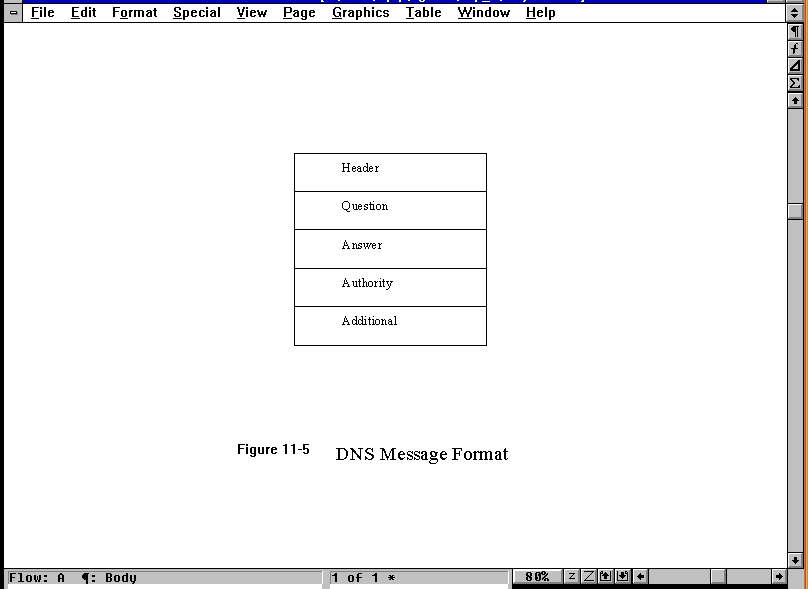
DNS messages are transferred between name servers to update their resource records. The fields of these messages are quite similar to those of the records themselves. The format of a DNS message is shown in Figure 11.5. The header has several subfields that contain information about the type of question or answer being sent. The rest of the message consists of four variable-length fields, which are further subdivided:
Figure 11.5. The DNS message format.
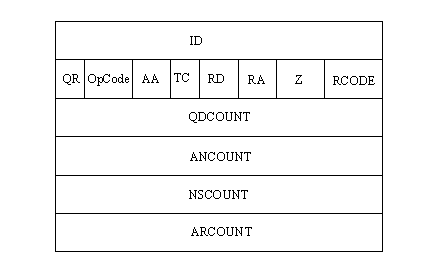
The DNS message header has several different fields itself, as shown in Figure 11.6. The header is present in all DNS messages. The header ID field is 16 bits long and is used to match queries and answers to each other. The single-bit QR field is set to a value of 0 to indicate a query, or a value of 1 to show a response. The OpCode field is 4 bits long and can have one of the values shown in Table 11.3.
Figure 11.6. The DNS message Header format.
|
OpCode Value |
Description |
|
0
|
Standard query
|
|
1
|
Inverse query
|
|
2
|
Server status request
|
|
3–15
|
Not used |
The AA field is the authoritative answer bit. A value of 1 in a response message indicates that the name server is the recognized authority for the queried domain name. The TC (truncation) bit is set to a value of 1 when the message is truncated because of excessive length. Otherwise, the TC bit is set to 0. The RD (recursion desired) bit is set to 1 when the name server is requested to perform a recursive query. The RA (recursion available) bit is set to 1 in a response when the name server can perform recursions.
The Z field is 3 bits long and is not used. The RCODE field is 4 bits long and can be set to one of the values shown in Table 11.4.
|
RCODE Value |
Description |
|
0
|
No errors
|
|
1
|
Format error; name server unable to interpret the query
|
|
2
|
Name server problems have occurred
|
|
3
|
The name server could not find the domain reference in the query
|
|
4
|
Name server does not support this type of query
|
|
5
|
Name server cannot perform the requested operation for administrative reasons
|
|
6–15
|
Not used |
The QDCOUNT field is a 16-bit field for the number of entries in the Question section. The ANCOUNT field is another 16-bit field for the number of replies in the Answer section (the number of resource records in the answer). The NSCOUNT field is 16 bits and specifies the number of server resource records in the Authority section of the message. The ARCOUNT 16-bit field specifies the number of resource records in the Additional record section.
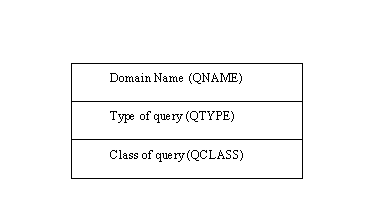
The Question section of the message has three fields of its own, as shown in Figure 11.7. The Question field carries the query, which is identified by these fields. The QNAME field is the domain name requested. The QTYPE is the type of query, using one of the values shown in Table 11.1. The QCLASS is the class of query, which can be set according to the application’s requirements.
Figure 11.7. The DNS message Question field format.
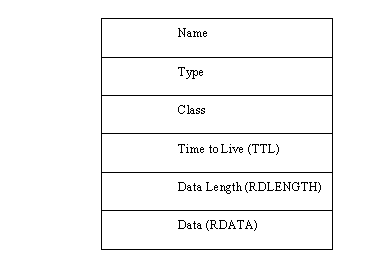
The last three fields in the DNS message (Answer, Authority, and Additional information) all have the same format, as shown in Figure 11.8. The Name field holds the domain name of the resource record. The Type field has any of the valid resource record type values. (See Table 11.1.)
Figure 11.8. The format for DNS message Answer, Authority, and Additional information fields.
The Class is the class of data in the data field. The Time to Live (TTL) field is the number of seconds the information is valid without an update. The RDLENGTH field is the length of the information in the data field. Finally, the RDATA field is the resource record information or other data, depending on the class and type of the query and reply. There can be many such records in the Answer, Authority, and Additional information sections of the DNS message.
As far as user applications are concerned, resolving the symbolic names into actual network addresses is easy. The process has been mentioned earlier. The application sends a query to a process called the name resolver, or resolver (which sometimes resides on another machine). The name resolver might be able to resolve the name directly, in which case it sends a return message to the application. If the resolver cannot determine the network address, it communicates with the name server (which might contact another name server).
The resolver is intended to replace existing name resolution systems on a machine, such as UNIX's /etc/hosts file. The replacement of these common mechanisms is transparent to the user, although the administrator must know whether the native name resolution system or DNS is to be used on each machine so the correct tables can be maintained.
When the resolver acquires information from a name server, it stores the entries in its own cache to reduce the need for more network traffic if the same symbolic name is used again (as is often the case with applications that work across networks). The amount of time the name resolver stores these records is dependent on the Time to Live field in the resource records sent, or on a default value set by the system.
When a name server cannot resolve a name, it can send back a message to the resolver with the address of another name server in the Authority field of the message. The resolver must then address a message to the other name server in the hopes of resolving the name. The resolver can ask the name server to conduct the query itself by setting the RD (recursive) bit in the message. The name server can refuse or accept the request.
The resolver uses both UDP and TCP in its query process, although UDP is more common, due to its speed. However, iterative queries or transfers of large amounts of information might resort to TCP because of its higher reliability.
Under the UNIX operating system, several different implementations of the name resolver are in use. The resolver supplied with the BSD versions of UNIX was particularly limited, offering neither a cache nor iterative query capabilities. To solve these limitations, the Berkeley Internet Name Domain (BIND) server was added. BIND provides both caching and iterative query capabilities in three different modes: as a primary server, as a secondary server, or as a caching-only server (which doesn't have a database of its own, only a cache). The use of BIND on BSD systems enables another process to take over the workload of name resolution, a process that might be on another machine entirely.
Configuring a DNS server requires several files and databases to be modified or created. The process is time-consuming, but luckily has to be done only once for each server. The files involved in most DNS setups, and their purposes, are as follows:
named.hosts: Defines the domain with hostname-to-IP mappings
named.rev: Uses IN-ADDR-ARPA for IP-to-hostname mappings
named.local: Used to resolve the loopback driver
named.ca: Lists root domain servers
named.boot: Used to set file and database locations
These filenames are used by convention, but they can be changed to suit your own personal needs. The primary file in the list is named.boot, which is read when the system boots up and defines the other files in the set. Therefore, any filename changes are reflected in named.boot. For simplicity, I use the conventional filenames in this chapter. Each of the files listed here is a database with entries in the form of a resource record.
For the sample server configuration, I assume a UNIX operating system using fairly standard names and network layouts. DNS lets you get very complex, but it's easier to see what the files and resource records are doing with a simple layout.
An SOA resource record is placed in the named.hosts file. Semicolons in the record are used for comments. This resource record has been formatted as one field per line to make its entries clear, although this is not necessary. This resource record defines an upper boundary of the tpci.com domain, with server.tpci.com the primary name server for the domain, root.merlin.tpci.com the e-mail address of the person responsible for the domain, and the rest of the entries identified by comments:
tpci.com.   IN   SOA     server.tpci.com

    root.merlin.tpci.com (

    2  ; Serial number

    7200 ; Refresh (2 hrs)

    3600 ; Retry (1 hr)

    151200 ; Expire (1 week)

    86400 ); min TTL
Note that the information from the serial number to the expire field is enclosed in parentheses. This is part of the command syntax and must be included to indicate the parameter order.
In addition to the SOA RR, the named.hosts file contains Address records. These records are used for the actual mapping of a host name to its IP address. A few Address resource records show the format of these entries (refer to earlier sections of this chapter for the meanings of each field if you are not sure):
artemis     IN     A    143.23.25.7

merlin      IN     A    143.23.25.9

pepper      IN     A    143.23.25.72
The hostnames are not given as fully qualified domain names because the server can deduce the full name. If you want to use the full domain name, you must follow the name with a period. The machines shown in the preceding example would be given like this using fully qualified domain names:
artemis.tpci.com.     IN     A    143.23.25.7

merlin.tpci.com.      IN     A    143.23.25.9

pepper.tpci.com.      IN     A    143.23.25.72
The Pointer (PTR) resource record is used to map an IP address to a name using IN-ADDR-ARPA. A single PTR RR helps make this clear. The record
7.0.120.147.in-addr.arpa IN PTR merlin
indicates that the machine named merlin has the IP address 147.120.0.7.
The Name Server resource records point to the name server that has authority for a particular zone. Name Server (NS) records are used when a large network has several subnetworks, each with its own name server. An entry looks like this:
tpci.com IN NS merlin.tpci.com
This record indicates that the DNS server for the tpci.com domain is called merlin.tpci.com. If there were several subnets used in tpci.com, there would be an NS RR for each subnet.
As you saw earlier, DNS uses several files to hold resource records describing the zones used by DNS. The first file of interest is named.hosts, which contains the SOA, NS, and A resource records. All entries in the named.hosts file must begin in the first character position of each line. Here's a sample named.hosts file with comments added to show the records:
; named.hosts files

; Start Of Authority RR

tpci.com.    IN    SOA     merlin.tpci.com

            root.merlin.tpci.com (

            2  ; Serial number

            7200 ; Refresh (2 hrs)

            3600 ; Retry (1 hr)

            151200 ; Expire (1 week)

            86400 ); min TTL

;

; Name Service RRs

tpci.com   IN   NS  merlin.tpci.com

subnet1.tpci.com IN NS goofy.subnet1.tpci.com

;

; Address RRs

artemis     IN     A    143.23.25.7

merlin      IN     A    143.23.25.9

windsor     IN     A    143.23.25.12

reverie     IN     A    143.23.25.23

bigcat      IN     A    143.23.25.43

pepper      IN     A    143.23.25.72
The first section sets the SOA record, which defines the parameters for TTL, expiry, refresh, and so on. It sets the name server for the tpci.com domain to merlin.tpci.com. The second section uses the NS resource records to define the name server for the tpci.com domain as merlin.tpci.com (the same as the SOA) and a subnet of tpci called subnet1, for which the name server is goofy.subnet1.tpci.com. The third section has a list of the address-record-name-to-IP-address mapping. There is an entry in this section for each machine on the network.
The named.rev file provides the reverse mapping of IP address to machine name and is composed of Pointer resource records. The same format as the named.hosts file is followed, except for the swapping of name and IP address and the conversion of the IP address to IN-ADDR-ARPA style. The equivalent named.rev file for the named.hosts file shown earlier looks like this:
; named.rev files

; Start Of Authority RR

23.143.in-addr.arpa    IN    SOA     merlin.tpci.com

            root.merlin.tpci.com (

            2  ; Serial number

            7200 ; Refresh (2 hrs)

            3600 ; Retry (1 hr)

            151200 ; Expire (1 week)

            86400 ); min TTL

;

; Name Service RRs

23.143.in-addr.arpa   IN   NS  merlin.tpci.com

100.23.143.in-addr.arpa   IN NS goofy.subnet1.tpci.com

;

; Address RRs

9.25.23.143.in-addr.arpa   IN   PTR merlin

12.25.23.143.in-addr.arpa  IN   PTR windsor

23.25.23.143.in-addr.arpa  IN   PTR reverie

43.25.23.143.in-addr.arpa  IN   PTR bigcat

72.25.23.143.in-addr.arpa  IN   PTR pepper
There must be a separate named.rev file for each zone or subdomain on the network. These files can have different names or be placed in different directories. If you have only a single zone, one named.rev file is all that's needed.
The named.local file contains an entry for the loopback driver (which always has the IP address 127.0.0.1). This file must contain information about the IN-ADDR-ARPA mapping of the loopback driver, as well as a domain again (because the named.rev file doesn't cover the 127 subnet). A named.local file looks like this:
; named.local files

; Start Of Authority RR

0.0.127.in-addr.arpa    IN    SOA     merlin.tpci.com

            root.merlin.tpci.com (

            2  ; Serial number

            7200 ; Refresh (2 hrs)

            3600 ; Retry (1 hr)

            151200 ; Expire (1 week)

            86400 ); min TTL

;

; Name Service RR

0.0.127.in-addr.arpa   IN   NS  merlin.tpci.com

;

; Address RR

1.0.0.127.in-addr.arpa   IN   PTR localhost
This file then provides the mapping from the machine named localhost to the IP address 127.0.0.1.
The named.ca file is used to specify name servers that the system can resort to. The machines specified in the named.ca file should be stable and not subject to rapid change. A sample named.ca file looks like this:
; named.ca

; servers for the root domain

;

.  99999999  IN   NS  ns.nic.ddn.mil.

   99999999  IN   NS  ns.nasa.gov.

   99999999  IN   NS  ns.internic.net

; servers by address

;

ns.nic.ddn.mil   99999999   IN  A  192.112.36.4

ns.nasa.gov      99999999   IN  A  192.52.195.10

ns.internic.net  99999999   IN  A  198.41.0.4
In this file only three DNS servers have been specified. A normal named.ca file can have a dozen or so name servers, depending on their proximity to your system. You can get a full list of valid root domain name servers through anonymous FTP to nic.ddn.mil, in the file /netinfo/root-servers.txt. This file can be pasted into named.ca. The servers specified in the named.ca file are each identified by two entries. One gives the root domain (the period) followed by the name server name; the other has the name server IP address. The Time to Live field is set very large because these servers are expected to be always available.
The named.boot file is used to trigger the loading of the DNS daemons and to specify the primary and secondary name servers on the network. A sample named.boot file looks like this:
; named.boot

directory    /usr/lib/named

primary    tpci.com    named.hosts

primary    25.143.in-addr.arpa    named.rev

primary    0.0.127.in-addr.arpa    named.local

cache    .    named.ca
The first line of the named.boot file has the keyword directory followed by the directory of the DNS configuration files. Each following line with the keyword primary tells DNS the files that it should use to find configuration information. The first line, for example, sets named.hosts as the file for locating the primary server of tpci.com. The IN-ADDR-ARPA information is kept in the file named.rev for the 143.25 subnet. The localhost information is in named.local, and finally the server and name cache information are in named.ca.
A secondary name server is configured only slightly differently than a primary server. The difference is in the named.boot file, which points back to the primary server.
The final step in the DNS configuration is to ensure that the DNS daemon called named is loaded when the UNIX system boots. This is usually done through the rc startup scripts. Most versions of UNIX have the routines for DNS startup already entered in the startup script, usually in the form of a check for the file named.boot. If named.boot exists, the DNS daemon named starts. The code usually looks like this:
# Run DNS server if named.boot exists

if [ -f /etc/inet/named.boot -a -x /usr/sbin/in.named ]

then

   /usr/sbin/in.named

fi
The exact directory paths and options might be different in your rc script, but the command should check for the named.boot file and start named if it exists.
Configuring a UNIX machine to use a primary DNS server for resolution is a quick process. First, the /etc/resolv.conf file is modified to include the primary server's address. For example, a resolv.conf file might look like this:
domain tpci.com

nameserver   143.25.0.1

nameserver   143.25.0.2
The first line establishes the domain name, which is followed by the IP addresses of available name servers. This file points to two name servers on the 143.25 subnet.
TCP/IP needs to know an Internet address before it can communicate with other machines. This can cause a problem when a machine is initially loaded or has no dedicated disk drive of its own. On Day 2, "TCP/IP and the Internet," you saw how Reverse Address Resolution Protocol (RARP) can be used to determine an IP address, but an alternative is in common use: the bootstrap protocol or BOOTP. BOOTP uses UDP to enable a diskless machine to determine its IP address without using RARP.
Diskless machines usually contain start-up information in their PROMs. Because these must be kept small and consistent between many models of diskless workstations to reduce costs, it is impossible to pack a complete protocol such as TCP/IP into a chip. It is also impossible to embed an IP address, because the chip can be used in many different machines on the same network. This forces a newly booted diskless workstation to determine its own IP address from the other machines on the network. (In practice, the diskless machine also must determine the IP address of the network server it will use, as well as the address of the nearest IP gateway.)
BOOTP overcomes a few of RARP's problems. RARP requires direct access to the network hardware, which can cause problems when dealing with servers. Also, RARP supplies only an IP address. When large packets must be sent, this wastes a lot of space that could be used for useful information. BOOTP was developed to use UDP and can be implemented within an application program. BOOTP also requires only a single packet of information to provide all the information a new diskless workstation requires to begin operation. Therefore, BOOTP is more efficient and easier to develop applications for, making it popular.
To determine a diskless workstation's IP address, BOOTP uses the broadcast capabilities of IP. (You might recall that IP enables several special network addresses that are broadcast to all machines on the network.) This lets the workstation send a message even when it doesn't know the destination machine's address or even its own.
IP broadcast addresses such as 255.255.255.255 enable a message to be sent to all machines on a network despite having no source or destination network address.
BOOTP puts all the communications tasks on the diskless workstation. It specifies that all UDP messages sent over the network use checksums and that the Do Not Fragment bit be set. This tends to reduce the number of lost, misinterpreted, or duplicated datagrams.
To handle the loss of a message, BOOTP uses a simple set of timers. When a message has been sent, a timer starts. If no reply has been received when the timer runs out, the message is resent. The protocol stipulates that the timer is set to a random value, which increases each time the timer expires until it reaches a maximum value, after which it is randomized again. This prevents massive traffic after several machines fail at once and try to broadcast BOOTP messages at the same time.
BOOTP uses the terms client and server to refer to machines. The client is the machine that initiates a query, and the server is the machine that replies to that query. From these definitions, it is easy to see that client and server have no physical relation to any workstation, because the role of each workstation can change with message traffic. Because most systems can handle multiple traffic threads at a time, it is possible for a machine to be both a client and a server simultaneously.
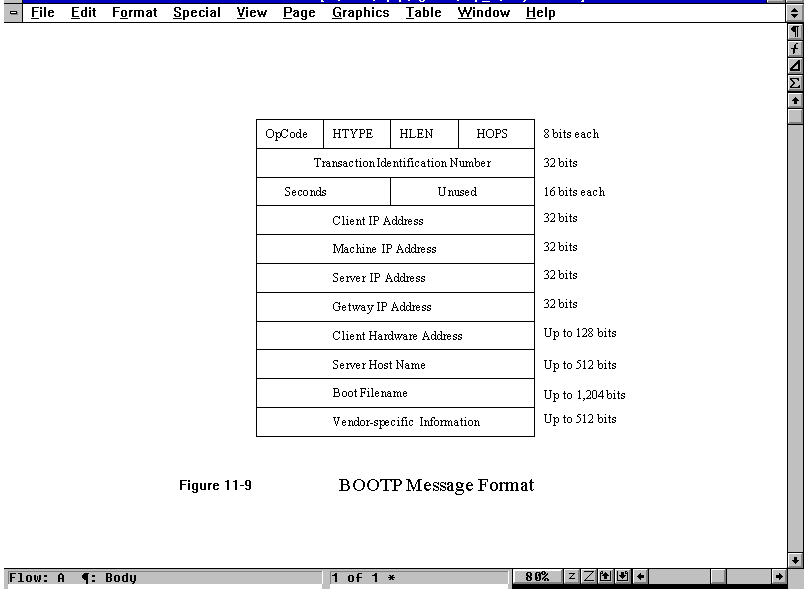
BOOTP messages are kept in fixed formats for simplicity and to enable the BOOTP software to fit in a small space within a PROM. The format of BOOTP messages is shown in Figure 11.9. The OpCode field is used to signal either a request (set to a value of 1) or a reply (set to a value of 2). The HTYPE field indicates the network hardware type. The HLEN field indicates the length of a hardware address. (These last two fields are the same as in ARP.)
Figure 11.9. The BOOTP message format.
The HOPS field keeps track of the number of times the message is forwarded. When the client sends the request message, a value of 0 is put in the HOPS field. If the server decides to forward the message to another machine, it increments the HOPS count. (Forwarding is necessary when bootstrapping a machine across more than one gateway.)
The Transaction Number field is an integer assigned by the client to the message and is unchanged from request to reply. This enables matching the replies to the correct request. The Seconds field is the number of seconds the client has been booted, assigned by the client when the message is sent.
The Client IP Address field is filled in as much as possible by the client. This might result in a partial network address or no information at all, depending on the client's knowledge of the network it is in. Any information that is unknown is set to 0 (so the field might be 0.0.0.0 if nothing is known about the network address). If the client wants information from a particular server, it can put the address of the server in the Server IP Address field. Similarly, if the client knows the server's name, it puts it in the Server Host Name field. The same applies for the other address fields. If the fields are set to 0, any server can respond. If a specific server or gateway is given, only that machine responds to the message.
The Vendor-Specific field is used, as the name suggests, for implementation information that is specific to each vendor. This field is optional. The first 32 bits define the format of the remaining information. These first bits are known as the magic cookie and have a standard value of 99.120.83.99. Following the magic cookie are sets of information in a three-field format: a type, a length, and a value. There are several types identified by the Internet RFC, as shown in Table 11.5. The Length field is not used for types 0 and 255, but it must be present for types 1 and 2. The length can vary depending on the number of entries in the other types of messages.
|
Type |
Code |
Length |
Description |
|
Padding
|
0
|
--
|
Used only for padding messages
|
|
Subnet Mask
|
1
|
4
|
Subnet mask for local network
|
|
Time of Day
|
2
|
4
|
Time of Day
|
|
Gateways
|
3
|
Number of entries
|
IP addresses of gateways
|
|
Time Servers
|
4
|
Number of entries
|
IP addresses of time servers
|
|
IEN116 Server
|
5
|
Number of entries
|
IP addresses of IEN116 servers
|
|
DomainName Server
|
6
|
Number of entries
|
IP addresses of Domain Name Servers
|
|
Log Server
|
7
|
Number of entries
|
IP addresses of log servers
|
|
Quote Server
|
8
|
Number of entries
|
IP addresses of quote servers
|
|
LPR Servers
|
9
|
Number of entries
|
IP addresses of lpr servers
|
|
Impress
|
10
|
Number of entries
|
IP addresses of impress servers
|
|
RLP Server
|
11
|
Number of entries
|
IP addresses of RLP servers
|
|
Hostname
|
12
|
Number of bytes
|
Client host name in host name
|
|
Boot size
|
13
|
2
|
Integer size of boot file
|
|
Unused
|
128–254
|
--
|
Not used
|
|
End
|
255
|
--
|
End of list |
You might remember that a machine can obtain the subnet mask from an ICMP message, but BOOTP is the recommended method of obtaining this value.
The Boot Filename field can specify a filename from which to obtain a memory image that enables the diskless workstation to boot properly. This might be vendor-set or supplied by the server. This enables the memory image to be obtained from one machine while the actual addresses are obtained from another. If this field is set to 0, the server selects the memory image to send.
The process of booting follows two steps. The first is to use BOOTP to obtain information about the network addresses of the client and at least one other machine (a gateway or server). The second step uses a different protocol to obtain a memory image for the client.
Timing is very important to networks, not only to ensure that internal timers are maintained properly, but also for synchronization of clocks for sending messages and timestamps within those messages. Some systems rely on time for routing. Ensuring that time clocks are consistent and accurate is a task often overlooked, but it remains important enough to have a formal procedure defined by an Internet RFC. The protocol that maintains time standards is called the Network Time Protocol, or NTP. NTP can use either TCP or UDP; port 37 is dedicated to it.
The operation of NTP relies on obtaining an accurate time from a query to a primary time server, which itself gets its timing information from a standard time source (such as the National Institute of Standards and Technology in the U.S.). The time server queries the standard clock (also called a master clocking source) and sets its own times to the standard.
Once the primary time server has an accurate time, it sends NTP messages to secondary time servers further out on the internetwork. Secondary time servers can communicate with more secondary time servers using NTP, although accuracy is lost with each communication due to latency in the networks. Eventually, these time messages can be sent to gateways and individual machines within a network, if the administrator so decides. Usually each network has at least one primary time server and one secondary server, although large networks might have several of each.
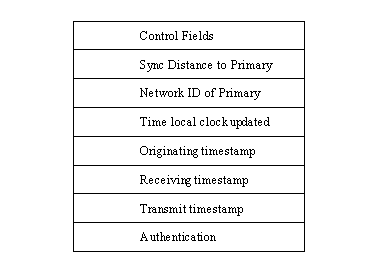
The format of NTP messages is simple, as shown in Figure 11.10. Several control fields are used for synchronization and updating procedures, but the details of these fields are not important to this discussion. The Sync Distance to Primary field is an estimate of the round-trip delay incurred to the primary clock. The ID of the primary time server is the address of the primary.
Figure 11.10. The NTP message format.
There are several timestamps in the NTP message. The Time Local Clock Updated is the time the message originator's local clock was updated. The Originate timestamp is the time the message was sent. The Receive timestamp is the time it was received. The Transmit timestamp is the time the message was transmitted after reception.
All timestamps are calculated from an offset of the number of seconds since January 1, 1900. The timestamp fields are 64 bits, the first 32 bits for a whole number and the last 32 for a fraction. The final Authentication field is optional and can be used to authenticate the message.
You have now seen how the Domain Name Service works. DNS is an integral and important part of most TCP/IP installations, enabling symbolic names to be resolved properly across networks. The use of name servers was explained, as well as the manner in which records are stored within the servers. Associated with DNS is the ARP and IN-ADDR-ARPA name resolution process.
Today I also looked at the BOOTP protocol, necessary to enable many diskless terminals and workstations to connect to the network and load their operating system. Without BOOTP, you would all need full-featured computers or workstations.
What are the top-level domain names and what are their purposes?
The top level domains are .arpa (Internet-specific), .com (commercial), .edu (educational institutions), .gov (governmental), .mil (military), and .org (non-commercial organizations).
What does a DNS name server do?
The DNS name server manages a zone of machines and provides name resolution for all machines within that zone.
If a name server cannot resolve a name using its own tables, what happens?
Queries can be sent from the machine receiving the query to other name servers to search for a resolution. If another machine does have the answer, it is not returned to the inquiring machine, however. Only the address of the name resolver with the answer is returned. The inquiring machine must then send a specific query to the resolver with the answer.
What is the advantage of the IN-ADDR-ARPA format?
IN-ADDR-ARPA enables a mapping from the IP address to the symbolic host name. Sometimes this is a fast way to obtain the symbolic name of a destination machine.
Why does BOOTP use UDP?
Simply because it is smaller to code. To embed TCP code in a PROM would take much more room than the simple code needed for UDP.