Today you will not learn how to configure and manage a network. The reason is simple: network management and configuration is a very complex issue that can be only briefly examined in a single chapter. If you are assigned the task of network administrator, there are a few good books available that help a little, but the only real teacher of network administration and troubleshooting is experience. The more you work with networks, the more you learn. Today's text presents an overview of network topologies and configuration issues and examines the basic steps in troubleshooting faulty TCP/IP systems. Remember that this is an overview only, intended to provide you with the background to the administration process.
Traditionally, network management means two different tasks: monitoring and controlling the network. Monitoring means watching the network's behavior to ensure that it is functioning smoothly and watching for potential troublespots. Controlling means changing the network while it is running, altering the configuration in some manner to improve performance or affect parts that are not functioning correctly.
On Day 1, "Open Systems, Standards, and Protocols," I looked at the ISO standards; ISO addresses networks, as well. ISO goes further than just two aspects of network administration, however, dividing network management into five parts defined within the Open Systems Interconnection Reference Model (OSI-RM). These five parts are called Specific Management Functional Areas (SMFAs) in the standard. The five aspects are as follows:
The five groups have some overlap, especially between performance and fault management. However, the division of the network management tasks can help account for all the necessary aspects. In some cases, large organizations have dedicated people for each group. For many smaller LANs, the role of handling all the problems usually falls to one person, who seldom worries about whether their actions are ISO-compliant.
The Internet Advisory Board (IAB) has developed or adopted several standards for network management. These have been, for the most part, specifically designed to fit TCP/IP requirements, although they do whenever possible meet the OSI architecture. An Internet working group responsible for the network management standards adopted a two-stage approach to provide for current and future needs.
The first step involves the use of the Simple Network Management Protocol (SNMP), which was designed and implemented by the working group. SNMP is currently used on many Internet networks, and it is integrated into many commercially available products. As technology has improved, SNMP has evolved and become more encompassing.
The second step involves OSI network management standards, called the Common Management Information Services (CMIS) and Common Management Information Protocol (CMIP), both to be used in future implementations of TCP/IP. The IAB has published Common Management Information Services and Protocol over TCP/IP (CMOT) as a standard for TCP/IP and OSI management.
Both SNMP and CMOT use the concept of network managers exchanging information with processes within network devices such as workstations, bridges, routers, and multiplexers. The primary management station communicates with the different management processes, building information about the status of the network. The architecture of both SNMP and CMOT is such that the information that is collected is stored in a manner that enables other protocols to read it.
The SNMP manager handles the overall software and communications between the devices using the SNMP communications protocol. Support software provides a user interface, enabling a network manager to observe the condition of the overall system and individual components and monitor any specific network device.
SNMP-managed devices all contain the SNMP agent software and a database called the Management Information Base (MIB). I look at the SNMP protocol and MIB layout later today, but for now a quick overview should help you understand how SNMP is used for network management. The MIB has 126 fields of information about the device status, performance of the device, its connections to different devices, and its configuration. The SNMP manager queries the MIB through the agent software and can specify changes to the configuration. Most SNMP managers query agents at a regular interval, such as fifteen minutes, unless instructed otherwise by the user.
The SNMP agent software is usually quite small (typically less than 64KB) because the SNMP protocol is simple. SNMP is designed to be a polling protocol, meaning that the manager issues messages to the agent. For efficiency and small size of executable programs, SNMP messages are enclosed within a UDP datagram and routed via IP (although many other protocols could be used). There are five message types available in SNMP:
UDP port 161 is used for all messages except traps, which arrive on UDP port 162. Agents receive their messages from the manager through the agent's UDP port 161.
Despite its widespread use, SNMP has some disadvantages. The most important might also be an advantage, depending on your point of view: the reliance on UDP. Because UDP is connectionless, there is no reliability inherent in the message sending. Another problem is that SNMP provides only a simple messaging protocol, so filtering messages cannot be performed. This increases the load on the receiving software. Finally, SNMP uses polling, which consumes a considerable amount of bandwidth. The trade-offs between SNMP and its more recent successor, CMIP, will make decisions regarding a management protocol more difficult in the future.
SNMP enables proxy management, which means that a device with an SNMP agent and MIB can communicate with other devices that do not have the full SNMP agent software. This proxy management lets other devices be controlled through a connected machine by placing the device's MIB in the agent's memory. For example, a printer can be controlled through proxy management from a workstation acting as an SNMP agent, which also runs the proxy agent and MIB for the printer.
Proxy management can be useful to off-load some devices that are under heavy load. For example, it is common under SNMP to use proxy to handle authentication processes, which can consume considerable resources, by passing this function to a less heavily used machine. Proxy systems can also affect the processing that needs to be performed at a bridge, for example, by having a proxy reformat the datagrams arriving, again to off-load the bridge from that time-consuming task.
After providing a quick overview, I can now look at SNMP in more detail. If you are satisfied with the overview, you can skip the next section, because most users never need to know about the make-up and layout of SNMP and MIB. If you want to know what's going on in a network, though, this information is invaluable.
The Simple Network Management Protocol (SNMP) was originally designed to provide a means of handling routers on a network. SNMP, although part of the TCP/IP family of protocols, is not dependent on IP. SNMP was designed to be protocol-independent (so it could run under IPX from Novell's SPX/IPX just as easily, for example), although the majority of SNMP installations use IP on TCP/IP networks.
SNMP is not a single protocol but three protocols that together make up a family, all designed to work toward administration goals. The protocols that make up the SNMP family and their roles follow:
Peripherals that have SNMP capabilities built-in run a management agent software package, either loaded as part of a boot cycle or embedded in firmware in the device. These devices with SNMP agents are called by a variety of terms depending on the vendor, but they are known as SNMP-manageable or SNMP-managed devices. SNMP-compliant devices also have the code for SNMP incorporated into their software or firmware. When SNMP exists on a device, it is called a managed device.
SNMP-managed devices communicate with SNMP server software located somewhere on the network. The device talks to the server in two ways: polled and interrupt. A polled device has the server communicate with the device, asking for its current condition or statistics. The polling is often done at regular intervals, with the server connecting with all the managed devices on the network. The problem with polling is that information is not always current, and network traffic rises with the number of managed devices and frequency of polling.
An interrupt-based SNMP system has the managed device send messages to the server when some conditions warrant. This way, the server knows of any problems immediately (unless the device crashes, in which case notification must be from another device that tried to connect to the crashed device). Interrupt-based devices have their own problems. Primary among the problems is the need to assemble a message to the server, which can require a lot of CPU cycles, all of which are taken away from the device's normal task. This can cause bottlenecks and other problems on that device. If the message to be sent is large, as it is if it contains a lot of statistics, the network can suffer a noticeable degradation while the message is assembled and transmitted.
If there is a major failure somewhere on the network, such as a power grid going down and uninterruptible power supplies kicking in, each SNMP-managed device might try to send interrupt-driven messages to the server at the same time to report the problem. This can swamp the network and result in incorrect information at the server.
A combination of polling and interruption is often used to get by all these problems. The combination is called trap-directed polling, and it involves the server polling for statistics at intervals or when directed by the system administrator. In addition, each SNMP-managed device can generate an interrupt message when certain conditions occur, but these tend to be more rigorously defined than in a pure interrupt-driven system. For example, if you use interrupt-only SNMP, a router might report load increases every 10 percent. If you use trap-directed polling, you know the load from the regular polling and can instruct the router to send an interrupt only when a significant increase in load is experienced. After receiving an interrupt message with trap-directed polling, the server can further query the device for more details, if necessary.
An SNMP server software package can communicate with the SNMP agents and transfer or request several types of information. Usually, the server requests statistics from the agent, including number of packets handled, status of the device, special conditions associated with the device type (such as out-of-paper indications or loss of connection from a modem), and processor load.
The server can also send instructions to the agent to modify entries in its database (the Management Information Base). The server can also send threshold or conditions under which the SNMP agent should generate an interrupt message to the server, such as when CPU load reaches 90 percent.
Communications between the server and agent occur in a fairly straightforward manner, although they tend to use abstract notation for message contents. For example, the server might send a What is your current load message and receive back a 75% message. The agent never sends data to the server unless an interrupt is generated or a poll request is made. This means that some long-standing problems can exist without the SNMP server knowing about them, simply because a poll wasn't conducted or an interrupt generated.
Every SNMP-managed device maintains a database that contains statistics and other data. These databases are called a Management Information Base, or MIB. The MIB entries have four pieces of information in them: an object type, a syntax, an access field, and a status field. MIB entries are usually standardized by the protocols and follow strict formatting rules defined by Abstract Syntax Notation One (ASN.1).
The object type is the name of the particular entry, usually as a simple name. The syntax is the value type, such as a string or integer. Not all entries in an MIB have a value. The access field is used to define the level of access to the entry, normally defined by the values read-only, read-write, write-only, and not accessible. The status field contains an indication of whether the entry in the MIB is mandatory (which means the managed device must implement the entry), optional (the managed device can implement the entry), or obsolete (not used).
There are two types of MIB in use, called MIB-1 and MIB-2. The structures are different. MIB-1 was used starting in 1988 and has 114 entries in the table, divided into groups. For a managed device to claim to be MIB-1 compatible, it must handle all the groups that are applicable to it. For example, a managed printer doesn't have to implement all the entries that deal with the Exterior Gateway Protocol (EGP), which is usually implemented only by routers and similar devices.
MIB-2 is a 1990 enhancement of MIB-1, made up of 171 entries in ten groups. The additions expand on some of the basic group entries in MIB-1 and add three new groups. As with MIB-1, an SNMP device that claims to be MIB-2 compliant must implement all those groups that are applicable to that type of device. You will find many devices that are MIB-1 compliant but not MIB-2.
In addition to MIB-1 and MIB-2, several experimental MIBs in use add different groups and entries to the database. None of these have been widely adopted, although some show promise. Some MIBs have also been developed by individual corporations for their own use, and some vendors offer compatibility with these MIBs. For example, Hewlett-Packard developed an MIB for their own use that some SNMP-managed devices and software server packages support.
The Simple Network Management Protocol (SNMP) has been through several iterations. The most commonly used version is called SNMP v1. Usually SNMP is used as an asynchronous client/server application, meaning that either the managed device or the SNMP server software can generate a message to the other and wait for a reply, if one is expected. These are packaged and handled by the network software (such as IP) as any other packet would be. SNMP uses UDP as a message transport protocol. UDP port 161 is used for all messages except traps, which arrive on UDP port 162. Agents receive their messages from the manager through the agent's UDP port 161.
When a request is sent, some of the fields in the SNMP entry are left blank. These are filled in by the client and returned. This is an efficient method of transferring the question and answer in one block, eliminating complex look-up algorithms to find out what query a received answer applies to.
The get command, for example, is sent with the Type and Value fields in the message set to NULL. The client sends back a similar message with these two fields filled in (unless they don't apply, in which case a different error message is returned).
SNMP v2 adds some new capabilities to the older SNMP version, the most handy of which for servers is the get-bulk operation. This lets a large number of MIB entries be sent in one message, instead of requiring multiple get-next queries with SNMP v1. In addition, SNMP v2 has much better security than SNMP v1, preventing unwanted intruders from monitoring the state or condition of managed devices. Both encryption and authentication are supported by SNMP v2. SNMP v2 is a more complex protocol and is not as widely used as SNMP v1.
Despite its widespread use, SNMP has a few disadvantages. The most important is its reliance on UDP. Because UDP is connectionless, there is no reliability inherent in messaging between server and agent. Another problem is that SNMP provides only a simple messaging protocol, so filtering messages cannot be performed. This increases the load on the receiving software. Finally, SNMP almost always uses polling to some degree, which consumes a considerable amount of bandwidth.
Although many operating systems support SNMP and enable you to configure its use, SNMP remains a very UNIX-oriented protocol. Chances are, if there's a UNIX box on your network, SNMP is based on the UNIX machine. Other operating systems such as Windows NT support SNMP client and server software—and they are usually very easy to set up and manage— but for this section I bow to the majority and look only at UNIX.
Most UNIX versions include both the client and server software as part of the operating system. The client software is executed through the snmpd daemon, which usually runs all the time when SNMP is used on the network. Normally, the snmpd daemon is started automatically when the system boots; it is controlled through the rc startup files. When SNMP starts, the daemon reads several configuration files. On most SNMP agents, the files that snmpd reads are as follows:
/etc/inet/snmpd.conf
/etc/inet/snmpd.comm
/etc/inet/snmpd.trap
The directories these files are under might be different for each UNIX version, so you should check the filesystem for their proper location.
The snmpd.conf file contains four system MIB objects. Most of the time these objects are set during installation, but you might want to verify their contents. A sample snmpd.conf file is shown here:
#      @(#)snmpd.conf    6.3 8/21/93 - STREAMware TCP/IP  source

#

# Copyrighted as an unpublished work.

#  Copyright 1987-1993 Lachman Technology, Inc.

# All rights reserved.

descr=SCO TCP/IP Runtime Release 2.0.0

objid=SCO.1.2.0.0

contact=Tim Parker  [email protected]

location=TPCI Int'l HQ, Ottawa
In many snmpd.conf files you have to fill out the contact and location fields yourself (which define the contact user and physical location of the system), but the descr and objid fields should be left as they are. The variables defined in the snmpd.conf file correspond to MIB variables as shown in Table 13.1.
|
snmpd.comf Variables |
MIB Variables |
|
descr
|
sysDescr
|
|
objid
|
sysObjectID
|
|
contact
|
sysContact
|
|
location
|
sysLocation |
The snmpd.comm (community) file is used to provide authentication information and a list of hosts that have access to the local database. Access by a remote machine to the local SNMP data is provided by including the remote machine's name in the snmpd.comm file. A sample snmpd.comm file looks like this:
#      @(#)snmpd.comm    6.5 9/9/93 - STREAMware TCP/IP  source

accnting    0.0.0.0        READ

r_n_d       147.120.0.1    WRITE

public      0.0.0.0        READ

interop     0.0.0.0        READ
Each line in the snmpd.comm file has three fields: the community name, the IP address of the remote machine, and the privileges the community has. If the IP address is set to 0.0.0.0, any machine can communicate with that community name. The privileges can be READ for read-only, WRITE for read and write, and NONE to prevent access by that community. Read and write access are references to capabilities to change MIB data, not filesystems.
The snmpd.trap file specifies the name of hosts to whom a trap message must be sent when a critical event is noticed. A sample snmpd.trap file looks like this:
#      @(#)snmpd.trap    6.4 9/9/93 - STREAMware TCP/IP  source

superduck  147.120.0.23    162
Each line in the snmpd.trap file has three fields: the name of the community, its IP address, and the UDP port to use to send traps.
UNIX offers several SNMP-based commands for network administrators to obtain information from an MIB or an SNMP-compliant device. The exact commands vary a little depending on the implementation, but most SNMP systems support the commands shown in Table 13.2.
|
Command |
Description |
|
getone
|
Uses the SNMP get command to retrieve a variable value
|
|
getnext
|
Uses the SNMP getnext command to retrieve the next variable value
|
|
getid
|
Retrieves the values for sysDescr, sysObjectID, and sysUpTime
|
|
getmany
|
Retrieves an entire group of MIB variables
|
|
snmpstat
|
Retrieves the contents of SNMP data structures
|
|
getroute
|
Retrieves routing information
|
|
setany
|
Uses the SNMP set command to set a variable value |
Most of the SNMP commands require an argument that specifies the information to be set or retrieved. The output from some of the commands given in Table 13.2 is shown in the following extract from an SNMP machine on a small local area network:
$ getone merlin udpInDatagrams.0

Name: udpInDatagrams.0

Value: 6

$ getid merlin public

Name: sysDescr.0

Value: UNIX System V Release 4.3

Name: sysObjectID.0

Value: Lachman.1.4.1

Name: sysUpTime.0

Value: 62521
None of the SNMP commands can be called user-friendly, because their responses are terse and sometimes difficult to analyze. For this reason, many GUI-based network analyzers are becoming popular, offering menu-based access to many SNMP functions and better presentation of data. The use of a GUI-based SNMP tool can present full-color graphical displays of network statistics in a real-time manner. However, these GUI tools tend to cost a considerable amount.
I briefly examined both LAN and WAN topologies on Day 1, looking at bus and ring networks and the connections between LANs to make a WAN, so that material should be somewhat familiar to you. You can now extend your attention from the LAN topology to the larger internetworked topology by using TCP/IP. To do that, I must tie the role of routers, bridges, and similar devices into the network topology and show their role in a TCP/IP system.
One useful concept to keep in mind is the 80/20 rule, which states that 80 percent of most network traffic is for local machines, and 20 percent needs to move off the LAN. In reality, the ratio of local traffic is usually much higher, but planning for an 80/20 split helps establish workable limits for connections to network backbones.
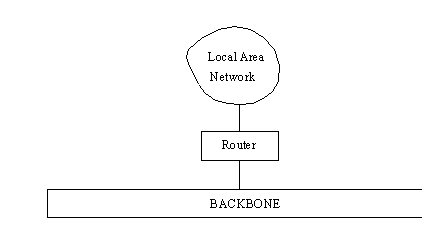
LANs are tied to a larger network backbone (either a WAN or an internetwork such as the Internet) through a device that handles the passage of datagrams between the LAN and the backbone. In a simple setup, a router performs this function. This is shown in Figure 13.1. Routers connect networks that use different link layer protocols or Media Access Control (MAC) protocols. Routers examine only the headers of datagrams that are specifically sent to them or are broadcast messages, but there is a lot of processing involved within the router.
Figure 13.1. A router connects a LAN to the backbone.
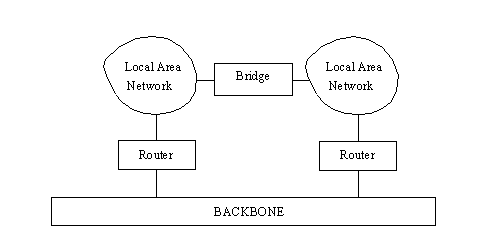
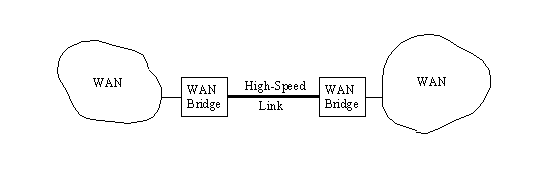
If two or more LANs are involved in one organization and there is the possibility of a lot of traffic between them, it is better to connect the two LANs directly with a bridge instead of loading the backbone with the cross-traffic. This is shown in Figure 13.2. Bridges can also connect two WANs using a high-speed line, as shown in Figure 13.3.
Figure 13.2. Using a bridge to connect two LANs.
Figure 13.3. Using a bridge to connect two WANs.
You might recall that bridges are used when the same network protocol is on both LANs, although the bridge does not care which physical media is used. Bridges can connect twisted-pair LANs to coaxial LANs, for example, or act as an interface to a fiber optic network. As long as the Media Access Control (MAC) protocol is the same, the bridge functions properly.
Many high-end bridges available today configure themselves automatically to the networks they connect and learn the physical addresses of equipment on each LAN by monitoring traffic. One problem with bridges is that they examine each datagram that passes through them, checking the source and destination addresses. This adds overhead and slows the routing through the bridge. (As mentioned earlier, routers don't examine each datagram.)
In a configuration using bridges between LANs or WANs, traffic from one LAN to another can be sent through the bridge instead of onto the backbone, providing better performance. For services such as Telnet and FTP, the speed difference between using a bridge and going through a router onto a heavily used backbone can be appreciable. If the backbone is not under the direct administration of the LAN's administrators (as with the Internet), having a bridge also provides a method for the corporation or organization to control the connection.
The use of a bridge has one other advantage: if the backbone fails, communications between the two LANs are not lost. The same applies, of course, if the bridge fails, because the backbone can be used as a rerouting path. For critical networks, backbones are usually duplicated for redundancy. In the same manner, most organizations have duplicate routers and bridges in case of failure.
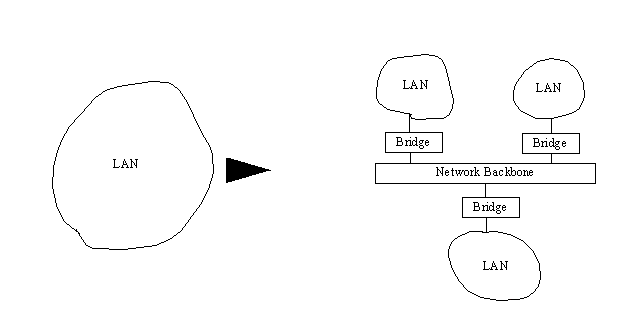
Bridges can be used when splitting a large LAN into smaller networks. This is often necessary when a LAN continues to expand as new equipment is added. Eventually the network traffic becomes bottlenecked. A useful and relatively easy solution is to divide the larger LAN into smaller LANs connected over a backbone. This helps conform to the 80/20 rule, while simplifying the traffic and administration overhead. This is shown in Figure 13.4. If the backbone is carefully chosen with lots of excess capacity, this type of topology can account for sizable future growth.
Figure 13.4. Dividing a large LAN into several smaller LANs.
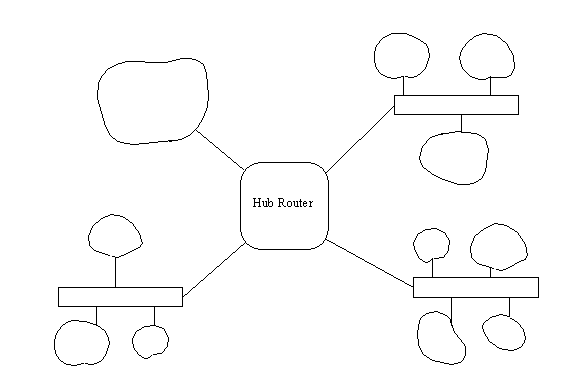
Routers, too, can be used to control large networks. This is an advantage when broadcasts are frequently used, because the router can filter out broadcasts that apply only to a specific LAN. (Most bridges propagate broadcasts across the network.) The use of a single switching router or hub router is becoming popular for joining different LANs within an organization, as shown as in Figure 13.5.
Figure 13.5. Using a hub router to connect LANs.
When large networks are necessary, several routers can be used to split the load. Intelligent network routers can optimize the routing of datagrams, as well as monitor and control network traffic and bottlenecks at any location.
On many occasions the advantages of a bridge and a router together are ideal. These combined devices, called brouters, are now making an appearance. Brouters can perform routing with some messages and bridging with others by examining incoming datagrams and using a filter mask to decide which function is performed. Brouters have the capability to handle multiple protocols, much like routers.
Equipment available today is much more capable than was available when TCP/IP began its development cycle. In some ways, this has simplified the task of adding to or configuring a network, but it has also posed some problems of its own. Most equipment can be added to a network by simply attaching the network medium (such as a coaxial or twisted-pair cable) and configuring the interface with the IP address and domain name.
Of course, the more complicated the network, the more work must be done. Configuring a bridge, for example, can be as simple as connecting it to the networks it serves. Most bridges can autoconfigure themselves and watch the network traffic to build a table of network address. However, adding filters to restrict traffic or limiting access through blocking ports requires more detailed configuration processes.
Configuring a network and TCP/IP is not difficult, but it can be time-consuming. Different operating systems approach the task in a variety of ways. UNIX, for example, uses a large number of small configuration files scattered throughout the file system. IBM mainframes use a single large file. Configurations on some systems use a menu-driven interface that guides the user through all the necessary steps, ensuring that no errors are made.
For most networks and their interface cards, the following information is required:
Secondary IP addresses can be used for devices such as routers, which can handle two logical networks. As noted, serial interfaces do not need an IP address, although they can be supplied. Serial interfaces also require a setting to indicate whether the device is configured to act as Data Terminal Equipment (DTE) or Data Communications Equipment (DCE), the serial port's baud rate and parity, and settings for the maximum size of a transmission.
Whatever equipment is used on a network, they all have a physical connection to the network transport medium. Typically this is a network card in a workstation, desktop PC, or printer. Software supplied with the device controls the interface, eliminating most of the worries of matching hardware, software, and protocols. After deciding on an IP address, the setting can be programmed either by switches or software, and the device is ready to talk to the network.
IP addresses can be chosen at random by the system administrator, but this can cause problems when the datagrams are released to a larger internetwork such as the Internet. Ideally, a network mask is assigned by the Network Information Center (NIC). This is then combined with the administrator's own numbering scheme in the LAN to produce the full IP address.
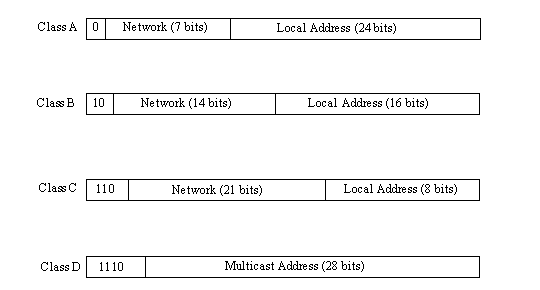
The IP addresses are assigned by the NIC based on the class of network, which reflects the size of the organization and the number of local equipment addresses required. As shown in Figure 13.6, there are four NIC-approved IP address structures. Class A addresses are for very large networks that need 24 bits available for local addresses, reducing the network address to 7 bits. Class B assigns 16 bits locally and 14 bits for the network address, whereas Class C enables only 8 bits for local addresses and 21 bits for the network address. Class C networks are for small companies only, because only 256 local addresses can be created. Class D addresses are used for special systems not usually encountered by users.
Figure 13.6. The four IP address class structures.
Numbering schemes within a network are left to the administrator's whim, although a convention of assigning low numbers to routers and bridges is usually followed. It is also useful to use Address Resolution Protocol (ARP) on local servers or routers to provide for faster startup when machines query for their IP addresses. This prevents system-wide broadcasts. The manner in which user equipment starts up (whether it uses BOOTP, ARP, or RARP) can affect the configuration of the local servers and routers.
Physical addresses of network connectors seldom have to be changed from their default settings. Most vendors guarantee a unique physical setting for their hardware, so these can usually be maintained with no change. For the conversion of IP address to physical address, this information must be stored in a routing table.
Routing tables for small networks are often created and maintained by hand. Larger networks might involve too many changes for the manual approach to be effective, so a routing protocol such as Routing Information Protocol (RIP) is used. Several routing protocols are available, including RIP and Open Shortest Path First (OSPF). The choice of the routing protocol can be important and usually depends on the size of the network and the connections between subnetworks and external systems. Routing protocols should be started automatically when the network is booted.
Configuring the network includes setting the domain name and network IP mask, following the formats approved by the NIC. Many operating systems have utilities that help configure the domain name and network IP mask. The Domain Administrator's Guide, which describes the process of forming a domain name, is available from the NIC (RFC 1032). These steps apply only if the network is to connect to the Internet or a similar internetwork. If the network is autonomous with no outside connections, the administrator can choose any network IP mask and domain name (although future connections might force a complete reconfiguration of the network if an NIC-consistent scheme is not used).
Connections to the Internet require an Autonomous System (AS) number from the NIC, which provides other systems with your border router address. Gateway protocols such as the Exterior Gateway Protocol (EGP) or newer Border Gateway Protocol (BGP) must be installed and configured to provide Internet routing.
Also involved in naming are the name-to-address resolution tables, which convert a symbolic name to an IP address. These are usually configured manually, although some automated formatting tools are offered with different operating systems. If the Domain Name System (DNS) is to be implemented, that adds another level of complexity to the name configuration, the details of which are best left to more specialized texts.
Some routers can be configured to filter message traffic. In these cases, the masks used to restrict or enable datagrams must be added to the router tables, as well as any limitations or exceptions to requests for socket services (such as Telnet). Setting ARP tables in routers can help bring up newly started machines more quickly than if a broadcast is sent network-wide to the primary ARP server. Several routers can be configured for priority routing, enabling priority based on the protocol, type of service, or a selected criteria such as IP address or socket.
Router software can be accessed either locally through a dedicated terminal or over the network. The latter enables a system administrator to log in using Telnet from a machine on the network and then run configuration or maintenance utilities. It is advisable to make access to these utilities extremely limited.
After the network addresses have been established, TCP can be configured. This is normally performed on a per-machine basis using an interface utility. In the TCP software configuration are settings for default window sizes and maximum segment size. If changes over the standard TCP port assignments are required, the configuration files must be edited. Processes that start TCP and monitor ports for connections (such as inetd, described on Day 6, "Telnet and FTP,") must be added to the system startup files. Other services such as electronic mail (which might use a dedicated protocol such as SNMP) must be installed and properly configured.
On Days 6 and 7 I looked at TCP/IP network utilities such as ping, finger, ruptime, and netstat, which help determine the status of connections and interfaces. I mention them here again briefly and also introduce some new commands. Several software vendors now offer talented network monitoring products that provide excellent information about the network, its connections, and the traffic it carries. Many of these products also enable dynamic configuration of the system.
The ping (Packet Internet Groper) command is the easiest method to check a machine's connection to the network. It uses the Internet Control Message Protocol (ICMP) to send a request for response. The ping command is useful with routers, because it can check each interface. Different versions of ping are available, some with different options.
The following output shows a character-based system using ping to check on another machine on the network. The command line uses the -c option to limit the number of packets sent. As you can see, an IP address was used to indicate the destination machine, and the machine translated this to the symbolic name pepper based on the host table.
# ping -c5 205.150.89.2

PING 205.150.89.2 (205.150.89.2): 56 data bytes

64 bytes from pepper (205.150.89.2): icmp_seq=0 ttl=32 time=40 ms

64 bytes from pepper (205.150.89.2): icmp_seq=1 ttl=32 time=0 ms

64 bytes from pepper (205.150.89.2): icmp_seq=2 ttl=32 time=0 ms

64 bytes from pepper (205.150.89.2): icmp_seq=3 ttl=32 time=0 ms

64 bytes from pepper (205.150.89.2): icmp_seq=4 ttl=32 time=0 ms

--- 205.150.89.2 ping statistics ---

5 packets transmitted, 5 packets received, 0% packet loss

round-trip min/avg/max = 0/8/40 ms
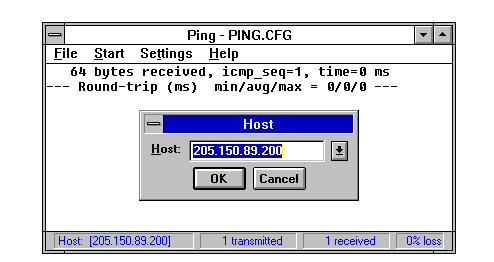
A GUI-based ping utility is shown in Figure 13.7. This shows the ChameleonNFS ping utility sending a single packet to a remote device (in this case a network printer with the IP address 205.150.89.200) and getting a positive response.
Figure 13.7. ping can also be used on GUI systems, although usually with fewer options than on UNIX.
A similar utility is spray, which uses a Remote Procedure Call (RPC, discussed on Day 9, "Setting Up a Sample TCP/IP Network: Servers") to send a constant stream of datagrams or ICMP messages. The difference between ping and spray is that spray sends the datagrams constantly, whereas ping has an interval between datagrams. This can be useful for checking burst-mode capabilities of the network. The output of a spray command on a BSD UNIX system looks like this:
$ spray -c 5 tpci_sun2

sending 5 packets of lnth 86 to tpci_sun2 ...

   in 0.3 seconds elapsed time,

   1 packets (20.00%) dropped by tpci_sun2

Sent: 19 packets/sec, 1.8K bytes/sec

Rcvd: 16 packets/sec, 1.6K bytes/sec
Day 7, "TCP/IP Configuration and Administration Basics," covered the netstat command in some detail. It is useful for checking the status of the network. The implementations of netstat vary widely depending on the operating system version.
Some systems have a utility called traceroute (available as public domain software), which sends a series of UDP datagrams to the target. The datagrams are constructed slightly differently depending on their location in the stream. The first three datagrams have the Time to Live (TTL) field set to 1, meaning the first time a router encounters the message it is returned with an expired message. The next three messages have the TTL field set to 2, and so on until the destination is reached.
The traceroute output shows the round-trip time of each message (which is useful for identifying bottlenecks in the network) and the efficiency of the routing algorithms (through a number of routers that might not be the best route). A sample output from a traceroute command (all machine names and IP address are invented) follows:
$ traceroute black.cat.com

1  TPCI.COM (127.01.13.12)           51ms   3ms   4ms

2  BEAST.COM (143.23.1.23)           60ms   5ms   7ms

3  bills_machine.com (121.22.56.1)   121ms  12ms  12ms

4  SuperGateway.com (130.12.14.2)    75ms   13ms  10ms

5  black.cat.com  (122.13.2.12)      45ms   4ms   6ms
When dealing with RPC, a utility called rpcinfo can determine which RPC services are currently active on the local or any remote system that supports RPC. The options supported by rpcinfo vary with the implementation, but all enable flags to decide which type of service to check. For example, the -p option displays the local portmapper. The following example shows the options supported on the SCO UNIX version of rpcinfo, as well as the output for the portmapper:
$ rpcinfo

Usage: rpcinfo [ -n portnum ] -u host prognum [ versnum ]

       rpcinfo [ -n portnum ] -t host prognum [ versnum ]

       rpcinfo -p [ host ]

       rpcinfo -b prognum versnum

$ rpcinfo -p

   program vers proto   port

    100000    2   tcp    111  portmapper

    100000    2   udp    111  portmapper

    150001    1   udp   1026  pcnfsd

    150001    2   udp   1026  pcnfsd

    100008    1   udp   1027  walld

    100002    1   udp   1028  rusersd

    100002    2   udp   1028  rusersd

    100024    1   udp   1029  status

    100024    1   tcp   1024  status

    100020    1   udp   1034  llockmgr

    100020    1   tcp   1025  llockmgr

    100021    2   tcp   1026  nlockmgr

    100021    1   tcp   1027  nlockmgr

    100021    1   udp   1038  nlockmgr

    100021    3   tcp   1028  nlockmgr

    100021    3   udp   1039  nlockmgr
Monitoring NFS (an RPC service) can be more complicated. A few utility programs are available. The nfsstat command displays information about recent calls:
$ nfsstat

Server rpc:

calls      badcalls   nullrecv   badlen     xdrcall

458        0          1          2          0

Server nfs:

calls      badcalls

412         2

null       getattr    setattr    root       lookup     readlink   read

0 0%       200 49%    0 0%       0 0%       120 29%    75 18%     126 31%

wrcache    write      create     remove     rename     link       symlink

0 0%       0 0%       0 0%       0 0%       0 0%       0 0%       0 0%

mkdir      rmdir      readdir    fsstat

0 0%       0 0%       52 13%     12 3%

Client rpc:

calls      badcalls   retrans    badxid     timeout    wait       newcred

1206       1          0          0          3          0          0

peekeers   badresps

0          1

Client nfs:

calls      badcalls   nclget     nclsleep

1231       0          1231       0

null       getattr    setattr    root       lookup     readlink   read

0 0%       0 0%       0 0%       0 0%       562 46%    134 11%    137 11%

wrcache    write      create     remove     rename     link       symlink

0 0%       0 0%       0 0%       0 0%       0 0%       0 0%       0 0%

mkdir      rmdir      readdir    fsstat

0 0%       0 0%       239 19%    98 8%
The mount program shows which directories are currently mounted, and the command showmount shows the current NFS servers on the system:
$ mount

pepper:/               /server               nfs ro,bg,intr

pepper:/apps           /server/apps          nfs ro,bg,intr

pepper:/usr            /server/usr           nfs rw,bg,intr

pepper:/u1             /server/u1            nfs rw,bg,intr

$ showmount

m_server.tpci.com

merlin.tpci.com

sco_gate.tpci.com

tpti.tpci.com
The mount output shows the directories on the machine named pepper that were mounted onto the local /server directory when the system booted. The permissions for each mounted directory are shown at the end of each line, where ro means read-only and rw means read-write. The bg in the status lines means background, indicating that if the mount fails, the system tries again periodically. The intr option means that keyboard interrupts can be used to halt the reconnection attempts.
Also available as public domain software are nfswatch and nhfsstone. The nfswatch utility monitors all NFS traffic on a server and updates status information at predetermined intervals. This can be useful for watching the load change during the day. The nhfsstone utility is for benchmarking, generating an artificial load and measuring the results.
A fast method to verify a port's proper functioning is to connect to it with Telnet or FTP. Both programs enable the user to specify the port to use instead of the default. In the following example, port 25 (usually used for mail) is tested:
$ telnet tpci_hpws4 25

Trying 127.12.12.126 ...

Connected to tpci_hpws4.

Escape shcracter is '^]'.

220 tpci_hpws4 Sendmail 3.1 ready at Sat, 2 July 94 12:16:54 EST

HELO TPCI_SERVER_1

250 tpci_hpws4 This is garbage typed to force a closed connections as it doesn't understand this stuff

QUIT

221 tpci_hpws4 closing connection

Connection closed by foreign host.
In this example, port 25 received the connection request properly and waited for the mail protocol messages. Because it didn't get any, it closed the connection. This short session establishes that port 25 is functioning properly as far as connections are concerned. It doesn't convey any information about the integrity of the mail transfer protocol, though.
All of these utilities can be combined to provide a troubleshooting checklist for basic problems. These tell you at least where the problem is, if not more. A diagnostic procedure is assembled from the utilities, such as the following:
Of course, if better tools are available from commercial sources, use them to their full advantage. It is important to know that you don't have to spend thousands of dollars on a network monitoring tool, because the utilities supplied with the operating system are often quite capable (if not as fancy or graphically oriented).
The physical connection to the network is a suitable starting point for troubleshooting when a problem is not obvious. Because there are many popular network interfaces, each of which must be dealt with in a slightly different manner, some generalizations must be made. The overall approach remains the same, however.
Assuming that the network itself is functional, the most common problems with the network interface are a faulty network card or a bad connector. Checking each is easily done by simple replacement. If the problem persists, the fault is most likely higher in the architecture.
Faulty network transport media (usually cables) are not uncommon. If a device at the end of a cable is not functioning, it is worthwhile to check the cable itself to ensure that a communication path exists. This can be done with a portable computer or terminal, or in some cases a conductivity tester, depending on the network. A systematic testing process can narrow down a network cabling problem to a specific segment.
One overlooked problem arises not because of a real fault with the network interface or the network itself, but because one device on the network is transmitting a different protocol. This can foul up the entire network and grind it to a halt. (For example, an Ethernet network might have one or more devices set to transmit IEEE 802.3 frames, which are not the same as Ethernet.)
If there is a conversion from one protocol to another, that can be suspect. For example, it is common to find AppleTalk networks running TCP/IP. The IP messages are encapsulated in AppleTalk frames. If the conversion between the two formats (which can occur at a gateway or router) is not clean, some faulty packets might be passed. This can cause network problems.
If the network connections and network interface cards appear to be working (which can be verified with a network analyzer or board swapping), the problem is in a higher layer.
The network layer (where IP resides) can be the most trouble-prone aspect of the network if configuration rules are not followed scrupulously. Because this layer handles routing, any mistakes can cause lost packets, making it appear that a machine on the network is not communicating with the others. ICMP can be a useful tool for troubleshooting this layer.
One of the most common mistakes, especially with large networks, is a duplication of IP addresses. This can be an accident, as a new address is programmed, or a user can move his or her machine and in the process jumble the IP address. It is not uncommon for users to change the IP address by mistake when investigating the software. The network mask must also be correct.
Addressing of packets within the IP layer (where the source and destination IP addresses are encapsulated in the IP header) is another source of problems. Determining destination IP addresses requires communications with another machine, which should hold the necessary information. If the Domain Name System (DNS) is active, it can contribute to the confusion if the server has faulty tables.
It is necessary for the IP address to be mapped to the physical address. Both ARP and RARP require this table to direct packets over the network. If a network card is changed for any reason, the unique physical address on the board no longer corresponds to the IP address, so messages are rerouted elsewhere. Network administrators must keep close track of any changes to the network hardware in all devices.
Problems can also occur with devices that handle intermediary routing, such as bridges, routers, and brouters. These must be aware of all changes to the network, as well as physical and logical addresses for the devices they are connected to. Specialized protocols such as Routing Information Protocol (RIP) and Open Shortest Path First (OSPF) handle much of this maintenance, but somewhere in the network a manual notation of changes must be made.
There are many potential sources of trouble with the network layer. Even processes that should work without trouble, such as packet fragmentation and reassembly, can cause problems.
Connectivity between machines at both the transport and network level can be tested using utilities such as ping. A systematic check of machines along a network and out over an internetwork can help isolate problems, not just in the source and destination machines but also in intermediate processors such as routers. The traceroute utility can be used for this, also, if it is available.
Assuming the network layer is functioning correctly, the host-to-host software might be a problem. If the software is correctly installed and started (which might sound obvious but is a common cause of failure), a process to isolate the problem must be followed. There are many files involved with both TCP and UDP, differing with each operating system version, so the documentation accompanying the TCP or UDP software should be consulted.
The protocol in use must be determined first: Is the machine using TCP or UDP, and if both, are both failing? Problems such as too many retransmissions or no timeout values can make UDP appear as if it is failing, but TCP would not be affected (unless it uses the same port or too many processes are active).
Port addresses can be problematic, especially with TCP. Each port on a machine can be sent a ping message from a remote machine to verify that it is communicating properly. If a port request fails, it might indicate an improper or missing entry in a configuration file. The finger utility might also be useful. If messages are passing correctly from one machine to another, the problem is in the configuration of the software, or a higher level application.
Incorrect configuration parameters can cause TCP or UDP failures. For example, if the send and receive window values for TCP are set to low levels, there might be no opportunity for applications to pass enough information. In this case, it might appear that TCP is at fault. Carefully check all configuration files and settings.
Assuming that both IP and TCP or UDP are functioning properly, the application layer is suspect. It is in this layer that higher-level protocols such as the File Transfer Protocol (FTP), Telnet, and SMTP are based. It can be difficult to find problems within the application layer, although a few simple tests help eliminate obvious solutions. Several commercial utilities are available to monitor reception within the application layer.
Assuming that data is getting to the right application (which can be checked with some diagnostic tools or simple programming routines), the problem might be in interpretation. Verify that the communications between two applications are both the same format. More than one application has expected ASCII and received EBCDIC. Diagnostics show the messages moving into the application properly, but they are total gibberish to the application when it tries to interpret them.
Assuming that is not the problem, there could be a fault with the applications at either end. Although you might assume that a Telnet program from one vendor would talk to one from another vendor, this is not true in an unfortunately large number of cases. If there are no identical software packages or versions known to work with the other package, this can be difficult to troubleshoot. This kind of cross-application problem is particularly prevalent with mixed-platform systems, such as a PC-based FTP or TCP/IP software package trying to access services on a UNIX host.
Some readily available utilities can be used to monitor the application layer. Some of these utilities are distributed with operating systems, and others are distributed as public domain software. The utility snmpwatch is a network monitoring program that reports on any SNMP variables that change their values. This can be helpful in diagnosing communications problems within SNMP.
The Internet Rover is a network monitoring program that enables testing of several protocols, including Telnet, FTP, and SMTP. Unfortunately, it doesn't work with all operating system variants. Another tool for SMTP testing is mconnect, which verifies connections.
This is not the place for a long discourse on computer security. Instead, I touch on the impact security has on TCP/IP-based networks only in the slightest terms. Security is an important issue and one often overlooked, usually to the administrator's rue. Taking the steps to set up a proper security policy and protecting the system as well as possible should be a mandatory task for every system administrator.
Routers can be significant in a network's security plan. Most routers enable the system administrator to restrict traffic through the router in some manner, either in one direction or both. A router can be set, for example, to prohibit Telnet or rlogin requests from outside the network, but enable through file transfer requests such as FTP. Routers can also prevent traffic into a local network through the router from anywhere outside the network, cutting down on access into (and through) a network.
Routers usually perform this type of traffic filtering by simply looking at the datagram headers for the requested port. If one of the restricted ports is requested, the datagram can be returned to the sender or discarded. Setting the proper access filters from a network router can be an effective and simple manner of restricting outside access.
Unfortunately, the Internet and most networks were simply not designed to prevent unauthorized access or monitoring. These features were usually added as an afterthought, and as such have some problems. Watching network traffic and trapping addresses, user IDs, and passwords is ridiculously easy, so MIT developed Kerberos security protocols to help.
Kerberos (named after the three-headed dog guarding the gates of Hades) uses an encryption key and server introduction method to enable access. Kerberos is slowly being adopted as a standard among Internet users (despite some governmental protests), and it works well with the TCP/IP family of protocols. For more information on Kerberos, connect to ATHENA.MIT.EDU over the Internet or send e-mail to that site requesting information.
I took a brief look at the network management and troubleshooting tools available with TCP/IP. As mentioned in the introduction, both subjects are complex, potentially demanding, and still considered by many to be an art. There are many excellent books on network management, so you are encouraged to scour your library or bookstore for ones that interest you if you want to know more about this subject.
The tools provided within the TCP/IP family give you enough diagnostic resources to isolate the source of practically any software or hardware problem. Sometimes the solution to a problem is simple and can be easily managed through a configuration change. Often, though, a problem is outside the bounds of TCP/IP's protocol, requiring more powerful diagnostic procedures. It is useful to follow the steps outlined in this chapter first, and resort to other systems only when the TCP/IP diagnostics have been unable to help.
System administration and network troubleshooting are both curious tasks. They require a lot of work at times, but there is an undeniable sense of accomplishment when a network runs smoothly or you have tracked down and fixed a problem. Although only a few users in every group are called upon to perform either task, those that do are in for quite an adventure!
According to the OSI Reference Model, what is the role of fault management?
Fault management is the detection, isolation, and correction of faults. It also includes the maintenance and checking of error and diagnostic logs. Fault management is one of five Specific Management Functional Areas defined by the ISO as part of the OSI-RM.
What are CMIP and CMIS? How do they relate to SNMP?
CMIP is the Common Management Information Protocol. CMIS is the Common Management Information Service. Both are part of the OSI network management proposal for use as a replacement for SNMP.
With SNMP, what is proxy management?
Proxy management is when a device that cannot hold the full SNMP agent software and management information base (MIB) has that information controlled by another machine (its proxy). The proxy communicates with the device being managed. A typical example is a printer attached to a workstation. The workstation acts as the printer's proxy because the printer has no controlling software with it.
What four utilities provide the basic TCP/IP troubleshooting information?
The four utilities most commonly used for troubleshooting a TCP/IP network are ping, finger, ruptime, and netstat.
When would you use the utility traceroute?
The traceroute utility is used to send UDP datagrams to a target machine, one hop at a time. The output from traceroute shows each machine that forwards the message, enabling you to follow the route to isolate a problem.