Before proceeding into a considerable amount of detail about TCP/IP, the Internet, and the Internet Protocol (IP), it is worthwhile to try to complete a quick outline of TCP/IP. Then, as the details of each protocol are discussed individually, they can be placed in the broader outline more easily, thereby leading to a more complete understanding in the next two chapters.
Just what is TCP/IP? As you saw on Day 1, it is a software-based communications protocol used in networking. Although the name TCP/IP implies that the entire scope of the product is a combination of two protocols—Transmission Control Protocol and Internet Protocol—the term TCP/IP refers not to a single entity combining two protocols, but a larger set of software programs that provides network services such as remote logins, remote file transfers, and electronic mail. TCP/IP provides a method for transferring information from one machine to another. A communications protocol should handle errors in transmission, manage the routing and delivery of data, and control the actual transmission by the use of predetermined status signals. TCP/IP accomplishes all of this.
TCP/IP is not a single product. It is a catch-all name for a family of protocols that use a similar behavior. Using the term TCP/IP usually refers to one or more protocols within the family, not just TCP and IP.
In the first chapter, you saw that the OSI Reference Model is composed of seven layers. TCP/IP was designed with layers as well, although they do not correspond one-to-one with the OSI-RM layers. You can overlay the TCP/IP programs on this model to give you a rough idea of where all the TCP/IP layers reside. I do that in a little more detail later in this chapter. Before that, I take a quick look at the TCP/IP protocols and how they relate to each other, and show a rough mapping to the OSI layers.
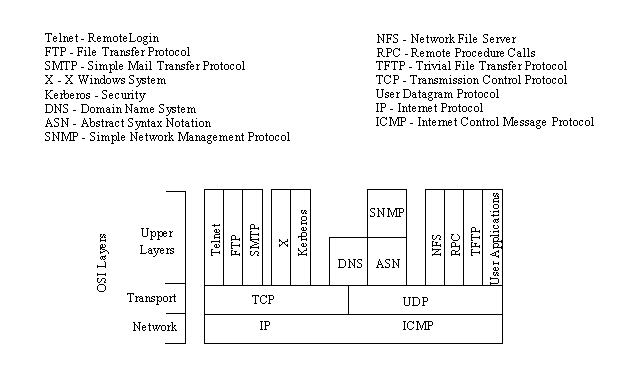
Figure 2.1 shows the basic elements of the TCP/IP family of protocols. You can see that TCP/IP is not involved in the bottom two layers of the OSI model (data link and physical) but begins in the network layer, where the Internet Protocol (IP) resides. In the transport layer, the Transmission Control Protocol (TCP) and User Datagram Protocol (UDP) are involved. Above this, the utilities and protocols that make up the rest of the TCP/IP suite are built using the TCP or UDP and IP layers for their communications system.
Figure 2.1. TCP/IP suite and OSI layers.
Figure 2.1 shows that some of the upper-layer protocols depend on TCP (such as Telnet and FTP), whereas some depend on UDP (such as TFTP and RPC). Most upper-layer TCP/IP protocols use only one of the two transport protocols (TCP or UDP), although a few, including DNS (Domain Name System) can use both.
A note of caution about TCP/IP: Despite the fact that TCP/IP is an open protocol, many companies have modified it for their own networking system. There can be incompatibilities because of these modifications, which, even though they might adhere to the official standards, might have other aspects that cause problems. Luckily, these types of changes are not rampant, but you should be careful when choosing a TCP/IP product to ensure its compatibility with existing software and hardware.
TCP/IP is dependent on the concept of clients and servers. This has nothing to do with a file server being accessed by a diskless workstation or PC. The term client/server has a simple meaning in TCP/IP: any device that initiates communications is the client, and the device that answers is the server. The server is responding to (serving) the client's requests.
To understand the roles of the many components of the TCP/IP protocol family, it is useful to know what you can do over a TCP/IP network. Then, once the applications are understood, the protocols that make it possible are a little easier to comprehend. The following list is not exhaustive but mentions the primary user applications that TCP/IP provides.
The Telnet program provides a remote login capability. This lets a user on one machine log onto another machine and act as though he or she were directly in front of the second machine. The connection can be anywhere on the local network or on another network anywhere in the world, as long as the user has permission to log onto the remote system.
You can use Telnet when you need to perform actions on a machine across the country. This isn't often done except in a LAN or WAN context, but a few systems accessible through the Internet allow Telnet sessions while users play around with a new application or operating system.
File Transfer Protocol (FTP) enables a file on one system to be copied to another system. The user doesn't actually log in as a full user to the machine he or she wants to access, as with Telnet, but instead uses the FTP program to enable access. Again, the correct permissions are necessary to provide access to the files.
Once the connection to a remote machine has been established, FTP enables you to copy one or more files to your machine. (The term transfer implies that the file is moved from one system to another but the original is not affected. Files are copied.) FTP is a widely used service on the Internet, as well as on many large LANs and WANs.
Simple Mail Transfer Protocol (SMTP) is used for transferring electronic mail. SMTP is completely transparent to the user. Behind the scenes, SMTP connects to remote machines and transfers mail messages much like FTP transfers files. Users are almost never aware of SMTP working, and few system administrators have to bother with it. SMTP is a mostly trouble-free protocol and is in very wide use.
Kerberos is a widely supported security protocol. Kerberos uses a special application called an authentication server to validate passwords and encryption schemes. Kerberos is one of the more secure encryption systems used in communications and is quite common in UNIX.
Domain Name System (DNS) enables a computer with a common name to be converted to a special network address. For example, a PC called Darkstar cannot be accessed by another machine on the same network (or any other connected network) unless some method of checking the local machine name and replacing the name with the machine's hardware address is available. DNS provides a conversion from the common local name to the unique physical address of the device's network connection.
Simple Network Management Protocol (SNMP) provides status messages and problem reports across a network to an administrator. SNMP uses User Datagram Protocol (UDP) as a transport mechanism. SNMP employs slightly different terms from TCP/IP, working with managers and agents instead of clients and servers (although they mean essentially the same thing). An agent provides information about a device, whereas a manager communicates across a network with agents.
Network File System (NFS) is a set of protocols developed by Sun Microsystems to enable multiple machines to access each other's directories transparently. They accomplish this by using a distributed file system scheme. NFS systems are common in large corporate environments, especially those that use UNIX workstations.
The Remote Procedure Call (RPC) protocol is a set of functions that enable an application to communicate with another machine (the server). It provides for programming functions, return codes, and predefined variables to support distributed computing.
Trivial File Transfer Protocol (TFTP) is a very simple, unsophisticated file transfer protocol that lacks security. It uses UDP as a transport. TFTP performs the same task as FTP, but uses a different transport protocol.
Transmission Control Protocol (the TCP part of TCP/IP) is a communications protocol that provides reliable transfer of data. It is responsible for assembling data passed from higher-layer applications into standard packets and ensuring that the data is transferred correctly.
User Datagram Protocol (UDP) is a connectionless-oriented protocol, meaning that it does not provide for the retransmission of datagrams (unlike TCP, which is connection-oriented). UDP is not very reliable, but it does have specialized purposes. If the applications that use UDP have reliability checking built into them, the shortcomings of UDP are overcome.
Internet Protocol (IP) is responsible for moving the packets of data assembled by either TCP or UDP across networks. It uses a set of unique addresses for every device on the network to determine routing and destinations.
Internet Control Message Protocol (ICMP) is responsible for checking and generating messages on the status of devices on a network. It can be used to inform other devices of a failure in one particular machine. ICMP and IP usually work together.
The architecture of TCP/IP is often called the Internet architecture because TCP/IP and the Internet as so closely interwoven. In the last chapter, you saw how the Internet standards were developed by the Defense Advanced Research Projects Agency (DARPA) and eventually passed on to the Internet Society.
The Internet was originally proposed by the precursor of DARPA, called the Advanced Research Projects Agency (ARPA), as a method of testing the viability of packet-switching networks. (When ARPA's focus became military in nature, the name was changed.) During its tenure with the project, ARPA foresaw a network of leased lines connected by switching nodes. The network was called ARPANET, and the switching nodes were called Internet Message Processors, or IMPs.
The ARPANET was initially to be comprised of four IMPs located at the University of California at Los Angeles, the University of California at Santa Barbara, the Stanford Research Institute, and the University of Utah. The original IMPs were to be Honeywell 316 minicomputers.
The contract for the installation of the network was won by Bolt, Beranek, and Newman (BBN), a company that had a strong influence on the development of the network in the following years. The contract was awarded in late 1968, followed by testing and refinement over the next five years.
In 1971, ARPANET entered into regular service. Machines used the ARPANET by connecting to an IMP using the "1822" protocol—so called because that was the number of the technical paper describing the system. During the early years, the purpose and utility of the network was widely (and sometimes heatedly) discussed, leading to refinements and modifications as users requested more functionality from the system.
A commonly recognized need was the capability to transfer files from one machine to another, as well as the capability to support remote logins. Remote logins would enable a user in Santa Barbara to connect to a machine in Los Angeles over the network and function as though he or she were in front of the UCLA machine. The protocol then in use on the network wasn't capable of handling these new functionality requests, so new protocols were continually developed, refined, and tested.
Remote login and remote file transfer were finally implemented in a protocol called the Network Control Program (NCP). Later, electronic mail was added through File Transfer Protocol (FTP). Together with NCP's remote logins and file transfer, this formed the basic services for ARPANET.
By 1973, it was clear that NCP was unable to handle the volume of traffic and proposed new functionality. A project was begun to develop a new protocol. The TCP/IP and gateway architectures were first proposed in 1974. The published article by Cerf and Kahn described a system that provided a standardized application protocol that also used end-to-end acknowledgments.
Neither of these concepts were really novel at the time, but more importantly (and with considerable vision), Cerf and Kahn suggested that the new protocol be independent of the underlying network and computer hardware. Also, they proposed universal connectivity throughout the network. These two ideas were radical in a world of proprietary hardware and software, because they would enable any kind of platform to participate in the network. The protocol was developed and became known as TCP/IP.
A series of RFCs (Requests for Comment, part of the process for adopting new Internet Standards) was issued in 1981, standardizing TCP/IP version 4 for the ARPANET. In 1982, TCP/IP supplanted NCP as the dominant protocol of the growing network, which was now connecting machines across the continent. It is estimated that a new computer was connected to ARPANET every 20 days during its first decade. (That might not seem like much compared to the current estimate of the Internet's size doubling every year, but in the early 1980s it was a phenomenal growth rate.)
During the development of ARPANET, it became obvious that nonmilitary researchers could use the network to their advantage, enabling faster communication of ideas as well as faster physical data transfer. A proposal to the National Science Foundation lead to funding for the Computer Science Network in 1981, joining the military with educational and research institutes to refine the network. This led to the splitting of the network into two different networks in 1984. MILNET was dedicated to unclassified military traffic, whereas ARPANET was left for research and other nonmilitary purposes.
ARPANET's growth and subsequent demise came with the approval for the Office of Advanced Scientific Computing to develop wide access to supercomputers. They created NSFNET to connect six supercomputers spread across the country through T-1 lines (which operated at 1.544 Mbps). The Department of Defense finally declared ARPANET obsolete in 1990, when it was officially dismantled.
TCP/IP became important when the Department of Defense started including the protocols as military standards, which were required for many contracts. TCP/IP became popular primarily because of the work done at UCB (Berkeley). UCB had been a center of UNIX development for years, but in 1983 they released a new version that incorporated TCP/IP as an integral element. That version—4.2BSD (Berkeley System Distribution)—was made available to the world as public domain software.
The popularity of 4.2BSD spurred the popularity of TCP/IP, especially as more sites connected to the growing ARPANET. Berkeley released an enhanced version (which included the so-called Berkeley Utilities) in 1986 as 4.3BSD. An optimized TCP implementation followed in 1988 (4.3BSD/Tahoe). Practically every version of TCP/IP available today has its roots (and much of its code) in the Berkeley versions.
The adoption of TCP/IP didn't conflict with the OSI standards because the two developed concurrently. In some ways, TCP/IP contributed to OSI, and vice-versa. Several important differences do exist, though, which arise from the basic requirements of TCP/IP which are:
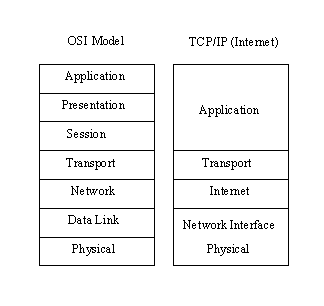
The differences between the OSI architecture and that of TCP/IP relate to the layers above the transport level and those at the network level. OSI has both the session layer and the presentation layer, whereas TCP/IP combines both into an application layer. The requirement for a connectionless protocol also required TCP/IP to combine OSI's physical layer and data link layer into a network level. TCP/IP also includes the session and presentation layers of the OSI model into TCP/IP’s application layer. A schematic view of TCP/IP's layered structure compared with OSI's seven-layer model is shown in Figure 2.2. TCP/IP calls the different network level elements subnetworks.
Figure 2.2. The OSI and TCP/IP layered structures.
Some fuss was made about the network level combination, although it soon became obvious that the argument was academic, as most implementations of the OSI model combined the physical and link levels on an intelligent controller (such as a network card). The combination of the two layers into a single layer had one major benefit: it enabled a subnetwork to be designed that was independent of any network protocols, because TCP/IP was oblivious to the details. This enabled proprietary, self-contained networks to implement the TCP/IP protocols for connectivity outside their closed systems.
The layered approach gave rise to the name TCP/IP. The transport layer uses the Transmission Control Protocol (TCP) or one of several variants, such as the User Datagram Protocol (UDP). (There are other protocols in use, but TCP and UDP are the most common.) There is, however, only one protocol for the network level—the Internet Protocol (IP). This is what assures the system of universal connectivity, one of the primary design goals.
There is a considerable amount of pressure from the user community to abandon the OSI model (and any future communications protocols developed that conform to it) in favor of TCP/IP. The argument hinges on some obvious reasons:
Arguing rather strenuously against TCP/IP, surprisingly enough, is the US government—the very body that sponsored it in the first place. Their primary argument is that TCP/IP is not an internationally adopted standard, whereas OSI has that recognition. The Department of Defense has even begun to move its systems away from the TCP/IP protocol set. A compromise will probably result, with some aspects of OSI adopted into the still-evolving TCP/IP protocol suite.
For many people the terms TCP/IP and Ethernet go together almost automatically, primarily for historical reasons, as well as the simple fact that there are more Ethernet-based TCP/IP networks than any other type. Ethernet was originally developed at Xerox's Palo Alto Research Center as a step toward an electronic office communications system, and it has since grown in capability and popularity.
Ethernet is a hardware system providing for the data link and physical layers of the OSI model. As part of the Ethernet standards, issues such as cable type and broadcast speeds are established. There are several different versions of Ethernet, each with a different data transfer rate. The most common is Ethernet version 2, also called 10Base5, Thick Ethernet, and IEEE 802.3 (after the number of the standard that defines the system adopted by the Institute of Electrical and Electronic Engineers). This system has a 10 Mbps rate.
There are several commonly used variants of Ethernet, such as Thin Ethernet (called 10Base2), which can operate over thinner cable (such as the coaxial cable used in cable television systems), and Twisted-Pair Ethernet (10BaseT), which uses simple twisted-pair wires similar to telephone cable. The latter variant is popular for small companies because it is inexpensive, easy to wire, and has no strict requirements for distance between machines.
The size of a network is also a good indicator. 10Base5 is used in large networks with many devices and long transmission runs. 10Base2 is used in smaller networks, usually with all the network devices in fairly close proximity. Twisted-pair (10BaseT) networks are often used for very small networks with a maximum of a few dozen devices in close proximity.
Ethernet and TCP/IP work well together, with Ethernet providing the physical cabling (layers one and two) and TCP/IP the communications protocol (layers three and four) that is broadcast over the cable. The two have their own processes for packaging information: TCP/IP uses 32-bit addresses, whereas Ethernet uses a 48-bit scheme. The two work together, however, because of one component of TCP/IP called the Address Resolution Protocol (ARP), which converts between the two schemes. (I discuss ARP in more detail later, in the section titled "Address Resolution Protocol.")
Ethernet relies on a protocol called Carrier Sense Multiple Access with Collision Detect (CSMA/CD). To simplify the process, a device checks the network cable to see if anything is currently being sent. If it is clear, the device sends its data. If the cable is busy (carrier detect), the device waits for it to clear. If two devices transmit at the same time (a collision), the devices know because of their constant comparison of the cable traffic to the data in the sending buffer. If a collision occurs, the devices wait a random amount of time before trying again.
As ARPANET grew out of a military-only network to add subnetworks in universities, corporations, and user communities, it became known as the Internet. There is no single network called the Internet, however. The term refers to the collective network of subnetworks. The one thing they all have in common is TCP/IP as a communications protocol.
As described in the first chapter, the organization of the Internet and adoption of new standards is controlled by the Internet Advisory Board (IAB). Among other things, the IAB coordinates several task forces, including the Internet Engineering Task Force (IETF) and Internet Research Task Force (IRTF). In a nutshell, the IRTF is concerned with ongoing research, whereas the IETF handles the implementation and engineering aspects associated with the Internet.
A body that has some bearing on the IAB is the Federal Networking Council (FNC), which serves as an intermediary between the IAB and the government. The FNC has an advisory capacity to the IAB and its task forces, as well as the responsibility for managing the government's use of the Internet and other networks. Because the government was responsible for funding the development of the Internet, it retains a considerable amount of control, as well as sponsoring some research and expansion of the Internet.
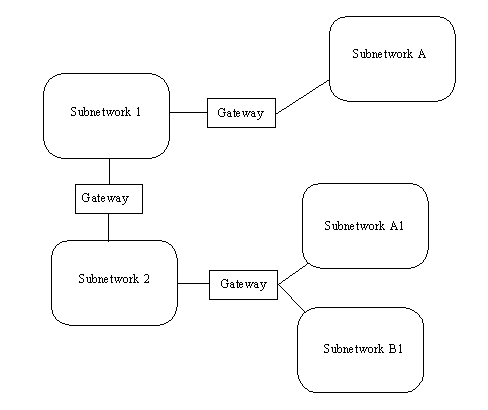
As mentioned earlier, the Internet is not a single network but a collection of networks that communicate with each other through gateways. For the purposes of this chapter, a gateway (sometimes called a router) is defined as a system that performs relay functions between networks, as shown in Figure 2.3. The different networks connected to each other through gateways are often called subnetworks, because they are a smaller part of the larger overall network. This does not imply that a subnetwork is small or dependent on the larger network. Subnetworks are complete networks, but they are connected through a gateway as a part of a larger internetwork, or in this case the Internet.
Figure 2.3. Gateways act as relays between subnetworks.
With TCP/IP, all interconnections between physical networks are through gateways. An important point to remember for use later is that gateways route information packets based on their destination network name, not the destination machine. Gateways are supposed to be completely transparent to the user, which alleviates the gateway from handling user applications (unless the machine that is acting as a gateway is also someone's work machine or a local network server, as is often the case with small networks). Put simply, the gateway's sole task is to receive a Protocol Data Unit (PDU) from either the internetwork or the local network and either route it on to the next gateway or pass it into the local network for routing to the proper user.
Gateways work with any kind of hardware and operating system, as long as they are designed to communicate with the other gateways they are attached to (which in this case means that it uses TCP/IP). Whether the gateway is leading to a Macintosh network, a set of IBM PCs, or mainframes from a dozen different companies doesn't matter to the gateway or the PDUs it handles.
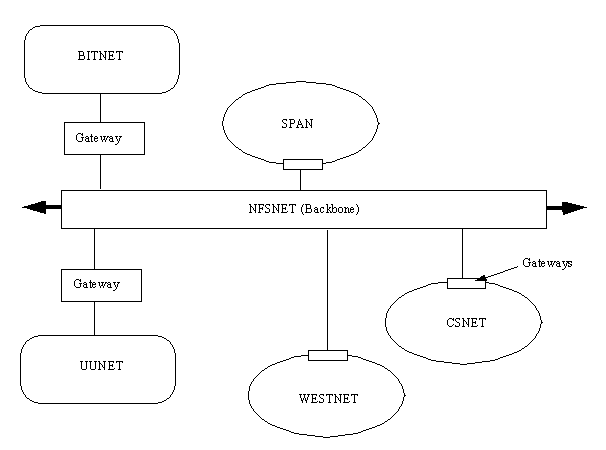
In the United States, the Internet has the NFSNET as its backbone, as shown in Figure 2.4. Among the primary networks connected to the NFSNET are NASA's Space Physics Analysis Network (SPAN), the Computer Science Network (CSNET), and several other networks such as WESTNET and the San Diego Supercomputer Network (SDSCNET), not shown in Figure 2.4. There are also other smaller user-oriented networks such as the Because It's Time Network (BITNET) and UUNET, which provide connectivity through gateways for smaller sites that can't or don't want to establish a direct gateway to the Internet.
Figure 2.4. The US Internet network.
The NFSNET backbone is comprised of approximately 3,000 research sites, connected by T-3 leased lines running at 44.736 Megabits per second. Tests are currently underway to increase the operational speed of the backbone to enable more throughput and accommodate the rapidly increasing number of users. Several technologies are being field-tested, including Synchronous Optical Network (SONET), Asynchronous Transfer Mode (ATM), and ANSI's proposed High-Performance Parallel Interface (HPPI). These new systems can produce speeds approaching 1 Gigabit per second.
Most internetworks, including the Internet, can be thought of as a layered architecture (yes, even more layers!) to simplify understanding. The layer concept helps in the task of developing applications for internetworks. The layering also shows how the different parts of TCP/IP work together. The more logical structure brought about by using a layering process has already been seen in the first chapter for the OSI model, so applying it to the Internet makes sense. Be careful to think of these layers as conceptual only; they are not really physical or software layers as such (unlike the OSI or TCP/IP layers).
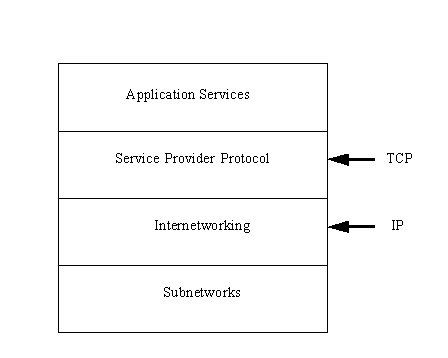
It is convenient to think of the Internet as having four layers. This layered Internet architecture is shown in Figure 2.5. These layers should not be confused with the architecture of each machine, as described in the OSI seven-layer model. Instead, they are a method of seeing how the internetwork, network, TCP/IP, and the individual machines work together. Independent machines reside in the subnetwork layer at the bottom of the architecture, connected together in a local area network (LAN) and referred to as the subnetwork, a term you saw in the last section.
Figure 2.5. The Internet architecture.
On top of the subnetwork layer is the internetwork layer, which provides the functionality for communications between networks through gateways. Each subnetwork uses gateways to connect to the other subnetworks in the internetwork. The internetwork layer is where data gets transferred from gateway to gateway until it reaches its destination and then passes into the subnetwork layer. The internetwork layer runs the Internet Protocol (IP).
The service provider protocol layer is responsible for the overall end-to-end communications of the network. This is the layer that runs the Transmission Control Protocol (TCP) and other protocols. It handles the data traffic flow itself and ensures reliability for the message transfer.
The top layer is the application services layer, which supports the interfaces to the user applications. This layer interfaces to electronic mail, remote file transfers, and remote access. Several protocols are used in this layer, many of which you will read about later.
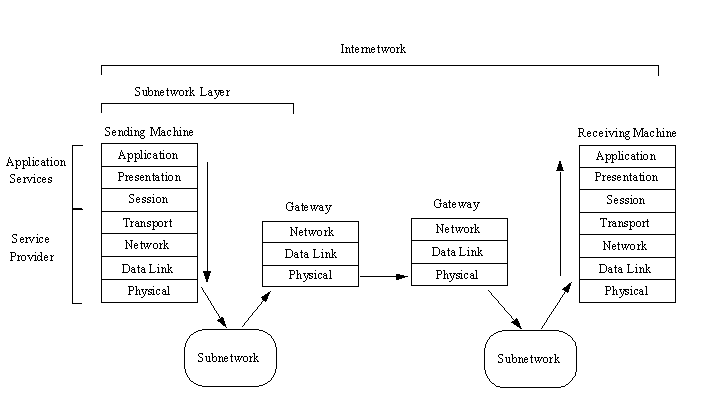
To see how the Internet architecture model works, a simple example is useful. Assume that an application on one machine wants to transfer a datagram to an application on another machine in a different subnetwork. Without all the signals between layers, and simplifying the architecture a little, the process is shown in Figure 2.6. The layers in the sending and receiving machines are the OSI layers, with the equivalent Internet architecture layers indicated.
Figure 2.6. Transfer of a datagram over an internetwork.
The data is sent down the layers of the sending machine, assembling the datagram with the Protocol Control Information (PCI) as it goes. From the physical layer, the datagram (which is sometimes called a frame after the data link layer has added its header and trailing information) is sent out to the local area network. The LAN routes the information to the gateway out to the internetwork. During this process, the LAN has no concern about the message contained in the datagram. Some networks, however, alter the header information to show, among other things, the machines it has passed through.
From the gateway, the frame passes from gateway to gateway along the internetwork until it arrives at the destination subnetwork. At each step, the gateway analyzes the datagram's header to determine if it is for the subnetwork the gateway leads to. If not, it routes the datagram back out over the internetwork. This analysis is performed in the physical layer, eliminating the need to pass the frame up and down through different layers on each gateway. The header can be altered at each gateway to reflect its routing path.
When the datagram is finally received at the destination subnetwork's gateway, the gateway recognizes that the datagram is at its correct subnetwork and routes it into the LAN and eventually to the target machine. The routing is accomplished by reading the header information. When the datagram reaches the destination machine, it passes up through the layers, with each layer stripping off its PCI header and then passing the result on up. At long last, the application layer on the destination machine processes the final header and passes the message to the correct application.
If the datagram was not data to be processed but a request for a service, such as a remote file transfer, the correct layer on the destination machine would decode the request and route the file back over the internetwork to the original machine. Quite a process!
Not everything goes smoothly when transferring data from one subnetwork to another. All manner of problems can occur, despite the fact that the entire network is using one protocol. A typical problem is a limitation on the size of the datagram. The sending network might support datagrams of 1,024 bytes, but the receiving network might use only 512-byte datagrams (because of a different hardware protocol, for example). This is where the processes of segmentation, separation, reassembly, and concatenation (explained in the last chapter) become important.
The actual addressing methods used by the different subnetworks can cause conflicts when routing datagrams. Because communicating subnetworks might not have the same network control software, the network-based header information might differ, despite the fact that the communications methods are based on TCP/IP. An associated problem occurs when dealing with the differences between physical and logical machine names. In the same manner, a network that requires encryption instead of clear-text datagrams can affect the decoding of header information. Therefore, differences in the security implemented on the subnetworks can affect datagram traffic. These differences can all be resolved with software, but the problems associated with addressing methods can become considerable.
Another common problem is the different networks' tolerance for timing problems. Time-out and retry values might differ, so when two subnetworks are trying to establish communication, one might have given up and moved on to another task while the second is still waiting patiently for an acknowledgment signal. Also, if two subnetworks are communicating properly and one gets busy and has to pause the communications process for a short while, the amount of time before the other network assumes a disconnection and gives up might be important. Coordinating the timing over the internetwork can become very complicated.
Routing methods and the speed of the machines on the network can also affect the internetwork's performance. If a gateway is managed by a particularly slow machine, the traffic coming through the gateway can back up, causing delays and incomplete transmissions for the entire internetwork. Developing an internetwork system that can dynamically adapt to loads and reroute datagrams when a bottleneck occurs is very important.
There are other factors to consider, such as network management and troubleshooting information, but you should begin to see that simply connecting networks together without due thought does not work. The many different network operating systems and hardware platforms require a logical, well-developed approach to the internetwork. This is outside the scope of TCP/IP, which is simply concerned with the transmission of the datagrams. The TCP/IP implementations on each platform, however, must be able to handle the problems mentioned.
Network addresses are analogous to mailing addresses in that they tell a system where to deliver a datagram. Three terms commonly used in the Internet relate to addressing: name, address, and route.
A name is a specific identification of a machine, a user, or an application. It is usually unique and provides an absolute target for the datagram. An address typically identifies where the target is located, usually its physical or logical location in a network. A route tells the system how to get a datagram to the address.
You use the recipient's name often, either specifying a user name or a machine name, and an application does the same thing transparently to you. From the name, a network software package called the name server tries to resolve the address and the route, making that aspect unimportant to you. When you send electronic mail, you simply indicate the recipient's name, relying on the name server to figure out how to get the mail message to them.
Using a name server has one other primary advantage besides making the addressing and routing unimportant to the end user: It gives the system or network administrator a lot of freedom to change the network as required, without having to tell each user's machine about any changes. As long as an application can access the name server, any routing changes can be ignored by the application and users.
Naming conventions differ depending on the platform, the network, and the software release, but following is a typical Ethernet-based Internet subnetwork as an example. There are several types of addressing you need to look at, including the LAN system, as well as the wider internetwork addressing conventions.
On a single network, several pieces of information are necessary to ensure the correct delivery of data. The primary components are the physical address and the data link address.
Each device on a network that communicates with others has a unique physical address, sometimes called the hardware address. On any given network, there is only one occurrence of each address; otherwise, the name server has no way of identifying the target device unambiguously. For hardware, the addresses are usually encoded into a network interface card, set either by switches or by software. With respect to the OSI model, the address is located in the physical layer.
In the physical layer, the analysis of each incoming datagram (or protocol data unit) is performed. If the recipient's address matches the physical address of the device, the datagram can be passed up the layers. If the addresses don't match, the datagram is ignored. Keeping this analysis in the bottom layer of the OSI model prevents unnecessary delays, because otherwise the datagram would have to be passed up to other layers for analysis.
The length of the physical address varies depending on the networking system, but Ethernet and several others use 48 bits in each address. For communication to occur, two addresses are required: one each for the sending and receiving devices.
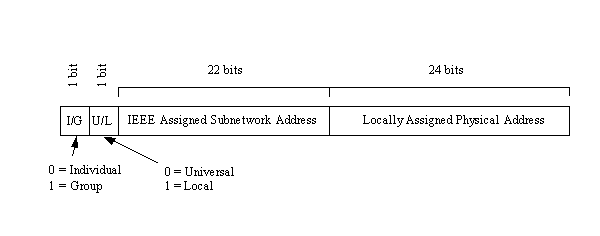
The IEEE is now handling the task of assigning universal physical addresses for subnetworks (a task previously performed by Xerox, as they developed Ethernet). For each subnetwork, the IEEE assigns an organization unique identifier (OUI) that is 24 bits long, enabling the organization to assign the other 24 bits however it wants. (Actually, two of the 24 bits assigned as an OUI are control bits, so only 22 bits identify the subnetwork. Because this provides 222 combinations, it is possible to run out of OUIs in the future if the current rate of growth is sustained.)
The format of the OUI is shown in Figure 2.7. The least significant bit of the address (the lowest bit number) is the individual or group address bit. If the bit is set to 0, the address refers to an individual address; a setting of 1 means that the rest of the address field identifies a group address that needs further resolution. If the entire OUI is set to 1s, the address has a special meaning which is that all stations on the network are assumed to be the destination.
Figure 2.7. Layout of the organization unique identifier.
The second bit is the local or universal bit. If set to zero, it has been set by the universal administration body. This is the setting for IEEE-assigned OUIs. If it has a value of 1, the OUI has been locally assigned and would cause addressing problems if decoded as an IEEE-assigned address.
The remaining 22 bits make up the physical address of the subnetwork, as assigned by the IEEE. The second set of 24 bits identifies local network addresses and is administered locally. If an organization runs out of physical addresses (there are about 16 million addresses possible from 24 bits), the IEEE has the capacity to assign a second subnetwork address.
The combination of 24 bits from the OUI and 24 locally assigned bits is called a media access control (MAC) address. When a packet of data is assembled for transfer across an internetwork, there are two sets of MACs: one from the sending machine and one for the receiving machine.
The IEEE Ethernet standards (and several other allied standards) use another address called the link layer address (abbreviated as LSAP for link service access point). The LSAP identifies the type of link protocol used in the data link layer. As with the physical address, a datagram carries both sending and receiving LSAPs. The IEEE also enables a code that identifies the EtherType assignment, which identifies the upper layer protocol (ULP) running on the network (almost always a LAN).
The layout of information in each transmitted packet of data differs depending on the protocol, but it is helpful to examine one to see how the addresses and related information are prepended to the data. This section uses the Ethernet system as an example because of its wide use with TCP/IP. It is quite similar to other systems as well.
A typical Ethernet frame (remember that a frame is the term for a network-ready datagram) is shown in Figure 2.8. The preamble is a set of bits that are used primarily to synchronize the communication process and account for any random noise in the first few bits that are sent. At the end of the preamble is a sequence of bits that are the start frame delimiter (SFD), which indicates that the frame follows immediately.
Figure 2.8. The Ethernet frame.
The recipient and sender addresses follow in IEEE 48-bit format, followed by a 16-bit type indicator that is used to identify the protocol. The data follows the type indicator. The Data field is between 46 and 1,500 bytes in length. If the data is less than 46 bytes, it is padded with 0s until it is 46 bytes long. Any padding is not counted in the calculations of the data field's total length, which is used in one part of the IP header. The next chapter covers IP headers.
At the end of the frame is the cyclic redundancy check (CRC) count, which is used to ensure that the frame's contents have not been modified during the transmission process. Each gateway along the transmission route calculates a CRC value for the frame and compares it to the value at the end of the frame. If the two match, the frame can be sent farther along the network or into the subnetwork. If they differ, a modification to the frame must have occurred, and the frame is discarded (to be later retransmitted by the sending machine when a timer expires).
In some protocols, such as the IEEE 802.3, the overall layout of the frame is the same, with slight variations in the contents. With 802.3, the 16 bits used by Ethernet to identify the protocol type are replaced with a 16-bit value for the length of the data block. Also, the data area itself is prepended by a new field.
TCP/IP uses a 32-bit address to identify a machine on a network and the network to which it is attached. IP addresses identify a machine's connection to the network, not the machine itself—an important distinction. Whenever a machine's location on the network changes, the IP address must be changed, too. The IP address is the set of numbers many people see on their workstations or terminals, such as 127.40.8.72, which uniquely identifies the device.
IP (or Internet) addresses are assigned only by the Network Information Center (NIC), although if a network is not connected to the Internet, that network can determine its own numbering. For all Internet accesses, the IP address must be registered with the NIC.
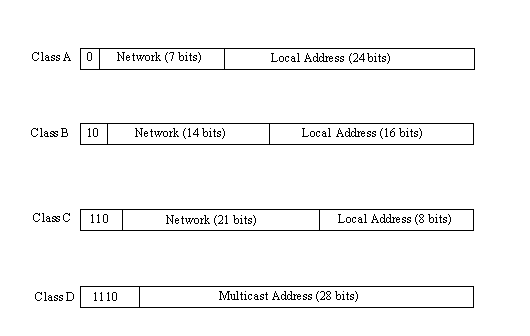
There are four formats for the IP address, with each used depending on the size of the network. The four formats, called Class A through Class D, are shown in Figure 2.9. The class is identified by the first few bit sequences, shown in the figure as one bit for Class A and up to four bits for Class D. The class can be determined from the first three (high-order) bits. In fact, in most cases, the first two bits are enough, because there are few Class D networks.
Figure 2.9. The four IP address class structures.
Class A addresses are for large networks that have many machines. The 24 bits for the local address (also frequently called the host address) are needed in these cases. The network address is kept to 7 bits, which limits the number of networks that can be identified. Class B addresses are for intermediate networks, with 16-bit local or host addresses and 14-bit network addresses. Class C networks have only 8 bits for the local or host address, limiting the number of devices to 256. There are 21 bits for the network address. Finally, Class D networks are used for multicasting purposes, when a general broadcast to more than one device is required. The lengths of each section of the IP address have been carefully chosen to provide maximum flexibility in assigning both network and local addresses.
IP addresses are four sets of 8 bits, for a total 32 bits. You often represent these bits as separated by a period for convenience, so the IP address format can be thought of as network.local.local.local for Class A or network.network.network.local for Class C. The IP addresses are usually written out in their decimal equivalents, instead of the long binary strings. This is the familiar host address number that network users are used to seeing, such as 147.10.13.28, which would indicate that the network address is 147.10 and the local or host address is 13.28. Of course, the actual address is a set of 1s and 0s. The decimal notation used for IP addresses is properly called dotted quad notation—a bit of trivia for your next dinner party.
The IP addresses can be translated to common names and letters. This can pose a problem, though, because there must be some method of unambiguously relating the physical address, the network address, and a language-based name (such a tpci_ws_4 or bobs_machine). The section later in this chapter titled "The Domain Name System" looks at this aspect of address naming.
From the IP address, a network can determine if the data is to be sent out through a gateway. If the network address is the same as the current address (routing to a local network device, called a direct host), the gateway is avoided, but all other network addresses are routed to a gateway to leave the local network (indirect host). The gateway receiving data to be transmitted to another network must then determine the routing from the data's IP address and an internal table that provides routing information.
As mentioned, if an address is set to all 1s, the address applies to all addresses on the network. (See the previous section titled "Physical Addresses.") The same rule applies to IP addresses, so that an IP address of 32 1s is considered a broadcast message to all networks and all devices. It is possible to broadcast to all machines in a network by altering the local or host address to all 1s, so that the address 147.10.255.255 for a Class B network (identified as network 147.10) would be received by all devices on that network (255.255 being the local addresses composed of all 1s), but the data would not leave the network.
There are two contradictory ways to indicate broadcasts. The later versions of TCP/IP use 1s, but earlier BSD systems use 0s. This causes a lot of confusion. All the devices on a network must know which broadcast convention is used; otherwise, datagrams can be stuck on the network forever!
A slight twist is coding the network address as all 0s, which means the originating network or the local address being set to 0s, which refers to the originating device only (usually used only when a device is trying to determine its IP address). The all-zero network address format is used when the network IP address is not known but other devices on the network can still interpret the local address. If this were transmitted to another network, it could cause confusion! By convention, no local device is given a physical address of 0.
It is possible for a device to have more than one IP address if it is connected to more than one network, as is the case with gateways. These devices are called multihomed, because they have a unique address for each network they are connected to. In practice, it is best to have a dedicate machine for a multihomed gateway; otherwise, the applications on that machine can get confused as to which address they should use when building datagrams.
Two networks can have the same network address if they are connected by a gateway. This can cause problems for addressing, because the gateway must be able to differentiate which network the physical address is on. This problem is looked at again in the next section, showing how it can be solved.
Determining addresses can be difficult because every machine on the network might not have a list of all the addresses of the other machines or devices. Sending data from one machine to another if the recipient machine's physical address is not known can cause a problem if there is no resolution system for determining the addresses. Having to constantly update a table of addresses on each machine would be a network administration nightmare. The problem is not restricted to machine addresses within a small network, because if the remote destination network addresses are unknown, routing and delivery problems will also occur.
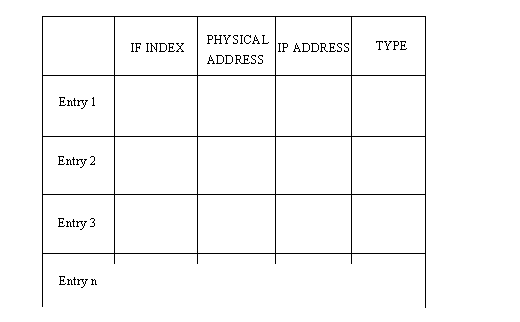
The Address Resolution Protocol (ARP) helps solve these problems. ARP's job is to convert IP addresses to physical addresses (network and local) and in doing so, eliminate the need for applications to know about the physical addresses. Essentially, ARP is a table with a list of the IP addresses and their corresponding physical addresses. The table is called an ARP cache. The layout of an ARP cache is shown in Figure 2.10. Each row corresponds to one device, with four pieces of information for each device:
Figure 2.10. The ARP cache address translation table layout.
The mapping type is one of four possible values indicating the status of the entry in the ARP cache. A value of 2 means the entry is invalid; a value of 3 means the mapping is dynamic (the entry can change); a value of 4 means static (the entry doesn't change); and a value of 1 means none of the above.
When the ARP receives a recipient device's IP address, it searches the ARP cache for a match. If it finds one, it returns the physical address. If the ARP cache doesn't find a match for an IP address, it sends a message out on the network. The message, called an ARP request, is a broadcast that is received by all devices on the local network. (You might remember that a broadcast has all 1s in the address.) The ARP request contains the IP address of the intended recipient device. If a device recognizes the IP address as belonging to it, the device sends a reply message containing its physical address back to the machine that generated the ARP request, which places the information into its ARP cache for future use. In this manner, the ARP cache can determine the physical address for any machine based on its IP address.
Whenever an ARP request is received by an ARP cache, it uses the information in the request to update its own table. Thus, the system can accommodate changing physical addresses and new additions to the network dynamically without having to generate an ARP request of its own. Without the use of an ARP cache, all the ARP requests and replies would generate a lot of network traffic, which can have a serious impact on network performance. Some simpler network schemes abandon the cache and simply use broadcast messages each time. This is feasible only when the number of devices is low enough to avoid network traffic problems.
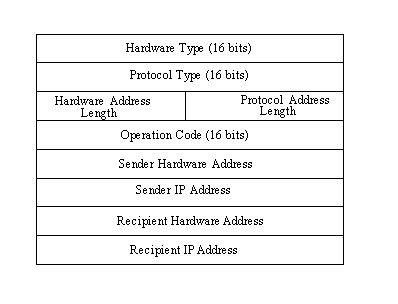
The layout of the ARP request is shown in Figure 2.11. When an ARP request is sent, all fields in the layout are used except the Recipient Hardware Address (which the request is trying to identify). In an ARP reply, all the fields are used.
Figure 2.11. The ARP request and ARP reply layout.
This layout, which is combined with the network system's protocols into a protocol data unit (PDU), has several fields. The fields and their purposes are as follows:
Some of these fields need a little more explanation to show their legal values and field usage. The following sections describe these fields in more detail.
The hardware type identifies the type of hardware interface. Legal values are as follows:
|
Type |
Description |
|
1
|
Ethernet
|
|
2
|
Experimental Ethernet
|
|
3
|
X.25
|
|
4
|
Proteon ProNET (Token Ring)
|
|
5
|
Chaos
|
|
6
|
IEEE 802.X
|
|
7
|
ARCnet |
The protocol type identifies the type of protocol the sending device is using. With TCP/IP, these protocols are usually an EtherType, for which the legal values are as follows:
|
Decimal |
Description |
|
512
|
XEROX PUP
|
|
513
|
PUP Address Translation
|
|
1536
|
XEROX NS IDP
|
|
2048
|
Internet Protocol (IP)
|
|
2049
|
X.75
|
|
2050
|
NBS
|
|
2051
|
ECMA
|
|
2052
|
Chaosnet
|
|
2053
|
X.25 Level 3
|
|
2054
|
Address Resolution Protocol (ARP)
|
|
2055
|
XNS
|
|
4096
|
Berkeley Trailer
|
|
21000
|
BBN Simnet
|
|
24577
|
DEC MOP Dump/Load
|
|
24578
|
DEC MOP Remote Console
|
|
24579
|
DEC DECnet Phase IV
|
|
24580
|
DEC LAT
|
|
24582
|
DEC
|
|
24583
|
DEC
|
|
32773
|
HP Probe
|
|
32784
|
Excelan
|
|
32821
|
Reverse ARP
|
|
32824
|
DEC LANBridge
|
|
32823
|
AppleTalk |
If the protocol is not EtherType, other values are allowed.
Two (or more) networks connected by a gateway can have the same network address. The gateway has to determine which network the physical address or IP address corresponds with. The gateway can do this with a modified ARP, called the Proxy ARP (sometimes called Promiscuous ARP). A proxy ARP creates an ARP cache consisting of entries from both networks, with the gateway able to transfer datagrams from one network to the other. The gateway has to manage the ARP requests and replies that cross the two networks.
An obvious flaw with the ARP system is that if a device doesn't know its own IP address, there is no way to generate requests and replies. This can happen when a new device (typically a diskless workstation) is added to the network. The only address the device is aware of is the physical address set either by switches on the network interface or by software. A simple solution is the Reverse Address Resolution Protocol (RARP), which works the reverse of ARP, sending out the physical address and expecting back an IP address. The reply containing the IP address is sent by an RARP server, a machine that can supply the information. Although the originating device sends the message as a broadcast, RARP rules stipulate that only the RARP server can generate a reply. (Many networks assign more than one RARP server, both to spread the processing load and to act as a backup in case of problems.)
Instead of using the full 32-bit IP address, many systems adopt more meaningful names for their devices and networks. Network names usually reflect the organization's name (such as tpci.com and bobs_cement). Individual device names within a network can range from descriptive names on small networks (such as tims_machine and laser_1) to more complex naming conventions on larger networks (such as hpws_23 and tpci704). Translating between these names and the IP addresses would be practically impossible on an Internet-wide scale.
To solve the problem of network names, the Network Information Center (NIC) maintains a list of network names and the corresponding network gateway addresses. This system grew from a simple flat-file list (which was searched for matches) to a more complicated system called the Domain Name System (DNS) when the networks became too numerous for the flat-file system to function efficiently.
DNS uses a hierarchical architecture, much like the UNIX filesystem. The first level of naming divides networks into the category of subnetworks, such as com for commercial, mil for military, edu for education, and so on. Below each of these is another division that identifies the individual subnetwork, usually one for each organization. This is called the domain name and is unique. The organization's system manager can further divide the company's subnetworks as desired, with each network called a subdomain. For example, the system merlin.abc_corp.com has the domain name abc_corp.com, whereas the network merlin.abc_corp is a subdomain of merlin.abc_corp.com. A network can be identified with an absolute name (such as merlin.abc_corp.com) or a relative name (such as merlin) that uses part of the complete domain name.
Seven first-level domain names have been established by the NIC so far. These are as follows:
|
.arpa
|
An ARPANET-Internet identification
|
|
.com
|
Commercial company
|
|
.edu
|
Educational institution
|
|
.gov
|
Any governmental body
|
|
.mil
|
Military
|
|
.net
|
Networks used by Internet Service Providers
|
|
.org
|
Anything that doesn't fall into one of the other categories |
The NIC also allows for a country designator to be appended. There are designators for all countries in the world, such as .ca for Canada and .uk for the United Kingdom.
DNS uses two systems to establish and track domain names. A name resolver on each network examines information in a domain name. If it can't find the full IP address, it queries a name server, which has the full NIC information available. The name resolver tries to complete the addressing information using its own database, which it updates in much the same manner as the ARP system (discussed earlier) when it must query a name server. If a queried name server cannot resolve the address, it can query another name server, and so on, across the entire internetwork.
There is a considerable amount of information stored in the name resolver and name server, as well as a whole set of protocols for querying between the two. The details, luckily, are not important to an understanding of TCP/IP, although the overall concept of the address resolution is important when understanding how the Internet translates between domain names and IP addresses.
In this chapter you have seen the relationship of OSI and TCP/IP layered architectures, a history of TCP/IP and the Internet, the structure of the Internet, Internet and IP addresses, and the Address Resolution Protocol. Using these concepts, you can now move on to look at the TCP/IP family of protocols in more detail.
The next chapter begins with the Internet Protocol (IP), showing how it is used and the format of its header information. The rest of the chapter covers gateway information necessary to piece together the rest of the protocols. Gateways are also revisited on Day 5.
Explain the role of gateways in internetworks.
Gateways act as a relay between networks, passing datagrams from network to network searching for a destination address. Networks talk to each other through gateways.
Expand the following TCP/IP protocol acronyms: DNS, SNMP, NFS, RPC, TFTP.
DNS is the Domain Name Server, which allows a common name to be used instead of an IP address. SNMP is the Simple Network Management Protocol, used to provide information about devices. NFS is the Network File System, a protocol that allows machines to access other file systems as if they were part of their own. RPC is the Remote Procedure Call protocol that allows applications to communicate. TFTP is the Trivial File Transfer Protocol, a simple file transfer system with no security.
Name the Internet's advisory bodies.
The Internet Advisory Board (IAB) controls the Internet. The Internet Engineering Task Force (IETF) handles implementations of protocols on the Internet, and the Internet Research Task Force (IRTF) handles research.
What does ARP do?
The Address Resolution Protocol converts IP addresses to physical device addresses.
What are the four IP address class structures and their structure?
Class A for large networks: Network address is 7 bits, local address is 24 bits. Class B for midsize networks: Network address is 14 bits, local address is 16 bits. Class C for small networks: Network address is 21 bits, local address is 8 bits. Class D for multicast addresses, using 28 bits. Class D networks are seldom encountered.