Today I start looking at the subject of TCP/IP by covering some background information you will need to put TCP/IP in perspective, and to understand why the TCP/IP protocols were designed the way they are. This chapter covers some important information, including the following:
You might be eager to get started with the nitty-gritty of the TCP/IP protocols, or to find out how to use the better-known services like FTP and Telnet. If you have a specific requirement to satisfy (such as how to transfer a file from one system to another), by all means use the Table of Contents to find the section you want. But if you want to really understand TCP/IP, you will need to wade through the material in this chapter. It's not complicated, although there are quite a few subjects to be covered. Luckily, none of it requires memorization; more often than not it is a matter of setting the stage for something else I discuss in the next week or so. So don't get too overwhelmed by this chapter!
This is a book about a family of protocols called TCP/IP, so why bother looking at open systems and standards at all? Primarily because TCP/IP grew out of the need to develop a standardized communications procedure that would inevitably be used on a variety of platforms. The need for a standard, and one that was readily available to anyone (hence open), was vitally important to TCP/IP's success. Therefore, a little background helps put the design of TCP/IP into perspective.
More importantly, open systems have become de rigueur in the current competitive market. The term open system is bandied around by many people as a solution for all problems (to be replaced occasionally by the term client/server), but neither term is usually properly used or understood by the people spouting them. Understanding what an open system really is and what it implies leads to a better awareness of TCP/IP's role on a network and across large internetworks like the Internet.
In a similar vein, the use of standards ensures that a protocol such as TCP/IP is the same on each system. This means that your PC can talk to a minicomputer running TCP/IP without special translation or conversion routines. It means that an entire network of different hardware and operating systems can work with the same network protocols. Developing a standard is not a trivial process. Often a single standard involves more than a single document describing a software system. A standard often involves the interrelationship of many different protocols, as does TCP/IP. Knowing the interactions between TCP/IP and the other components of a communications system is important for proper configuration and optimization, and to ensure that all the services you need are available and interworking properly.
There are many definitions of open systems, and a single, concise definition that everyone is happy with is far from being accepted. For most people, an open system is best loosely defined as one for which the architecture is not a secret. The description of the architecture has been published or is readily available to anyone who wants to build products for a hardware or software platform. This definition of an open system applies equally well to hardware and software.
When more than a single vendor begins producing products for a platform, customers have a choice. You don't particularly like Nocrash Software's network monitoring software? No problem, because FaultFree Software's product runs on the Nocrash hardware, and you like its fancy interface much better. You need a more colorful graphical front-end to your Whizbang PC than the one Whizbang provides? Download one from Super Software through the Internet, and it works perfectly. The primary idea, of course, is a move away from proprietary platforms to one that is multivendor.
A decade ago, open systems were virtually nonexistent. Each hardware manufacturer had a product line, and you were practically bound to that manufacturer for all your software and hardware needs. Some companies took advantage of the captive market, charging outrageous prices or forcing unwanted configurations on their customers. The groundswell of resentment grew to the point that customers began forcing the issue. The lack of choice in software and hardware purchases is why several dedicated minicomputer and mainframe companies either went bankrupt or had to accept open system principles: their customers got fed up with relying on a single vendor. A good example of a company that made the adaptation is Digital Equipment Corporation (DEC). They moved from a proprietary operating system on their VMS minicomputers to a UNIX-standard open operating system. By doing that, they kept their customers happy, and they sold more machines. That's one of the primary reasons DEC is still in business today.
UNIX is a classic example of an open software platform. UNIX has been around for 30 years. The source code for the UNIX operating system was made available to anyone who wanted it, almost from the start. UNIX's source code is well understood and easy to work with, the result of 30 years of development and improvement. UNIX can be ported to run on practically any hardware platform, eliminating all proprietary dependencies. The attraction of UNIX is not the operating system's features themselves but simply that a UNIX user can run software from other UNIX platforms, that files are compatible from one UNIX system to another (except for disk formats), and that a wide variety of vendors sell products for UNIX.
The growth of UNIX pushed the large hardware manufacturers to the open systems principle, resulting in most manufacturers licensing the right to produce a UNIX version for their own hardware. This step let customers combine different hardware systems into larger networks, all running UNIX and working together. Users could move between machines almost transparently, ignorant of the actual hardware platform they were on. Open systems, originally of prime importance only to the largest corporations and governments, is now a key element in even the smallest company's computer strategy.
Although UNIX is a copyrighted work now owned by X/Open, the details of the operating system have been published and are readily available to any developer who wants to produce applications or hardware that work with the operating system. UNIX is unique in this respect.
The term open system networking means many things, depending on whom you ask. In its broadest definition, open system networking refers to a network based on a well-known and understood protocol (such as TCP/IP) that has its standards published and readily available to anyone who wants to use them. Open system networking also refers to the process of networking open systems (machaine-specific hardware and software) using a network protocol. It is easy to see why people want open systems networking, though. Three services are widely used and account for the highest percentage of network traffic: file transfer, electronic mail, and remote login. Without open systems networking, setting up any of these three services would be a nightmare.
File transfers enable users to share files quickly and efficiently, without excessive duplication or concerns about the transport method. Network file transfers are much faster than an overnight courier crossing the country, and usually faster than copying a file on a disk and carrying it across the room. File transfer is also extremely convenient, which not only pleases users but also eliminates time delays while waiting for material. A common open system governing file transfers means that any incompatibilities between the two machines transferring files can be overcome easily.
Electronic mail has mushroomed to a phenomenally large service, not just within a single business but worldwide. The Internet carries millions of messages from people in government, private industry, educational institutions, and private interests. Electronic mail is cheap (no paper, envelope, or stamp) and fast (around the world in 60 seconds or so). It is also an obvious extension of the computer-based world we work in. Without an open mail system, you wouldn't have anywhere near the capabilities you now enjoy.
Finally, remote logins enable a user who is based on one system to connect through a network to any other system that accepts him as a user. This can be in the next workgroup, the next state, or in another country. Remote logins enable users to take advantage of particular hardware and software in another location, as well as to run applications on another machine. Once again, without an open standard, this would be almost impossible.
To understand networking protocols, it is useful to know a little about networks. A quick look at the most common network architectures will help later in this book when you read about network operations and routing. The term network usually means a set of computers and peripherals (printers, modems, plotters, scanners, and so on) that are connected together by some medium. The connection can be direct (through a cable) or indirect (through a modem). The different devices on the network communicate with each other through a predefined set of rules (the protocol).
The devices on a network can be in the same room or scattered through a building. They can be separated by many miles through the use of dedicated telephone lines, microwave, or a similar system. They can even be scattered around the world, again connected by a long-distance communications medium. The layout of the network (the actual devices and the manner in which they are connected to each other) is called the network topology.
Usually, if the devices on a network are in a single location such as a building or a group of rooms, they are called a local area network, or LAN. LANs usually have all the devices on the network connected by a single type of network cable. If the devices are scattered widely, such as in different buildings or different cities, they are usually set up into several LANs that are joined together into a larger structure called a wide area network, or WAN. A WAN is composed of two or more LANs. Each LAN has its own network cable connecting all the devices in that LAN. The LANs are joined together by another connection method, often high-speed telephone lines or very fast dedicated network cables called backbones, which I discuss in a moment.
One last point about WANs: they are often treated as a single entity for organizational purposes. For example, the ABC Software company might have branches in four different cities, with a LAN in each city. All four LANs are joined together by high-speed telephone lines. However, as far as the Internet and anyone outside the ABC Software company are concerned, the ABC Software WAN is a single entity. (It has a single domain name for the Internet. Don’t worry if you don’t known what a domain is at this point in time; it refers to a single entity for organizational purposes on the Internet, as you will see later.)
TCP/IP works across LANs and WANs, and there are several important aspects of LAN and WAN topologies you should know about. You can start with LANs and look at their topologies. Although there are many topologies for LANs, three topologies are dominant: bus, ring, and hub.
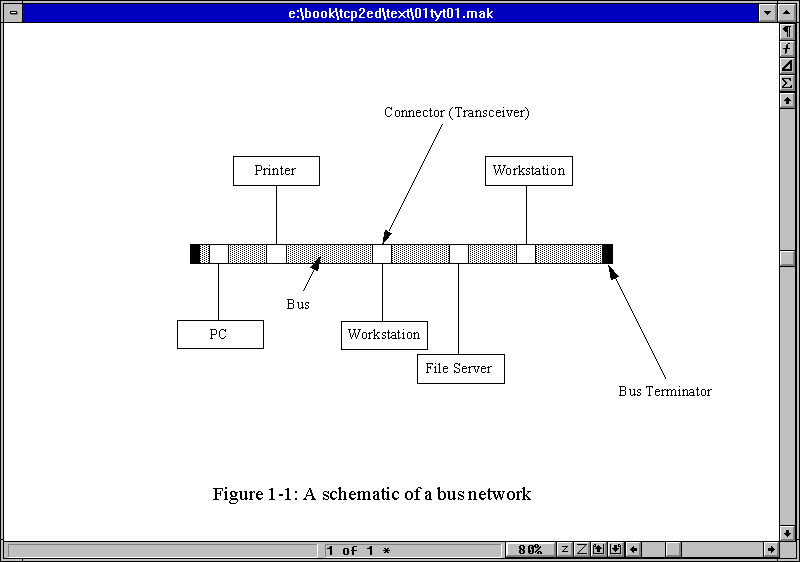
The bus network is the simplest, comprising a single main communications pathway with each device attached to the main cable (bus) through a device called a transceiver or junction box. The bus is also called a backbone because it resembles a human spine with ribs emanating from it. From each transceiver on the bus, another cable (often very short) runs to the device's network adapter. An example of a bus network is shown in Figure 1.1.
Figure 1.1. A schematic of a bus network showing the backbone with transceivers leading to network devices.
The primary advantage of a bus network is that it allows for a high-speed bus. Another advantage of the bus network is that it is usually immune to problems with any single network card within a device on the network. This is because the transceiver allows traffic through the backbone whether a device is attached to the junction box or not. Each end of the bus is terminated with a block of resistors or a similar electrical device to mark the end of the cable electrically. Each device on the pathway has a special identifying number, or address, that lets the device know that incoming information is for that device.
A bus network is seldom a straight cable. Instead, it is usually twisted around walls and buildings as needed. It does have a single pathway from one end to the other, with each end terminated in some way (usually with a resistor). Figure 1.1 shows a logical representation of the network, meaning it has simplified the actual physical appearance of the network into a schematic with straight lines and no real scale to the connections. A physical representation of the network would show how it goes through walls, around desks, and so on. Most devices on the bus network can send or receive data along the bus by packaging a message with the intended recipient's address.
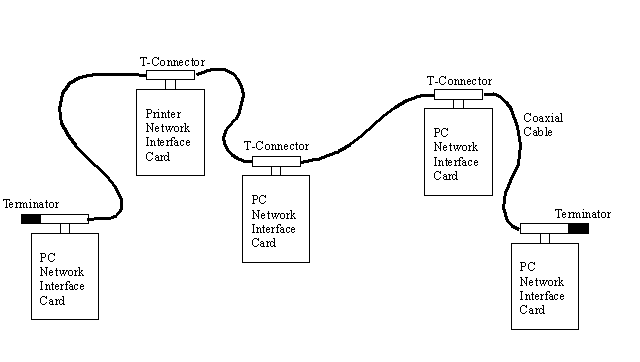
A variation of the bus network topology is found in many small LANs that use Thin Ethernet cable (which looks like television coaxial cable) or twisted-pair cable (which resembles telephone cables). This type of network consists of a length of coaxial cable that snakes from machine to machine. Unlike the bus network in Figure 1.1, there are no transceivers on the bus. Instead, each device is connected into the bus directly using a T-shaped connector on the network interface card, often using a connector called a BNC. The connector connects the machine to the two neighbors through two cables, one to each neighbor. At the ends of the network, a simple resistor is added to one side of the T-connector to terminate the network electrically.
A schematic of this type of network is shown in Figure 1.2. Each network device has a T-connector attached to the network interface card, leading to its two neighbors. The two ends of the bus are terminated with resistors.
Figure 1.2. A schematic of a machine-to-machine bus network.
This machine-to-machine (also called peer-to-peer) network is not capable of sustaining the higher speeds of the backbone-based bus network, primarily because of the medium of the network cable. A backbone network can use very high-speed cables such as fiber optics, with smaller (and slower) cables from each transceiver to the device. A machine-to-machine network is usually built using twisted-pair or coaxial cable because these cables are much cheaper and easier to work with. Until recently, machine-to-machine networks were limited to a throughput of about 10 Mbps (megabits per second), although recent developments called 100VG AnyLAN and Fast Ethernet allow 100 Mbps on this type of network.
The advantage of this machine-to-machine bus network is its simplicity. Adding new machines to the network means installing a network card and connecting the new machine into a logical place on the backbone. One major advantage of the machine-to-machine bus network is also its cost: it is probably the lowest cost LAN topology available. The problem with this type of bus network is that if one machine is taken off the network cable, or the network interface card malfunctions, the backbone is broken and must be tied together again with a jumper of some sort or the network might cease to function properly.
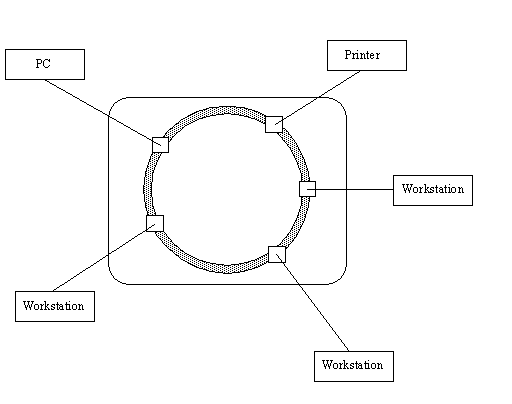
A ring network topology is often drawn as its name suggests, shaped like a ring. A typical ring network schematic is shown in Figure 1.3. You might have heard of a token ring network before, which is a ring topology network. You might be disappointed to find no physical ring architecture in a ring network, though.
Figure 1.3. A schematic of a ring network.
The term ring is a misnomer because ring networks don't have an unending cable like a bus network with the two terminators joined together. Instead, the ring refers to the design of the central unit that handles the network's message passing. In a token ring network, the central control unit is called a Media Access Unit, or MAU. The MAU has a ring circuit inside it (for which the network topology is named). The ring inside the MAU serves as the bus for devices to obtain messages.
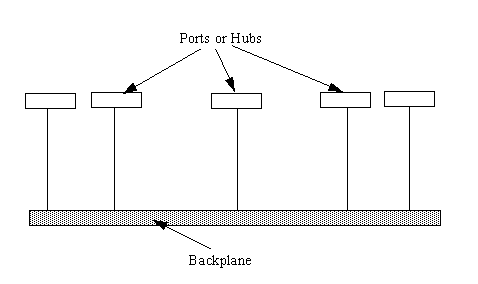
A hub network uses a main cable much like the bus network, which is called the backplane. The hub topology is shown in Figure 1.4. From the backplane, a set of cables leads to a hub, which is a box containing several ports into which devices are plugged. The cables to a connection point are often called drops, because they drop from the backplane to the ports.
Figure 1.4. A schematic of a hub network.
Hub networks can be very large, using a high-speed fiber optic backplane and slightly slower Ethernet drops to hubs from which a workgroup can be supported. The hub network can also be small, with a couple of hubs supporting a few devices connected together by standard Ethernet cables. The hub network is scaleable (meaning you can start small and expand as you need to), which is part of its attraction.
Hub networks have become popular for large installations, in part because they are easy to set up and maintain. They also can be the least expensive system in many larger installations, which adds to their attraction. The backplane can extend across a considerable distance just like a bus network, whereas the ports, or connection points, are usually grouped in a set placed in a box or panel. There can be many panels or connection boxes attached to the backplane.
As I mentioned earlier, LANs can be combined into a large entity called a WAN. WANs are usually composed of LANs joined together by a high-speed link (such as a telephone line or dedicated cable). At the entrance to each LAN, one or more machines act as the link between the LAN and WAN: these are called gateways. I talk about gateways and the types of gateways used in a WAN in more detail on many of the following days, but for now you need to know only that a gateway is the interface between a LAN and a WAN. The same applies for any LAN that accesses the Internet: one machine usually acts as the gateway from the LAN to the Internet (which is really just a very large WAN).
Many terms other than gateway are also used. You will hear terms like router and bridge. They are all gateways, but they perform slightly different tasks. To understand their roles (which I mention many times in the next week's material), you need to take a quick look at how WANs are laid out.
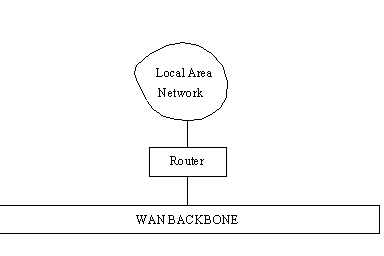
LANs can be tied to a WAN through a gateway that handles the passage of data between the LAN and WAN backbone. In a simple layout, a router is used to perform this function. This is shown in Figure 1.5.
Figure 1.5. A router connects a LAN to the backbone.
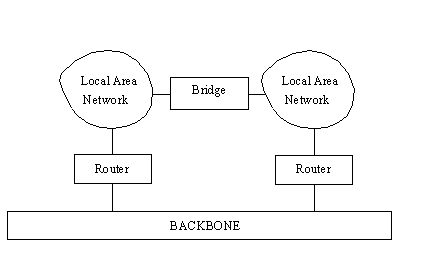
Another gateway device, called a bridge, is used to connect LANs using the same network protocol. Bridges are used only when the same network protocol (such as TCP/IP) is on both LANs. The bridge does not care which physical media is used. Bridges can connect twisted-pair LANs to coaxial LANs, for example, or act as an interface to a fiber optic network. As long as the network protocol is the same, the bridge functions properly.
If two or more LANs are involved in one organization and there is the possibility of a lot of traffic between them, it is better to connect the two LANs directly with a bridge instead of loading the backbone with the cross-traffic. This is shown in Figure 1.6.
Figure 1.6. Using a bridge to connect two LANs.
In a configuration using bridges between LANs, traffic from one LAN to another can be sent through the bridge instead of onto the backbone, providing better performance. For services such as Telnet and FTP, the speed difference between using a bridge and going through a router onto a heavily used backbone can be significant.
WANs are an important subject, and I look at them again in more detail on Day 13, "Managing and Troubleshooting TCP/IP."
Suppose you have to write a program that provides networking functions to every machine on your LAN. Writing a single software package that accomplishes every task required for communications between different computers would be a nightmarish task. Apart from having to cope with the different hardware architectures, simply writing the code for all the applications you desire would result in a program that was far too large to execute or maintain.
Dividing all the requirements into similar-purpose groups is a sensible approach, much as a programmer breaks code into logical chunks. With open systems communications, groups are quite obvious. One group deals with the transport of data, another with the packaging of messages, another with end-user applications, and so on. Each group of related tasks is called a layer.
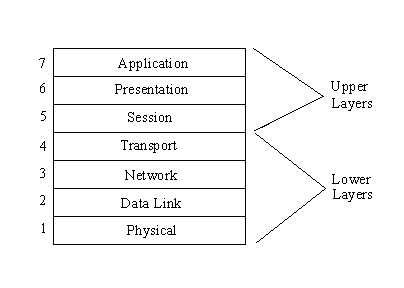
Of course, some crossover of functionality is to be expected, and several different approaches to the same division of layers for a network protocol were proposed. One that became adopted as a standard is the Open Systems Interconnection Reference Model (which is discussed in more detail in the next section). The OSI Reference Model (OSI-RM) uses seven layers, as shown in Figure 1.7. The TCP/IP architecture is similar but involves only five layers, because it combines some of the OSI functionality in two layers into one. For now, though, consider the seven-layer OSI model.
Figure 1.7. The OSI Reference Model showing all seven layers.
The application, presentation, and session layers are all application-oriented in that they are responsible for presenting the application interface to the user. All three are independent of the layers below them and are totally oblivious to the means by which data gets to the application. These three layers are called the upper layers.
The lower four layers deal with the transmission of data, covering the packaging, routing, verification, and transmission of each data group. The lower layers don't worry about the type of data they receive or send to the application, but deal simply with the task of sending it. They don't differentiate between the different applications in any way.
The following sections explain each layer to help you understand the architecture of the OSI-RM (and later contrast it with the architecture of TCP/IP).
The application layer is the end-user interface to the OSI system. It is where the applications, such as electronic mail, USENET news readers, or database display modules, reside. The application layer's task is to display received information and send the user's new data to the lower layers.
In distributed applications, such as client/server systems, the application layer is where the client application resides. It communicates through the lower layers to the server.
The presentation layer's task is to isolate the lower layers from the application's data format. It converts the data from the application into a common format, often called the canonical representation. The presentation layer processes machine-dependent data from the application layer into a machine-independent format for the lower layers.
The presentation layer is where file formats and even character formats (ASCII and EBCDIC, for example) are lost. The conversion from the application data format takes place through a "common network programming language" (as it is called in the OSI Reference Model documents) that has a structured format.
The presentation layer does the reverse for incoming data. It is converted from the common format into application-specific formats, based on the type of application the machine has instructions for. If the data comes in without reformatting instructions, the information might not be assembled in the correct manner for the user's application.
The session layer organizes and synchronizes the exchange of data between application processes. It works with the application layer to provide simple data sets called synchronization points that let an application know how the transmission and reception of data are progressing. In simplified terms, the session layer can be thought of as a timing and flow control layer.
The session layer is involved in coordinating communications between different applications, letting each know the status of the other. An error in one application (whether on the same machine or across the country) is handled by the session layer to let the receiving application know that the error has occurred. The session layer can resynchronize applications that are currently connected to each other. This can be necessary when communications are temporarily interrupted, or when an error has occurred that results in loss of data.
The transport layer, as its name suggests, is designed to provide the "transparent transfer of data from a source end open system to a destination end open system," according to the OSI Reference Model. The transport layer establishes, maintains, and terminates communications between two machines.
The transport layer is responsible for ensuring that data sent matches the data received. This verification role is important in ensuring that data is correctly sent, with a resend if an error was detected. The transport layer manages the sending of data, determining its order and its priority.
The network layer provides the physical routing of the data, determining the path between the machines. The network layer handles all these routing issues, relieving the higher layers from this issue.
The network layer examines the network topology to determine the best route to send a message, as well as figuring out relay systems. It is the only network layer that sends a message from source to target machine, managing other chunks of data that pass through the system on their way to another machine.
The data link layer, according to the OSI reference paper, "provides for the control of the physical layer, and detects and possibly corrects errors that can occur." In practicality, the data link layer is responsible for correcting transmission errors induced during transmission (as opposed to errors in the application data itself, which are handled in the transport layer).
The data link layer is usually concerned with signal interference on the physical transmission media, whether through copper wire, fiber optic cable, or microwave. Interference is common, resulting from many sources, including cosmic rays and stray magnetic interference from other sources.
The physical layer is the lowest layer of the OSI model and deals with the "mechanical, electrical, functional, and procedural means" required for transmission of data, according to the OSI definition. This is really the wiring or other transmission form.
When the OSI model was being developed, a lot of concern dealt with the lower two layers, because they are, in most cases, inseparable. The real world treats the data link layer and the physical layer as one combined layer, but the formal OSI definition stipulates different purposes for each. (TCP/IP includes the data link and physical layers as one layer, recognizing that the division is more academic than practical.)
Both OSI and TCP/IP are rooted in formal descriptions, presented as a series of complex documents that define all aspects of the protocols. To define OSI and TCP/IP, several new terms were developed and introduced into use; some (mostly OSI terms) are rather unusual. You might find the term OSI-speak used to refer to some of these rather grotesque definitions, much as legalese refers to legal terms.
To better understand the details of TCP/IP, it is necessary to deal with these terms now. You won't see all these terms in this book, but you might encounter them when reading manuals or online documentation. Therefore, all the major terms are covered here.
To transfer data effectively, many experiments have shown that creating a uniform chunk of data is better than sending characters singly or in widely varying sized groups. Usually these chunks of data have some information ahead of them (the header) and sometimes an indicator at the end (the trailer). These chunks of data are called packets in most synchronous communications systems.
The amount of data in a packet and the composition of the header can change depending on the communications protocol as well as some system limitations, but the concept of a packet always refers to the entire set (including header and trailer). The term packet is used often in the computer industry, sometimes when it shouldn't be.
You often see the word packet used as a generic reference to any group of data packaged for transmission. As an application's data passes through the layers of the architecture, each adds more information. The term packet is frequently used at each stage. Treat the term packet as a generalization for any data with additional information, instead of the specific result of only one layer's addition of header and trailer. This goes against the efforts of both OSI and the TCP governing bodies, but it helps keep your sanity intact!
A subsystem is the collective of a particular layer across a network. For example, if 10 machines are connected together, each running the seven-layer OSI model, all 10 application layers are the application subsystem, all 10 data link layers are the data link subsystem, and so on. As you might have already deduced, with the OSI Reference Model there are seven subsystems.
It is entirely possible (and even likely) that all the individual components in a subsystem will not be active at one time. Using the 10-machine example again, only three might have the data link layer actually active at any moment in time, but the cumulative of all the machines makes up the subsystem.
A layer can have more than one part to it. For example, the transport layer can have routines that verify checksums as well as routines that handle resending packets that didn't transfer correctly. Not all these routines are active at once, because they might not be required at any moment. The active routines, though, are called entities. The word entity was adopted in order to find a single term that could not be confused with another computer term such as module, process, or task.
The notations N, N+1, N+2, and so on are used to identify a layer and the layers that are related to it. Referring to Figure 1.7, if the transport layer is layer N, the physical layer is N–3 and the presentation layer is N+2. With OSI, N always has a value of 1 through 7 inclusive.
One reason this notation was adopted was to enable writers to refer to other layers without having to write out their names every time. It also makes flow charts and diagrams of interactions a little easier to draw. The terms N+1 and N–1 are commonly used in both OSI and TCP for the layers above and below the current layer, respectively, as you will see.
To make things even more confusing, many OSI standards refer to a layer by the first letter of its name. This can lead to a real mess for the casual reader, because "S-entity," "5-entity," and "layer 5" all refer to the session layer.
Each layer performs N-functions. The functions are the different things the layer does. Therefore, the functions of the transport layer are the different tasks that the layer provides. For most purposes in this book, functions and entities mean the same thing.
This uses the hierarchical layer structure to express the idea that one layer provides a set of facilities to the next higher layer. This is sensible, because the application layer expects the presentation layer to provide a robust, well-defined set of facilities to it. In OSI-speak, the (N+1)-entities assume a defined set of N-facilities from the N-entity.
The entire set of N-facilities provided to the (N+1)-entities is called the N-service. In other words, the service is the entire set of N-functions provided to the next higher layer. Services might seem like functions, but there is a formal difference between the two. The OSI documents go to great lengths to provide detailed descriptions of services, with a "service definition standard" for each layer. This was necessary during the development of the OSI standard so that the different tasks involved in the communications protocol could be assigned to different layers, and so that the functions of each layer are both well-defined and isolated from other layers.
The service definitions are formally developed from the bottom layer (physical) upward to the top layer. The advantage of this approach is that the design of the N+1 layer can be based on the functions performed in the N layer, avoiding two functions that accomplish the same task in two adjacent layers.
An entire set of variations on the service name has been developed to apply these definitions, some of which are in regular use:
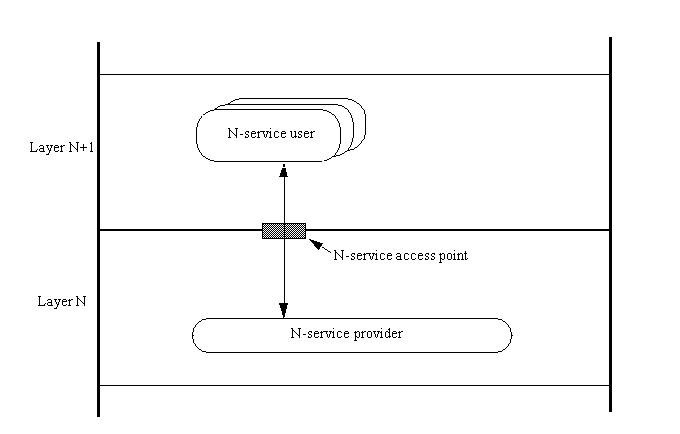
An N-service user is a user of a service provided by the N layer to the next higher (N+1) layer.
An N-service provider is the set of N-entities that are involved in providing the N layer service.
An N-service access point (often abbreviated to N-SAP) is where an N-service is provided to an (N+1)-entity by the N-service provider.
N-service data is the packet of data exchanged at an N-SAP.
N-service data units (N-SDUs) are the individual units of data exchanged at an N-SAP (so that N-service data is made up of N-SDUs).
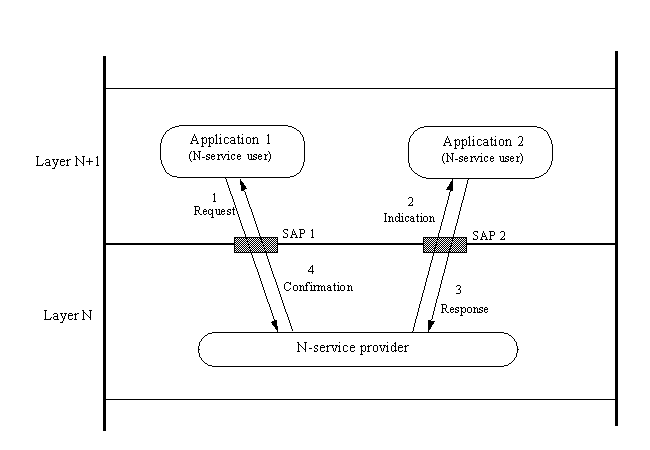
These terms are shown in Figure 1.8. Another common term is encapsulation, which is the addition of control information to a packet of data. The control data contains addressing details, checksums for error detection, and protocol control functions.
Figure 1.8. Service providers and service users communicate through service access points.
It is important to remember that all these terms are used in a formal description, because a formal language is usually the only method to adequately describe something as complex as a communications protocol. It is possible, though, to fit these terms together so that they make a little more sense when you encounter them. An example should help.
The session layer has a set of session functions. It provides a set of session facilities to the layer above it, the presentation layer. The session layer is made up of session entities. The presentation layer is a user of the services provided by the session layer (layer 5). A presentation entity is a user of the services provided by the session layer and is called a presentation service user.
The session service provider is the collection of session entities that are actively involved in providing the presentation layer with the session's services. The point at which the session service is provided to the presentation layer is the session service access point, where the session service data is sent. The individual bits of data in the session service data are called session service data units.
Confusing? Believe it or not, after a while you will begin to feel more comfortable with these terms. The important ones to know now are that a layer provides a set of entities through a service access point to the next higher layer, which is called the service user. The data is sent in chunks called service data, made up of service data units.
Communication between two parties (whether over a telephone, between layers of an architecture, or between applications themselves) takes place in three distinct stages: establishment of the connection, data transfer, and connection termination.
Communication between two OSI applications in the same layer is through queues to the layer beneath them. Each application (more properly called a service user) has two queues, one for each direction to the service provider of the layer beneath (which controls the whole layer). In OSI-speak, the two queues provide for simultaneous (or atomic) interactions between two N-service action points.
Data, called service primitives, is put into and retrieved from the queue by the applications (service users). A service primitive can be a block of data, an indicator that something is required or received, or a status indicator. As with most aspects of OSI, a lexicon has been developed to describe the actions in these queues:
A request primitive is when one service submits a service primitive to the queue (through the N-SAP) requesting permission to communicate with another service in the same layer.
An indication primitive is what the service provider in the layer beneath the sending application sends to the intended receiving application to let it know that communication is desired.
A response primitive is sent by the receiving application to the layer beneath's service provider to acknowledge the granting of communications between the two service users.
A confirmation primitive is sent from the service provider to the final application to indicate that both applications on the layer above can now communicate.
An example might help clarify the process. Assume that two applications in the presentation layer want to communicate with each other. They can't do so directly (according to the OSI model), so they must go through the layer below them. These steps are shown in Figure 1.9.
Figure 1.9. Two applications communicate through SAPs using primitives.
The first application sends a request primitive to the service provider of the session layer and waits. The session layer's service provider removes the request primitive from the inbound queue from the first application and sends an indication primitive to the second application's inbound queue.
The second application takes the indication primitive from its queue to the session service provider and decides to accept the request for connection by sending a positive response primitive back through its queue to the session layer. This is received by the session layer service provider, and a confirmation primitive is sent to the first application in the presentation layer. This is a process called confirmed service because the applications wait for confirmation that communications are established and ready.
OSI also provides for unconfirmed service, in which a request primitive is sent to the service provider, sending the indication primitive to the second application. The response and confirmation primitives are not sent. This is a sort of "get ready, because here it comes whether you want it or not" communication, often referred to as send and pray.
When two service users are using confirmed service to communicate, they are considered connected. Two applications are talking to each other, aware of what the other is doing with the service data. OSI refers to the establishment and maintenance of state information between the two, or the fact that each knows when the other is sending or receiving. OSI calls this connection-oriented or connection-mode communications.
Connectionless communication is when service data is sent independently, as with unconfirmed service. The service data is self-contained, possessing everything a receiving service user needs to know. These service data packets are often called datagrams. The application that sends the datagram has no idea who receives the datagram and how it is handled, and the receiving service users have no idea who sent it (other than information that might be contained within the datagram itself). OSI calls this connectionless-mode.
OSI (and TCP/IP) use both connected and connectionless systems between layers of their architecture. Each has its benefits and ideal implementations. All these communications are between applications (service users) in each layer, using the layer beneath to communicate. There are many service users, and this process is going on all the time. It's quite amazing when you think about it.
People don't question the need for rules in a board game. If you didn't have rules, each player could be happily playing as it suits them, regardless of whether their play was consistent with that of other players. The existence of rules ensures that each player plays the game in the same way, which might not be as much fun as a free-for-all. However, when a fight over a player's actions arises, the written rules clearly indicate who is right. The rules are a set of standards by which a game is played.
Standards prevent a situation arising where two seemingly compatible systems really are not. For example, 10 years ago when CP/M was the dominant operating system, the 5.25-inch floppy was used by most systems. But the floppy from a Kaypro II couldn't be read by an Osbourne I because the tracks were laid out in a different manner. A utility program could convert between the two, but that extra step was a major annoyance for machine users.
When the IBM PC became the platform of choice, the 5.25-inch format used by the IBM PC was adopted by other companies to ensure disk compatibility. The IBM format became a de facto standard, one adopted because of market pressures and customer demand.
Creating a standard in today's world is not a simple matter. Several organizations are dedicated to developing the standards in a complete, unambiguous manner. The most important of these is the International Organization for Standardization, or ISO (often called the International Standardization Organization to fit their acronym, although this is incorrect). ISO consists of standards organizations from many countries who try to agree on international criterion. The American National Standards Institute (ANSI), British Standards Institute (BSI), Deutsches Institut fur Normung (DIN), and Association Francaise du Normalization (AFNOR) are all member groups. The ISO developed the Open Systems Interconnection (OSI) standard that is discussed throughout this book.
Each nation's standards organization can create a standard for that country, of course. The goal of ISO, however, is to agree on worldwide standards. Otherwise, incompatibilities could exist that wouldn't allow one country's system to be used in another. (An example of this is with television signals: the US relies on NTSC, whereas Europe uses PAL—systems that are incompatible with each other.)
Curiously, the language used for most international standards is English, even though the majority of participants in a standards committee are not from English-speaking countries. This can cause quite a bit of confusion, especially because most standards are worded awkwardly to begin with.
The reason most standards involve awkward language is that to describe something unambiguously can be very difficult, sometimes necessitating the creation of new terms that the standard defines. Not only must the concepts be clearly defined, but the absolute behavior is necessary too. With most things that standards apply to, this means using numbers and physical terms to provide a concrete definition. Defining a 2x4 piece of lumber necessitates the use of a measurement of some sort, and similarly defining computer terms requires mathematics.
Simply defining a method of communications, such as TCP/IP, would be fairly straightforward if it weren't for the complication of defining it for open systems. The use of an open system adds another difficulty because all aspects of the standard must be machine-independent. Imagine trying to define a 2x4 without using a measurement you are familiar with, such as inches, or if inches are adopted, it would be difficult to define inches in an unambiguous way (which indeed is what happens, because most units of length are defined with respect to the wavelength of a particular kind of coherent light).
Computers communicate through bits of data, but those bits can represent characters, numbers, or something else. Numbers could be integers, fractions, or octal representations. Again, you must define the units. You can see that the complications mount, one on top of the other.
To help define a standard, an abstract approach is usually used. In the case of OSI, the meaning (called the semantics) of the data transferred (the abstract syntax) is first dealt with, and the exact representation of the data in the machine (the concrete syntax) and the means by which it is transferred (transfer syntax) are handled separately. The separation of the abstract lets the data be represented as an entity, without concern for what it really means. It's a little like treating your car as a unit instead of an engine, transmission, steering wheel, and so on. The abstraction of the details to a simpler whole makes it easier to convey information. ("My car is broken" is abstract, whereas "the power steering fluid has all leaked out" is concrete.)
To describe systems abstractly, it is necessary to have a language that meets the purpose. Most standards bodies have developed such a system. The most commonly used is ISO's Abstract Syntax Notation One, frequently shortened to ASN.1. It is suited especially for describing open systems networking. Thus, it's not surprising to find it used extensively in the OSI and TCP descriptions. Indeed, ASN.1 was developed concurrently with the OSI standards when it became necessary to describe upper-layer functions.
The primary concept of ASN.1 is that all types of data, regardless of type, size, origin, or purpose, can be represented by an object that is independent of the hardware, operating system software, or application. The ASN.1 system defines the contents of a datagram protocol header—the chunk of information at the beginning of an object that describes the contents to the system. (Headers are discussed in more detail in the section titled "Protocol Headers" later in this chapter.)
Part of ASN.1 describes the language used to describe objects and data types (such as a data description language in database terminology). Another part defines the basic encoding rules that deal with moving the data objects between systems. ASN.1 defines data types that are used in the construction of data packets (datagrams). It provides for both structured and unstructured data types, with a list of 28 supported types.
When the Defense Advanced Research Projects Agency (DARPA) was established in 1980, a group was formed to develop a set of standards for the Internet. The group, called the Internet Configuration Control Board (ICCB) was reorganized into the Internet Activities Board (IAB) in 1983, whose task was to design, engineer, and manage the Internet.
In 1986, the IAB turned over the task of developing the Internet standards to the Internet Engineering Task Force (IETF), and the long-term research was assigned to the Internet Research Task Force (IRTF). The IAB retained final authorization over anything proposed by the two task forces.
The last step in this saga was the formation of the Internet Society in 1992, when the IAB was renamed the Internet Architecture Board. This group is still responsible for existing and future standards, reporting to the board of the Internet Society.
After all that, what happened during the shuffling? Almost from the beginning, the Internet was defined as "a loosely organized international collaboration of autonomous, interconnected networks," which supported host-to-host communications "through voluntary adherence to open protocols and procedures" defined in a technical paper called the Internet Standards, RFC 1310,2. That definition is still used today.
The IETF continues to work on refining the standards used for communications over the Internet through a number of working groups, each one dedicated to a specific aspect of the overall Internet protocol suite. There are working groups dedicated to network management, security, user services, routing, and many more things. It is interesting that the IETF's groups are considerably more flexible and efficient than those of, say, the ISO, whose working groups can take years to agree on a standard. In many cases, the IETF's groups can form, create a recommendation, and disband within a year or so. This helps continuously refine the Internet standards to reflect changing hardware and software capabilities.
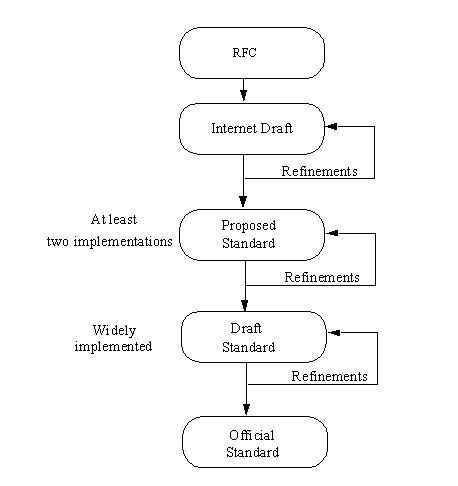
Creating a new Internet standard (which happened with TCP/IP) follows a well-defined process, shown schematically in Figure 1.10. It begins with a request for comment (RFC). This is usually a document containing a specific proposal, sometimes new and sometimes a modification of an existing standard. RFCs are widely distributed, both on the network itself and to interested parties as printed documents. Important RFCs and instructions for retrieving them are included in the appendixes at the end of this book.
Figure 1.10. The process for adopting a new Internet standard.
The RFC is usually discussed for a while on the network itself, where anyone can express their opinion, as well as in formal IETF working group meetings. After a suitable amount of revision and continued discussion, an Internet draft is created and distributed. This draft is close to final form, providing a consolidation of all the comments the RFC generated.
The next step is usually a proposed standard, which remains as such for at least six months. During this time, the Internet Society requires at least two independent and interoperable implementations to be written and tested. Any problems arising from the actual tests can then be addressed. (In practice, it is usual for many implementations to be written and given a thorough testing.)
After that testing and refinement process is completed, a draft standard is written, which remains for at least four months, during which time many more implementations are developed and tested. The last step—after many months—is the adoption of the standard, at which point it is implemented by all sites that require it.
Diplomats follow rules when they conduct business between nations, which you see referred to in the media as protocol. Diplomatic protocol requires that you don't insult your hosts and that you do respect local customs (even if that means you have to eat some unappetizing dinners!). Most embassies and commissions have specialists in protocol, whose function is to ensure that everything proceeds smoothly when communications are taking place. The protocol is a set of rules that must be followed in order to "play the game," as career diplomats are fond of saying. Without the protocols, one side of the conversation might not really understand what the other is saying.
Similarly, computer protocols define the manner in which communications take place. If one computer is sending information to another and they both follow the protocol properly, the message gets through, regardless of what types of machines they are and what operating systems they run (the basis for open systems). As long as the machines have software that can manage the protocol, communications are possible. Essentially, a computer protocol is a set of rules that coordinates the exchange of information.
Protocols have developed from very simple processes ("I'll send you one character, you send it back, and I'll make sure the two match") to elaborate, complex mechanisms that cover all possible problems and transfer conditions. A task such as sending a message from one coast to another can be very complex when you consider the manner in which it moves. A single protocol to cover all aspects of the transfer would be too large, unwieldy, and overly specialized. Therefore, several protocols have been developed, each handling a specific task.
Combining several protocols, each with their own dedicated purposes, would be a nightmare if the interactions between the protocols were not clearly defined. The concept of a layered structure was developed to help keep each protocol in its place and to define the manner of interaction between each protocol (essentially, a protocol for communications between protocols!).
As you saw earlier, the ISO has developed a layered protocol system called OSI. OSI defines a protocol as "a set of rules and formats (semantic and syntactic), which determines the communication behavior of N-entities in the performance of N-functions." You might remember that N represents a layer, and an entity is a service component of a layer.
When machines communicate, the rules are formally defined and account for possible interruptions or faults in the flow of information, especially when the flow is connectionless (no formal connection between the two machines exists). In such a system, the ability to properly route and verify each packet of data (datagram) is vitally important. As discussed earlier, the data sent between layers is called a service data unit (SDU), so OSI defines the analogous data between two machines as a protocol data unit (PDU).
The flow of information is controlled by a set of actions that define the state machine for the protocol. OSI defines these actions as protocol control information (PCI).
It is necessary to introduce a few more terms commonly used in OSI and TCP/IP, but luckily they are readily understood because of their real-world connotations. These terms are necessary because data doesn't usually exist in manageable chunks. The data might have to be broken down into smaller sections, or several small sections can be combined into a large section for more efficient transfer. The basic terms are as follows:
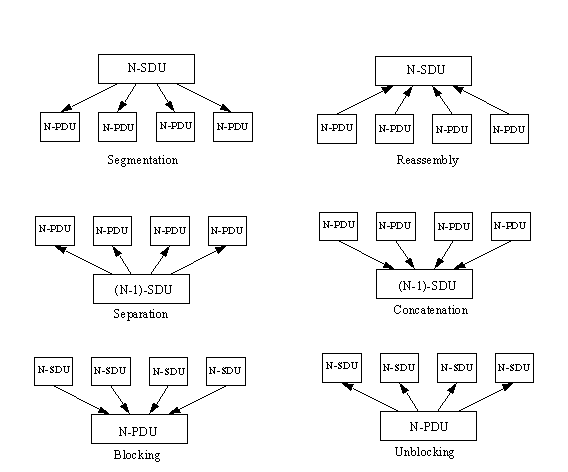
Segmentation is the process of breaking an N-service data unit (N-SDU) into several N-protocol data units (N-PDUs).
Reassembly is the process of combining several N-PDUs into an N-SDU (the reverse of segmentation).
Blocking is the combination of several SDUs (which might be from different services) into a larger PDU within the layer in which the SDUs originated.
Unblocking is the breaking up of a PDU into several SDUs in the same layer.
Concatenation is the process of one layer combining several N-PDUs from the next higher layer into one SDU (like blocking except occurring across a layer boundary).
Separation is the reverse of concatenation, so that a layer breaks a single SDU into several PDUs for the next layer higher (like unblocking except across a layer boundary).
These six processes are shown in Figure 1.11.
Figure 1.11. Segmentation, reassembly, blocking, unblocking, concatenation, and separation.
Finally, here is one last set of definitions that deal with connections:
Multiplexing is when several connections are supported by a single connection in the next lower layer (so three presentation service connections could be multiplexed into a single session connection).
Demultiplexing is the reverse of multiplexing, in which one connection is split into several connections for the layer above it.
Splitting is when a single connection is supported by several connections in the layer below (so the data link layer might have three connections to support one network layer connection).
Recombining is the reverse of splitting, so that several connections are combined into a single one for the layer above.
Multiplexing and splitting (and their reverses, demultiplexing and recombining) are different in the manner in which the lines are split. With multiplexing, several connections combine into one in the layer below. With splitting, however, one connection can be split into several in the layer below. As you might expect, each has its importance within TCP and OSI.
Protocol control information is information about the datagram to which it is attached. This information is usually assembled into a block that is attached to the front of the data it accompanies and is called a header or protocol header. Protocol headers are used for transferring information between layers as well as between machines. As mentioned earlier, the protocol headers are developed according to rules laid down in the ISO's ASN.1 document set.
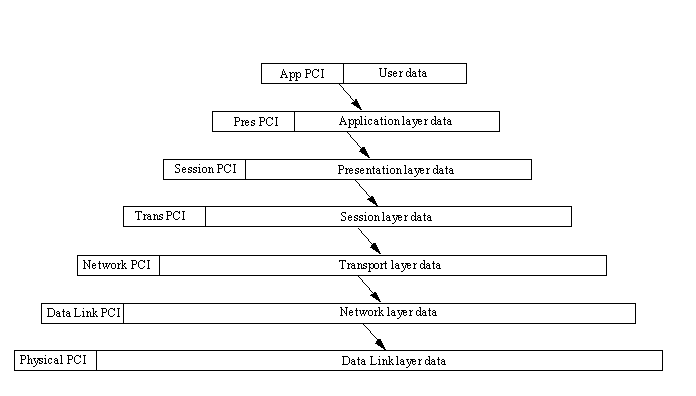
When a protocol header is passed to the layer beneath, the datagram including the layer's header is treated as the entire datagram for that receiving layer, which adds its own protocol header to the front. Thus, if a datagram started at the application layer, by the time it reached the physical layer, it would have seven sets of protocol headers on it. These layer protocol headers are used when moving back up the layer structure; they are stripped off as the datagram moves up. An illustration of this is shown in Figure 1.12.
Figure 1.12. Adding each layer's protocol header to user data.
It is easier to think of this process as layers on an onion. The inside is the data that is to be sent. As it passes through each layer of the OSI model, another layer of onion skin is added. When it is finished moving through the layers, several protocol headers are enclosing the data. When the datagram is passed back up the layers (probably on another machine), each layer peels off the protocol header that corresponds to the layer. When it reaches the destination layer, only the data is left.
This process makes sense, because each layer of the OSI model requires different information from the datagram. By using a dedicated protocol header for each layer of the datagram, it is a relatively simple task to remove the protocol header, decode its instructions, and pass the rest of the message on. The alternative would be to have a single large header that contained all the information, but this would take longer to process. The exact contents of the protocol header are not important right now, but I examine them later when looking at the TCP protocol.
As usual, OSI has a formal description for all this, which states that the N-user data to be transferred is prepended with N-protocol control information (N-PCI) to form an N-protocol data unit (N-PDU). The N-PDUs are passed across an N-service access point (N-SAP) as one of a set of service parameters comprising an N-service data unit (N-SDU). The service parameters comprising the N-SDU are called N-service user data (N-SUD), which is prepended to the (N–1)PCI to form another (N–1)PDU.
For every service in a layer, there is a protocol for it to communicate to the layer below it (remember that applications communicate through the layer below, not directly). The protocol exchanges for each service are defined by the system, and to a lesser extent by the application developer, who should be following the rules of the system.
Protocols and headers might sound a little complex or overly complicated for the task that must be accomplished, but considering the original goals of the OSI model, it is generally acknowledged that this is the best way to go. (Many a sarcastic comment has been made about OSI and TCP that claim the header information is much more important than the data contents. In some ways this is true, because without the header the data would never get to its destination.)
Today's text has thrown a lot of terminology at you, most of which you will see frequently in the following chapters. In most cases, a gentle reminder of the definition accompanies the first occurrence of the term. To understand the relationships between the different terms, though, you might have to refer back to today's material.
You now have the basic knowledge to relate TCP/IP to the OSI's layered model, which will help you understand what TCP/IP does (and how it goes about doing it). The next chapter looks at the history of TCP/IP and the growth of the Internet.
What are the three main types of LAN architecture? What are their primary characteristics?
The three network architectures are bus, ring, and hub. There are others, but these three describe the vast majority of all LANs.
A bus network is a length of cable that has a connector for each device directly attached to it. Both ends of the network cable are terminated. A ring network has a central control unit called a Media Access Unit to which all devices are attached by cables. A hub network has a backplane with connectors leading through another cable to the devices.
What are the seven OSI layers and their responsibilities?
The OSI layers (from the bottom up) are as follows:
Physical: Transmits data
Data Link: Corrects transmission errors
Network: Provides the physical routing information
Transport: Verifies that data is correctly transmitted
Session: Synchronizes data exchange between upper and lower layers
Presentation: Converts network data to application-specific formats
Application: End-user interface
What is the difference between segmentation and reassembly, and concatenation and separation?
Segmentation is the breaking apart of a large N-service data unit (N-SDU) into several smaller N-protocol data units (N-PDUs), whereas reassembly is the reverse.
Concatenation is the combination of several N-PDUs from the next higher layer into one SDU. Separation is the reverse.
Define multiplexing and demultiplexing. How are they useful?
Multiplexing is when several connections are supported by a single connection. According to the formal definition, this applies to layers (so that three presentation service connections could be multiplexed into a single session connection). However, it is a term generally used for all kinds of connections, such as putting four modem calls down a single modem line. Demultiplexing is the reverse of multiplexing, in which one connection is split into several connections.
Multiplexing is a key to supporting many connections at once with limited resources. A typical example is a remote office with twenty terminals, each of which is connected to the main office by a telephone line. Instead of requiring twenty lines, they can all be multiplexed into three or four. The amount of multiplexing possible depends on the maximum capacity of each physical line.
How many protocol headers are added by the time an OSI-based e-mail application (in the application layer) has sent a message to the physical layer for transmission?
Seven, one for each OSI layer. More protocol headers can be added by the actual physical network system. As a general rule, each layer adds its own protocol information.