Although TCP/IP works transparently for the user, occasionally communications seem to be slow and TCP/IP is suspected as the cause. Most users are impatient and expect things to happen right away, so delays for any reason lead to frustration. Rather than sit and wait, most users like to be able to verify that a connection to a remote machine is active and a delay is caused by network traffic instead of a system failure. At the least, most users would like to understand why a session is progressing slowly.
TCP/IP has several utility programs that provide status information and performance statistics. Also available are several debugging programs and options to enable a developer or knowledgeable user to trace a problem. This chapter examines the basic set of these tools. Although TCP/IP is a standard, there are many different implementations of the protocol family. Most versions have the basic toolset discussed today, although some might alter names and output to their own liking.
All network addresses and machine names in this chapter are chosen at random and do not represent any particular network. Because the network addresses used might correspond to a real network, you should not use them in any experimentation, or you might incur the wrath of a system administrator!
Not all the commands shown in this chapter are available to regular users (as opposed to system administrators) on all systems, although some system administrators do enable some access to the utilities for checking connection and TCP/IP status. The commands are presented here to show the debugging and diagnostic capabilities available to the TCP/IP user and administrator. The commands are not covered in exhaustive detail but are intended to complete the TCP/IP picture for you. Many of these programs and utilities are seen again later in this book when I set up a sample TCP/IP network.
Several files are involved in the complete specification of network addresses and configuration for TCP/IP. For illustrative purposes, a UNIX system is used as the standard here, although a few other operating systems are mentioned as appropriate. Other operating systems use different filenames, but the purpose of the files is usually the same. You might have to check with your operating system documentation to identify the files used for each purpose.
UNIX allows comments on every line of these configuration files, as long as they are prefaced by a pound sign (#). If you see this character in your own system's configuration files, you should note that it is not part of an entry. With many operating systems, the default configuration files have many entries, most of which are commented out until the system administrator removes the comments.
You might not be able to examine the files or run the utilities mentioned in this chapter because of security restrictions. If you edit the configuration files, make sure you do not make any unintentional changes! Make backups of all the files before you make any changes to your systems.
Whenever a symbolic name is used as a target address by an application, there must be some method to resolve that name into a network address. An ASCII file is commonly used with the symbolic names matched to network addresses. This does not apply when the Yellow Pages (YP), Network Information Services (NIS), or the Domain Name Server (DNS) is used; they use their own configuration files.
On UNIX systems, the file /etc/hosts is used to hold the network addresses, as well as one special connection called the loopback (which is examined later in this chapter in the section titled "The Loopback Driver"). The loopback connection address is usually listed as the machine name loopback or localhost.
The file /etc/hosts consists of the network address in one column separated from the symbolic name in another. The network addresses can be specified in decimal, octal, or hexadecimal format (although decimal is the most common). More than one symbolic name can be specified on a line by separating the names with either space characters or tabs. The /etc/hosts file can be as long as necessary to contain all the symbolic names used on the local machine; they do not need to be presented in any order. A sample UNIX /etc/hosts file is as follows:
# network host addresses

127.0.0.1            localhost local tpci_server

157.40.40.1          tpci_sco1

157.40.40.2          tpci_sco2

157.40.40.3          tpci_hpws1

157.40.40.0          tpci_server tpci_main tpci

47.80.157.36         bnr.ca BNR bnr

191.13.123.4         kitty_cat

205.150.89.1         roy_maclean big_roy

210.24.47.128        bobs_machine
As you can see, the file is made up of two columns. The first column gives the IP address of a machine, and the second (separated by one or more whitespace characters) gives the machine's name. If several names can be used to identify the remote machine, they are listed on the same line, separated by whitespace. For example, the remote machine with IP address 205.150.89.1 can be addressed as either roy_maclean or big_roy. Whenever either of those names is used in a command (such as an FTP or Telnet application), this file is used to match to the proper IP address.
A system or network administrator can update the /etc/hosts file at any time, and changes are effective immediately (so the machine doesn't have to be rebooted to effect the changes). Whenever a symbolic name is specified by a user or an application, the /etc/hosts file is always searched first for a matching name, and the proper address is read from the same line.
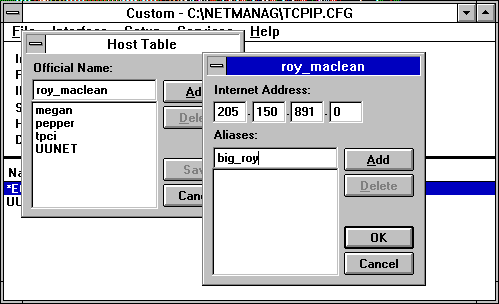
Most TCP/IP implementations on other platforms have a similar type of file to resolve IP addresses from symbolic names. NetManage ChameleonNFS running on a Windows 3.x machine, for example, uses a Host Table to match names and IP addresses. The Host Table, shown in Figure 7.1, is a graphical front-end to a file equivalent to /etc/hosts on a UNIX machine.
Figure 7.1. ChameleonNFS uses a Host Table to match symbolic names and IP addresses.
Networks can be addressed by a symbolic name, just as machines are. To resolve the network names, another file is used that contains the corresponding network address. Typically, this file isn't accessed often, because few users want to address an entire network within their application. The network name resolution file's most common use is to specify the local network's name.
UNIX systems usually use the file /etc/networks to specify symbolic network names. The format of the file provides a network symbolic name, its network address, and any alias that might be used, in much the same format as the /etc/hosts table is used for specific machines. A sample /etc/networks file is shown here:
# local network names

tpci       146.1          tpci_network  tpci_local

bnr        47.80          BNR bnr.ca

tmn        123.2.21

unique     89.123.23      UNIQUE

sco        132.147        SCO

loopback   127            localhost
The /etc/networks file layout is a little different from /etc/hosts in that the usual network name is given in the first column, followed by the IP network address, then any aliases.
The last entry in this example file gives the loopback name. The first entry specifies the local machine name, its network address, and any name variants. Using this file, an application that wanted to reach the network called UNIQUE could use that name and let the operating system resolve it to the IP network address 89.123.23.
Many implementations of TCP/IP on other platforms don't bother with a network name resolution file like this. Part of the reason is that the /etc/networks file has little use on a UNIX platform, and many single-user operating systems don't require the type of versatility a multiuser operating system like UNIX must supply to an entire network.
Protocol numbers are used to identify the transport protocol to the receiving machine to enable proper decoding of the information within the datagram. With TCP/IP, the protocol number is embedded in the Internet Protocol header. A configuration file is usually used to identify all the transport protocols available on the system and their respective protocol numbers.
UNIX systems use the /etc/protocols file for this purpose. Usually, this file is not modified by the administrator but is maintained by the system and updated automatically as part of the installation procedure when new TCP/IP software or services are added. The /etc/protocols file contains the protocol name, its number, and any alias that might be used for that protocol. A sample /etc/protocols file is shown here:
#

# Internet (IP) protocols

#

ip      0       IP      # internet protocol, pseudo protocol number

icmp    1       ICMP    # internet control message protocol

igmp    2       IGMP    # internet group management protocol

ggp     3       GGP     # gateway-gateway protocol

tcp     6       TCP     # transmission control protocol

egp     8       EGP     # Exterior-Gateway Protocol

pup     12      PUP     # PARC universal packet protocol

udp     17      UDP     # user datagram protocol

hello   63      HELLO   # HELLO Routing Protocol

ospf    89      OSPF    # Open Shortest Path First Routing Protocol
In this /etc/protocols file, the IP protocol is assigned protocol 0, and TCP is protocol 6. The values in this table should not be changed from their default values except when special network conditions mandate a change. If new TCP/IP services are added to the UNIX system this file resides on, new entries are made to this file by the application installation routine.
There are usually no equivalents of the /etc/protocols file on other operating systems because they assume that the standard transport number is used for each protocol.
The final common configuration file used on most UNIX systems identifies the existing network services. As with the /etc/protocols file, this file is not usually modified by an administrator but is maintained by software as it is installed or configured.
The UNIX network services file is /etc/services. The file is in ASCII format consisting of the service name, a port number, and the protocol type. The port number and protocol type are separated by a slash. The port numbers for TCP/IP usually follow the conventions mentioned in the previous chapters. Any optional service alias names follow after the port numbers. A short extract from a sample /etc/services file (the file is usually quite lengthy) is shown here:
# network services

echo     7/tcp

echo     7/udp

discard  9/tcp   sink  null

discard  9/udp   sink  null

ftp      21/tcp

telnet   23/tcp

smtp     25/tcp   mail mailx

tftp     69/udp

# specific services

login    513/tcp

who      513/udp   whod
TCP/IP requires that each machine on the network have an IP address. Usually, each machine also has a unique symbolic name; otherwise, the IP address must be used for all connections to that machine. Most operating systems have a simple program that identifies the name of the local machine. UNIX systems have the utility hostname for this purpose, as well as the uname program, which can give the node name with the command uname -n. The uname utility is usually supported in System V and compatible operating systems only.
The host name is sometimes saved in a separate file that is read when the operating system starts up, or it can be read from one of the configuration files mentioned previously. The hostname is used by most protocols on the system and by many TCP/IP applications, so it is important for proper system operation. The host name can sometimes be changed by editing the system file that contains the name and then rebooting the machine, although many operating systems provide a utility program to ensure that this process is performed correctly.
On many UNIX systems, the hostname and uname commands echo back the local machine name, as the following sample session shows:
$ hostname

tpci_sco4.tpci.com

$ uname -n

tpci_sco4
On the SCO UNIX system used in this example, the hostname command returns the fully qualified domain name, whereas the uname command provides the local machine name only. On a Hewlett-Packard workstation running HP-UX, both commands return only the local machine name. The exact behavior of the hostname and uname commands is therefore quite dependent on the implementation.
On a Linux system, for example, the hostname command can be used to not only show the current host name setting but also to change it when used with the -S (for set) option. For example, the command
hostname -S willow.tree.com
changes the local fully qualified domain name to willow.tree.com. Not all versions of Linux support the -S option of the hostname command.
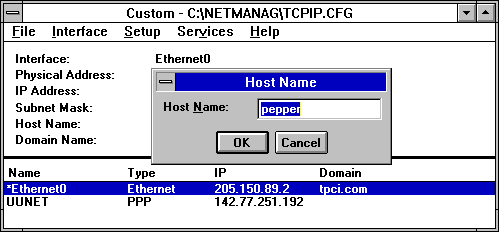
Most TCP/IP suites for other operating systems use a simpler method of setting the host name. For example, on a Windows 3.x machine the NetManage ChameleonNFS package uses the dialog shown in Figure 7.2 to quickly set the host name.
Figure 7.2. ChameleonNFS uses this dialog to set the host name.
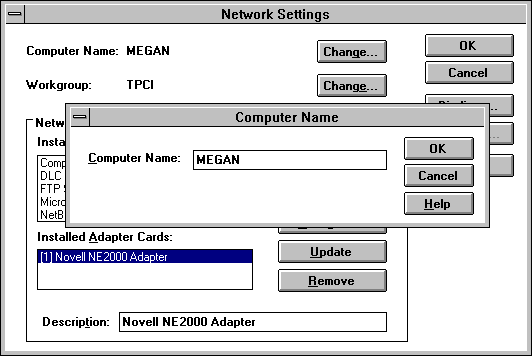
Windows NT has TCP/IP services built into the basic distribution. On a Windows NT system, the host name is specified through the Network dialog opened from the Control Panel, as shown in Figure 7.3. Both the Windows NT and Windows 3.x systems enable a change in the host name to be made effective immediately, although a system reboot is recommended to clear all configuration information held in memory.
Figure 7.3. Setting the host name through the Windows NT Network Control Panel.
A potential problem can occur when the local machine is multihomed, or based in several networks with a different name and IP address for each network. The single name in the configuration file in such an installation might not provide enough information to permit proper routing over all the connected networks. This problem is seldom encountered, but it does require the system administrator to set the hostname for each network carefully.
Aside from the simple machine name query shown, the hostname system is a full protocol that enables access to the Network Information Center (NIC) tables to verify addresses and obtain information about the network, gateways, and hosts. It uses TCP port number 101 to connect to the NIC. This type of access is usually restricted to the network administrator.
The loopback driver is probably the most fundamental and often-used diagnostic available to an administrator. A loopback driver acts as a virtual circuit, enabling outgoing information to be immediately rerouted back to an input. This enables testing of the machine's circuits by eliminating any external influences, such as the network itself, gateways, or remote machines. By convention, each machine uses the IP address 127.0.0.1 for the loopback driver (also called the localhost IP address).
Every system should have a loopback driver in place whether the machine is on a network or not. This is because some applications insist on having an IP address they can access to function properly. Many license servers on a UNIX machine have this requirement, for example. Although the need for a loopback driver isn't important for non-networked Windows and similar operating system machines, a loopback driver is always installed with a TCP/IP suite.
By using a loopback driver, an administrator can be sure that the local machine is working properly and that any failures are from further out. Also, some applications insist on having a loopback driver IP address in order to function properly.
Loopback drivers are usually embedded as part of the operating system kernel, or sometimes as an add-on utility program. Most multiuser systems employ an embedded loopback driver. UNIX is a good example: within the kernel is a device driver specifically designed to act as a loopback driver. The loopback driver is almost always added automatically when the operating system is installed, but a few UNIX-based operating systems, including several versions of Linux, don't perform this function, and the loopback driver must be added manually by the system administrator. As previously mentioned, several configuration files on the system contain the address of the loopback's connection, such as /etc/hosts.
Using the loopback driver to reroute the output stream, the network interface card (usually an Ethernet card) is bypassed. The loopback driver is useful for testing TCP/IP software installations, because it immediately shows any problems with the local configuration. This can be done before the machine is physically connected to the network or even before the networking hardware and software are installed. For example, you can use the loopback driver to test your TCP/IP configuration before it is connected to a network by using the ping command with the localhost name or IP address, as the following example shows:
# ping -c5 localhost

PING localhost (127.0.0.1): 56 data bytes

64 bytes from localhost (127.0.0.1): icmp_seq=0 ttl=64 time=10 ms

64 bytes from localhost (127.0.0.1): icmp_seq=1 ttl=64 time=0 ms

64 bytes from localhost (127.0.0.1): icmp_seq=2 ttl=64 time=0 ms

64 bytes from localhost (127.0.0.1): icmp_seq=3 ttl=64 time=0 ms

64 bytes from localhost (127.0.0.1): icmp_seq=4 ttl=64 time=0 ms

--- localhost ping statistics ---

5 packets transmitted, 5 packets received, 0% packet loss

round-trip min/avg/max = 0/2/10 ms

# ping -c5 127.0.0.1

PING 127.0.0.1 (127.0.0.1): 56 data bytes

64 bytes from localhost (127.0.0.1): icmp_seq=0 ttl=64 time=0 ms

64 bytes from localhost (127.0.0.1): icmp_seq=1 ttl=64 time=0 ms

64 bytes from localhost (127.0.0.1): icmp_seq=2 ttl=64 time=0 ms

64 bytes from localhost (127.0.0.1): icmp_seq=3 ttl=64 time=0 ms

64 bytes from localhost (127.0.0.1): icmp_seq=4 ttl=64 time=0 ms

--- 127.0.0.1 ping statistics ---

5 packets transmitted, 5 packets received, 0% packet loss

round-trip min/avg/max = 0/0/0 ms
In the preceding example I used the ping command with the -c option to specify five pings, first with the localhost name (which /etc/hosts resolves to the IP address 127.0.0.1) and then with the IP address itself. If either command had failed, it would indicate a problem with either the /etc/hosts file (if the name localhost could not be resolved) or with the TCP/IP installation (if both commands failed).
The arp program manages entries in the system's Address Resolution Protocol (ARP) tables. You may recall that ARP provides the link between the IP address and the underlying physical address. For more information, see Day 2, "TCP/IP and the Internet."
Using arp (or its equivalent in other operating systems), the administrator can create, modify, or delete entries in the ARP table. Typically, this has to be performed whenever a machine's network address changes (either because of a change in the network hardware or because of a physical move).
The arp program differs considerably between implementations and is seldom used by users, so examples of its use are left to the operating system's configuration and administration documentation.
The ifconfig program, or one like it, enables an administrator to activate and deactivate network interfaces, as well as to configure them. Access to the ifconfig program is generally restricted to a superuser or network administrator. Changes to the configuration can usually be made only before the system is fully operational (such as in single-user mode on a UNIX system). When issued, ifconfig essentially instructs the network layer of the kernel to work with the specified network interface by assigning an IP address, then issuing a command to make the interface active on the system. Only when the interface is active can the operating system kernel send and receive data through the interface.
The ifconfig program enables a network administrator to perform several useful functions on most operating systems:
Activate or deactivate an interface
Activate or deactivate ARP on an interface
Activate or deactivate debugging mode on an interface
Assign a broadcast address
Assign a subnetwork mask
Assign a routing method
Examining all the options available to ifconfig would require several dozen pages. Because this material is rarely used and differs with each implementation, administrators are referred to their operating system documentation. As an example, the Linux version of the ifconfig command uses this general format:
ifconfig interface_type IP_Address
interface_type is the interface's device driver name (such as lo for loopback, ppp for PPP, and eth for Ethernet), and IP_Address is the IP address used by that interface.
When used with only the name of an interface, ifconfig usually returns information about the current state of the interface, as shown in the following example. In this example, a query of both an Ethernet card (called ec0) and the loopback driver (called lo0) is performed. The status flags of the interface are followed by the Internet address, the broadcast address, and optionally a network mask, which defines the Internet address used for address comparison when routing.
tpci_sco1-12> ifconfig ec0

ec0: flags=807<UP,BROADCAST,DEBUG,ARP>

     inet 146.8.12.15 netmask fffff00 broadcast

146.8.12.15

tpci_sco1-13> ifconfig lo0

lo0: flags=49<UP,LOOPBACK,RUNNING>

     inet 127.0.0.1 netmask ff000000
The preceding example shows that the Ethernet connection ec0 is active (UP), able to transmit broadcasts (BROADCAST), and is in debugging mode (DEBUG). Also, the ARP protocol is active (ARP). You may recall that a broadcast message is sent to all machines on the local network by setting the host ID address to all 1s.
Once the ifconfig command has been run and an interface is active, many operating systems require the route command to be issued to add or remove routes in the kernel's routing table. This is needed to enable the local machine to find other machines. The general format of the route command on a UNIX or Linux system is this:
route add|del IP_Address
Either add or del is specified to add or remove the route from the kernel's routing table, and IP_Address is the remote route being affected.
The current contents of the kernel's routing table can be displayed on some systems by entering the command route by itself on the command line. For example, on a Linux system that is set up only with the loopback driver, you see an output like this:
$ route

Kernel Routing Table

Destination    Gateway   Genmask   Flags  MSS  Window  Use Iface

loopback         *       255.0.0.0   U    1936  0       16  lo
The important columns are the destination name, which shows the name of the configured target (in this case only loopback), the mask to be used (Genmask), and the interface (Iface, in this case /dev/lo). You can force route to display the IP addresses instead of symbolic names by using the -n option:
$ route -n

Kernel Routing Table

Destination    Gateway   Genmask   Flags  MSS  Window  Use Iface

127.0.0.1         *       255.0.0.0   U    1936  0       16  lo
Not all UNIX and Linux versions show this type of output from the route command.
The use of the ifconfig and route programs can be shown in the setup of a Slackware Linux system's Ethernet connection. To make the Ethernet interface active, the ifconfig command is issued with the Ethernet device name (eth0 on a Slackware Linux system) and the local IP address. For example, the command
ifconfig eth0 147.123.20.1
sets up the local machine with the IP Address 147.123.20.1. The interface is the Ethernet device /dev/eth0. The interface can then be checked with the ifconfig command using the interface name:
$ ifconfig eth0

eth0    Link encap 10Mps: Ethernet Hwaddr

    inet addr 147.123.20.1 Bcast 147.123.1.255 Mask 255.255.255.0

    UP BROADCAST RUNNING  MTU 1500 Metric 1

    RX packets:0 errors:0 dropped:0 overruns:0

    TX packets:0 errors:0 dropped:0 overruns:0
You may notice in the output that the broadcast address was set based on the local machine's IP address. This is used by TCP/IP to access all machines on the local area network at once. The Message Transfer Unit (MTU) size is usually set to the maximum value of 1500 (for Ethernet networks).
Next, an entry is added to the kernel routing tables to let the kernel know about the local machine's network address. The IP address that is used with the route command is not your local machine's IP address, but that of the network as a whole without the local identifier. To set the entire local are network at once, the -net option of the route command is used. In the case of the IP addresses shown earlier, the command would be this:
route add -net 147.123.20.0
This adds all the machines on the network identified by the network address 147.123.20 to the kernel's list of accessible machines. An alternative method is to use the /etc/networks file. Once the route has been added to the kernel routing tables, it can be tested with the ping command.
The inetd program is a holdover from the early days of TCP/IP UNIX development. When a UNIX machine was started, it would activate TCP/IP and immediately accept connections at its ports, spawning a process for each. This could result in many identical processes, one for each available port.
To control the processes better, the inetd program was developed to handle the port connections itself, offloading that task from the server. The primary difference is that inetd creates a process for each connection that is established, whereas the server creates a process for each port (which leads to many unused processes).
On many systems, some of the test programs and status information utilities are run through inetd. Typically, services like echo, discard, and time use inetd.
The inetd program uses a configuration file usually called /etc/inetd.cfg, /etc/inetd.conf, or /etc/inetd.cf on UNIX systems. An extract of a sample /etc/inetd.cfg file is shown in the following code:
#      @(#)inetd.conf     5.2 Lachman System V STREAMS TCP  source

#

#     System V STREAMS TCP - Release 4.0

ftp       stream     tcp     nowait     NOLUID     /etc/ftpd       ftpd

telnet    stream     tcp     nowait     NOLUID     /etc/telnetd    telnetd

shell     stream     tcp     nowait     NOLUID     /etc/rshd       rshd

login     stream     tcp     nowait     NOLUID     /etc/rlogind    rlogind

exec      stream     tcp     nowait     NOLUID     /etc/rexecd     rexecd

finger    stream     tcp     nowait     nouser     /etc/fingerd    fingerd

comsat    dgram      udp     wait       root       /etc/comsat     comsat

ntalk     dgram      udp     wait       root       /etc/talkd      talkd

echo      stream     tcp     nowait     root       internal

discard   stream     tcp     nowait     root       internal

chargen   stream     tcp     nowait     root       internal

daytime   stream     tcp     nowait     root       internal

time      stream     tcp     nowait     root       internal

echo      dgram      udp     wait       root       internal

discard   dgram      udp     wait       root       internal

chargen   dgram      udp     wait       root       internal

daytime   dgram      udp     wait       root       internal

time      dgram      udp     wait       root       internal
The columns show the service name (which corresponds to an entry in the services file, such as /etc/services), the socket type (stream, raw, or datagram), the protocol name, whether inetd can accept further connections at the same port immediately (nowait) or must wait for the server to finish (wait), the login that owns the service, the server program name, and any optional parameters needed for the server program.
The configuration file is read when the server is booted and every time a hang-up signal is received from an application. This enables dynamic changes to the file, because any modifications would be read and register on the next file read.
The netstat program or a similar utility provides comprehensive information about the local system and its TCP/IP implementation. This is the program most commonly used by administrators to quickly diagnose a problem with TCP/IP. The actual information and its format supplied by the netstat utility differs with the operating system implementation, but it usually supplies the following important summaries, each of which is covered in more detail later:
Communications end points
Network interface statistics
Information on the data buffers
Routing table information
Protocol statistics
On some systems, information about the interprocess communications and other protocol stacks might be appended. The information to be displayed can usually be toggled with a command-line option. The output from a typical UNIX installation that uses the netstat command is shown in the next few sections, which discuss netstat and its output in more detail. The output and meaning might be different with other operating systems, but the general purpose of the diagnostic tool remains the same.
The netstat command with no options provides information on all active communications end points. To display all end points (active and passive), netstat uses the -a option.
The output is formatted into columns showing the protocol (Proto), the amount of data in the receive and send queues (Recv-Q and Send-Q), the local and remote addresses, and the current state of the connection. A truncated sample output is shown here:
$ netstat -a

Active Internet connections (including servers)

Proto Recv-Q Send-Q  Local Address          Foreign Address        (state)

ip         0      0  *.*                    *.*

tcp        0   2124  tpci.login             merlin.1034            ESTABL.

tcp        0      0  tpci.1034              prudie.login           ESTABL.

tcp    11212      0  tpci.1035              treijs.1036            ESTABL.

tcp        0      0  tpci.1021              reboc.1024             TIME_WAIT

tcp        0      0  *.1028                 *.*                    LISTEN

tcp        0      0  *.*                    *.*                    CLOSED

tcp        0      0  *.6000                 *.*                    LISTEN

tcp        0      0  *.listen               *.*                    LISTEN

tcp        0      0  *.1024                 *.*                    LISTEN

tcp        0      0  *.sunrpc               *.*                    LISTEN

tcp        0      0  *.smtp                 *.*                    LISTEN

tcp        0      0  *.time                 *.*                    LISTEN

tcp        0      0  *.echo                 *.*                    LISTEN

tcp        0      0  *.finger               *.*                    LISTEN

tcp        0      0  *.exec                 *.*                    LISTEN

tcp        0      0  *.telnet               *.*                    LISTEN

tcp        0      0  *.ftp                  *.*                    LISTEN

tcp        0      0  *.*                    *.*                    CLOSED

udp        0      0  *.60000                *.*

udp        0      0  *.177                  *.*

udp        0      0  *.1039                 *.*

udp        0      0  *.1038                 *.*

udp        0      0  localhost.1036         localhost.syslog

udp        0      0  *.1034                 *.*

udp        0      0  *.*                    *.*

udp        0      0  *.1027                 *.*

udp        0      0  *.1026                 *.*

udp        0      0  *.sunrpc               *.*

udp        0      0  *.1025                 *.*

udp        0      0  *.time                 *.*

udp        0      0  *.daytime              *.*

udp        0      0  *.chargen              *.*

udp        0      0  *.route                *.*

udp        0      0  *.*                    *.*
In the preceding example, there are three active TCP connections, as identified by the state ESTABL. One has data being sent (as shown in the Send-Q column), and another has incoming data in the queue. The network names and port numbers of the connection ends are shown whenever possible. An asterisk (*) means there is no end point associated with that address yet.
One connection is waiting to be hung up, identified by TIME_WAIT in the state column. After 30 seconds, these sessions are terminated and the connection freed. Any row with LISTEN as the state has no connection at the moment, and is waiting. There is no state column for UDP sessions because they do not have an end-to-end connection (as discussed on Day 5, "Gateway and Routing Protocols"). A CLOSED entry in the output shows that the connection is closed but hasn’t switched over to LISTEN yet.
The behavior of the network interface (such as the network interface card) can be determined with the -i option to the netstat command. This information quickly shows an administrator whether there are major problems with the network connection.
The netstat -i command displays the name of the interface, the maximum number of characters a packet can contain (Mtu), the network and host addresses or names, the number of input packets (Ipkts), input errors (Ierrs), output packets (Opkts), output errors (Oerrs), and number of collisions (Collis) experienced in the current sampling session. The collisions column has relevance only for a networking system that enables packet collisions, such as Ethernet. A sample output from a netstat -i command is shown here:
$ netstat -i

Name   Mtu   Network     Address       Ipkts   Ierrs Opkts   Oerrs Collis

ec0    1500  tpci        merlin         34     0     125     0     0

lan0   1497  47.80       tpci_hpws4  11625     0   11625     0     0

lo0    8232  loopback    localhost     206     0     206     0     0
An administrator can obtain more specific information about one interface by using the -I option with a device name and a time interval, specified in seconds, such as netstat -I ec0 30 to obtain specific information about the behavior of the ec0 (Ethernet) interface over the last 30 seconds.
Information about the data buffers can be obtained with the netstat command's -m option. Monitoring the behavior of the buffers is important, because they directly impact the performance of TCP/IP. The output of the netstat -m command differs depending on the version of UNIX in use, reflecting the different implementations of the TCP/IP code.
The netstat -m command output from a System V-based UNIX version is shown in the following code example. Entries are provided for the streamhead, queue, message descriptor table (mblks), data descriptor table (dblks), and the different classes of data descriptor tables. The columns show the number of blocks configured (config) and currently allocated (alloc), the number of columns free (free), the total number of blocks in use (total), the maximum number of blocks that were in use at one time (max), and the number of times a block was not available (fail).
$ netstat -m

streams allocation:

                     config   alloc    free   total     max    fail

streams                 292      79     213     233      80       0

queues                 1424     362    1062     516     368       0

mblks                  5067     196    4871    3957     206       0

dblks                  4054     196    3858    3957     206       0

class 0,    4 bytes     652      50     602     489      53       0

class 1,   16 bytes     652       2     650     408       4       0

class 2,   64 bytes     768       6     762    2720      14       0

class 3,  128 bytes     872     105     767     226     107       0

class 4,  256 bytes     548      21     527      36      22       0

class 5,  512 bytes     324      12     312      32      13       0

class 6, 1024 bytes     107       0     107       1       1       0

class 7, 2048 bytes      90       0      90       7       1       0

class 8, 4096 bytes      41       0      41      38       1       0

total configured streams memory: 1166.73KB

streams memory in use: 44.78KB

maximum streams memory used: 58.57KB
For the administrator, the failure column is important. It should always show 0s. If a larger number appears, that resource has been overtaxed and the number of blocks assigned to that resource should be increased (followed by a kernel rebuild and a reboot of the system to effect the changes).
Routing tables are continually updated to reflect connections to other machines. To obtain information about the routing tables, the netstat -r and -rs options are used. (The latter generates statistics about the routing tables.)
The output from netstat -r and netstat -rs commands are shown in the following code example. The columns show the destination machine, the address of the gateway to be used, a flag to show whether the route is active (U) and whether it leads to a gateway or a machine (H for host), a reference counter (Refs) that specifies how many active connections can use that route simultaneously, the number of packets that have been sent over the route (Use), and the interface name.
$ netstat -r

Routing tables

Destination      Gateway            Flags    Refs     Use  Interface

localhost        localhost          UH          4      10  lo0

merlin           localhost          UH          2       2  ec0

treijs           hoytgate           UG          0       0  ec0

47.80            bcarh736           U          12   21029  lan0

tpci sco4-57> netstat -rs

routing:

              0 bad routing redirects

              0 dynamically created routes

              0 new gateways found unreachable

              2 destinations found unreachable

            122 uses of a wildcard route

              0 routes marked doutbful

              0 routes cleared of being doubtful

              0 routes deleted
Statistics about the overall behavior of network protocols can be obtained with the netstat -s command. This usually provides summaries for IP, ICMP, TCP, and UDP. The output from this command is useful for determining where an error in a received packet was located, which then leads the user to isolate whether that error was caused by a software or network problem.
Issuing the netstat -s command provides a verbose output. A sample output is shown in the following code. The entries are self-explanatory.
tpci_sco4-67> netstat -s

ip:

     183309 total packets received

     0 bad header checksums

     0 with size smaller than minimum

     0 with data size < data length

     0 with header length < data size

     0 with data length < header length

     0 with unknown protocol

     13477 fragments received

     0 fragments dropped (dup or out of space)

     0 fragments dropped after timeout

     0 packets reassembled

     0 packets forwarded

     0 packets not forwardable

     75 no routes

     0 redirects sent

     0 system errors during input

     309 packets delivered

     309 total packets sent

     0 system errors during output

     0 packets fragmented

     0 packets not fragmentable

     0 fragments created

icmp:

     1768 calls to icmp_error

     0 errors not generated because old message was icmp

     Output histogram:

          destination unreachable: 136

     0 messages with bad code fields

     0 messages < minimum length

     0 bad checksums

     0 messages with bad length

     Input histogram:

          destination unreachable: 68

     0 message responses generated

     68 messages received

     68 messages sent

     0 system errors during output

tcp:

    9019 packets sent

              6464 data packets (1137192 bytes)

          4 data packets (4218 bytes) retransmitted

          1670 ack-only packets (918 delayed)

          0 URG only packets

          0 window probe packets

          163 window update packets

          718 control packets

               24 resets

     9693 packets received

          4927 acks (for 74637 bytes)

          37 duplicate acks

          0 acks for unsent data

          5333 packets (1405271 bytes) received in-sequence

          23 completely duplicate packets (28534 bytes)

          0 packets with some dup. data (0 bytes duped)

          38 out-of-order packets (5876 bytes)

          0 packets (0 bytes) of data after window

          0 window probes

          134 window update packets

          0 packets received after close

          0 discarded for bad checksums

          0 discarded for bad header offset fields

          0 discarded because packet too short

          0 system errors encountered during processing

     224 connection requests

     130 connection accepts

     687 connections established (including accepts)

     655 connections closed (including 0 drops)

     24 embryonic connections dropped

     0 failed connect and accept requests

     0 resets received while established

     5519 segments updated rtt (of 5624 attempts)

     5 retransmit timeouts

          0 connections dropped by rexmit timeout

     0 persist timeouts

     0 keepalive timeouts

          0 keepalive probes sent

          0 connections dropped by keepalive

     0 connections lingered

          0 linger timers expired

          0 linger timers cancelled

          0 linger timers aborted by signal

udp:

     0 incomplete headers

     0 bad data length fields

     0 bad checksums

     68 bad ports

     125 input packets delivered

     0 system errors during input

     268 packets sent
The ping (Packet Internet Groper) utility is used to query another system to ensure that a connection is still active. (You may recall the ruptime utility from yesterday, which also does this. However, ruptime waits five minutes before trying the remote, and you may want to know right away if the connection is active.) The ping command is available on most operating systems that implement TCP/IP.
The ping program operates by sending out an Internet Control Message Protocol (ICMP) echo request. If the destination machine's IP software receives the ICMP request, it issues an echo reply immediately. The sending machine continues to send an echo request until the ping program is terminated with a break sequence (Ctrl+C or the Delete key in UNIX). After termination, ping displays a set of statistics. A sample ping session is shown here:
$ ping merlin

PING merlin: 64 data bytes

64 bytes from 142.12.130.12: icmp_seq=0.  time=20.  ms

64 bytes from 142.12.130.12: icmp_seq=1.  time=10.  ms

64 bytes from 142.12.130.12: icmp_seq=2.  time=10.  ms

64 bytes from 142.12.130.12: icmp_seq=3.  time=20.  ms

64 bytes from 142.12.130.12: icmp_seq=4.  time=10.  ms

64 bytes from 142.12.130.12: icmp_seq=5.  time=10.  ms

64 bytes from 142.12.130.12: icmp_seq=6.  time=10.  ms

--- merling PING Statistics ---

7 packets transmitted, 7 packets received, 0% packet loss

round-trip (ms) min/avg/max = 10/12/20
An alternate method to invoke ping is to provide the number of times you want it to query the remote. Also, you could provide a packet length as a test. The following example instructs ping to use 256 data byte packets and try five times. Using ping to send large packets is one method of determining the network's behavior with large packet sizes, especially when fragmentation must occur. The ping program is also useful for monitoring response times of the network, by observing the reply time on packets sent as the network load (or the machine load) changes. This information can be very useful in optimization of TCP/IP.
$ ping merlin 256 5

PING merlin: 256 data bytes

256 bytes from 142.12.130.12: icmp_seq=0.  time=20.  ms

256 bytes from 142.12.130.12: icmp_seq=1.  time=10.  ms

256 bytes from 142.12.130.12: icmp_seq=2.  time=10.  ms

256 bytes from 142.12.130.12: icmp_seq=3.  time=20.  ms

256 bytes from 142.12.130.12: icmp_seq=4.  time=10.  ms

--- merling PING Statistics ---

5 packets transmitted, 5 packets received, 0% packet loss

round-trip (ms) min/avg/max = 10/13/20
Some older implementations of ping simply reply with a message that the system at the other end is active. (The message is of the form X is alive.) To obtain the verbose messages shown previously, the -s option must be used.
The ping program is useful for diagnostics because it provides four important pieces of information: whether the TCP/IP software is functioning correctly; whether a local network device can be addressed (validating its address); whether a remote machine can be accessed (again validating the address and testing the routing); and verifying the software on the remote machine.
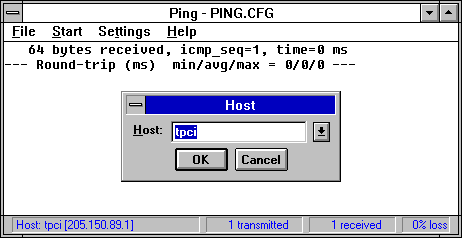
Most non-UNIX TCP/IP implementations provide ping utilities as part of their suite. For example, Figure 7.4 shows the NetManage ChameleonNFS ping utility. The Chameleon ping sends only a single ICMP packet instead of a continuous stream, but is useful for verifying that a remote machine is responding.
Figure 7.4. ChameleonNFS uses a ping utility to send a single packet.
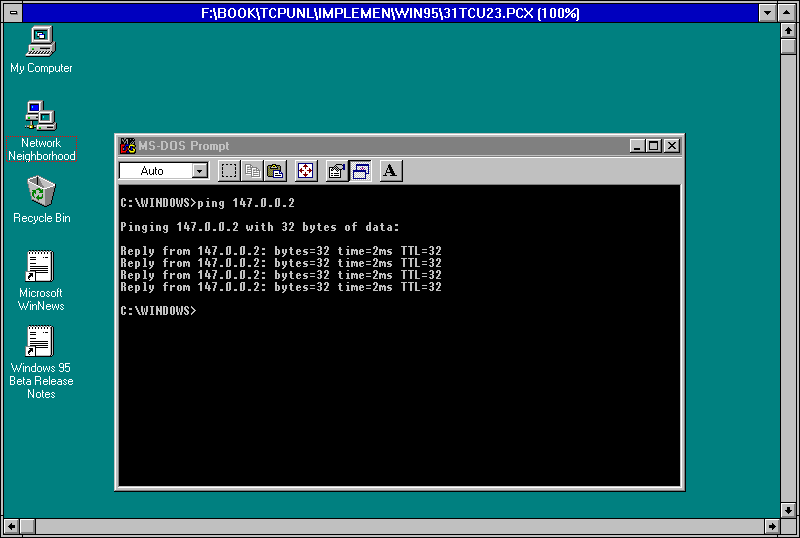
Windows 95 has a ping utility built into the distribution software, but it is DOS-based and doesn't use the Windows 95 GUI. Figure 7.5 shows the Windows 95 ping utility used to ping another machine on the network.
Figure 7.5. The Windows 95 ping utility is DOS-based.
There is a tracing option built into TCP/IP. When simpler methods have failed, this option can be used to trace a problem. To activate the trace, a system call is sent to the end point that turns on a flag. Most TCP/IP implementations enable the tracing option to be turned on from the command line using the -d (debug) option. When tracing is turned on, all activities are echoed to a buffer or to the screen, depending on the system configuration.
The output from the TCP/IP tracing option is examined using the program trpt (trace report). A specific connection can be specified, or all behavior passing through TCP/IP can be displayed. The output from trpt is verbose and of little interest to most users.
This chapter has shown you the basic administration programs used with TCP/IP, as well as the configuration files that are necessary in order to use symbolic names. Although this information is not likely to be used by most users, knowing the available tools and the type of diagnostics that can be produced is useful in better understanding TCP/IP.
All the TCP/IP protocols available to you are listed in a system configuration file. Which file is this?
All TCP/IP protocols are listed in /etc/ protocols. The file lists the protocol name and the corresponding protocol number.
What is a loopback driver used for?
The loopback driver is a virtual circuit within the host machine, avoiding all contact with the physical network itself. The most common use of a loopback driver is as a diagnostic. By sending data to the loopback driver, you can make sure the protocols are working correctly on your machine. Without this capability, it would be difficult to separate network problems and software configuration problems.
What does the following excerpt from a netstat -a command tell you?
Proto Recv-Q Send-Q  Local Address          Foreign Address        (state)

ip         0      0  *.*                    *.*

tcp        0   1024  tpci.login             merlin.1034            ESTABL.

tcp     8756      0  tpci.1035              treijs.1036            ESTABL.

tcp        0      0  tpci.1021              reboc.1024             TIME_WAIT

tcp        0      0  *.1028                 *.*                    LISTEN

tcp        0      0  *.6000                 *.*                    LISTEN
This extract shows there are two established TCP connections (to merlin.1034 and treijs.1036), one of which is sending information and the other receiving. The connection to reboc.1024 is waiting to hang up. There are two ports waiting for a connection.
What is the utility ping used for?
The ping utility is used to query another system. It sends an ICMP message to the remote and waits for a reply. The ping command is very useful for testing connections.
What command gives you overall statistics about the network protocols running on your system?
One of the best summaries is obtained with the netstat -s command.